Coz of max 5 attachments, explanation below with next two screenshots
Attachments:

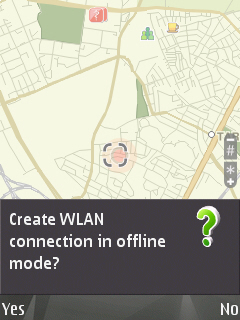
Coz of max 5 attachments, explanation below with next two screenshots
And now whats happening EXACTLY.
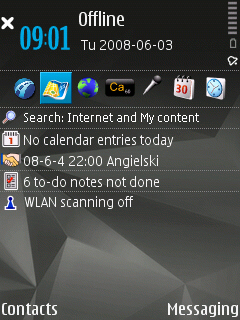
Firstly, Ive done what someone suggested - turned on OFFLINE profile.
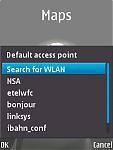
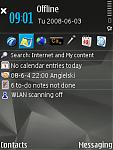
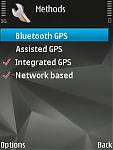
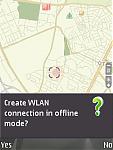
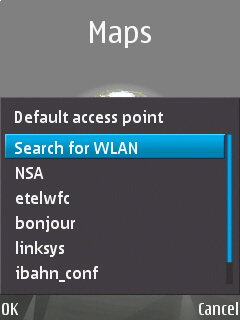
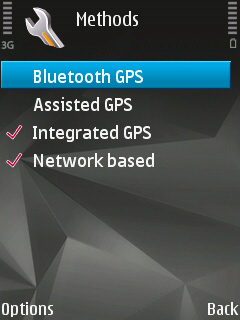
What did Nokia Maps when i run it? Huh! First what i saw was the query WHICH ACCESS POINT TO USE!!! Remember, network is OFF in settings (can post screenshot too). Only thing you see that can cause internet connection is the GPS setting which ap to use, but again, its set to OFF! And only Nokia Maps does the connection EVEN in offline.
So, lets say its even GPS software, what's the difference? Its Nokia's soft too. So i wont change my opinion about their software in any way (its reply for a post before) but it has no matter. The question is, what's happening?
K.
PS. NSA is my "default" access point for Nokia Maps - its WLAN, but there is INTERNET when it was not-offline, coz when offline it tries to use default, and when online it somehow finds my INTERNET 3G and uses it (as I said before, maybe it really is "default" ap 4 gps, but its off too).
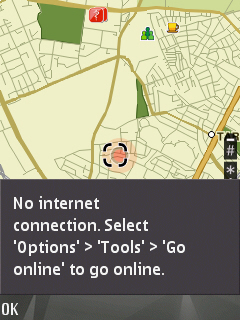
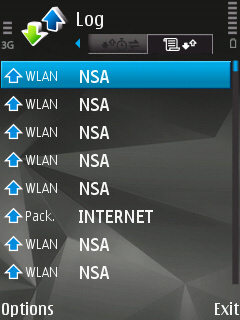
I dont quite know how your going to prove it by screenshots, as its notoriously difficult to pin down which app is using data on a symbian phone. But by all means, do so, Im interested to see how you have determined this.
But it still stands that its either a bug, or something else since so many people on here have tried it and not had any data gone through.
Edit:
Sorry, I cant see where its definatly nokia maps casuing that packet?
Could be another program.
However *if* this only comes up when your running maps, and you dont get any data sent any other time, then chances are its maps.
Must be a bug though, perhaps your could try a reinstall, or failing that, format your phone and start afresh?
Ok, first off, turn off network positioning.
Just have GPS ticked and nothing else.
Next, load up maps and go to:
Options - tools - settings - internet
And where it says 'go online at startup' choose No.
Go out and restart maps, and see if you still have data transferred.
N/A wrote:"Network Based" is not = A-GPS."Network Based" is actually a network service (if the operator supports it) to ascertain the location based on the cellular basestation the phone is connected to, what other basestations are around, what the timing and signal strength is, information network operators have where the basestations are physically, and their antenna direction, sector width, etc., to calculate an approximate location without any GPS satellite data.
http://en.wikipedia.org/wiki/AGPS if you look that is exactly what you have just described. With AGPS the data is returned via the net to a AGPS server which will map the base station(s) to GPS chords and return the satellite manifest for that region and pseudo gps coordinates to the phone to guesstimate its location. With these two pieces of info the phone can usually get a lock straight away
My question was is where does the data for Network Based GPS come from? Do the transmitters broadcast a GPS location or are the transmitter IDs included in the mapping data.
Personally the most ive ever paid for data is 1p per kilobyte for GPRS ( �10per meg ) which was abroad. Even the most expensive country for roaming data ( �20 iir ) and without a data plan I would be charged �0.007 - �0.02 roughly which compared to my fuel and the extra 30s I have to sit there like a peen waiting for a sat fix is pretty much a non issue. My own personal experience of AGPS was the total transfer on my last trip which was over 200 miles was practically nothing.
If it was costing around 5p per fix I might think otherwise but I seriously doubt anyone in the world is paying close to �50 per meg for GPRS.
Ok, krzych, explain this....
How come you are the only one who is falling victim to this underhand, clandestine action from Nokia, who are the root of all evil and ripping you a new a**hole ??
Why hasn't anyone else claimed the same ??
The simple explanation is that either 1) You don't know how to use your phone, 2) You don't know how to use Maps, and 3) you use incompatible, unofficial software to facilitate the application you are complaining about.
Seriously, if you don't like Maps, don't use it !!
Cease your hate filled bile and go troll elsewhere.
And I make no apologies for anything. I have not been rude to you. Quite the opposite.
Good day to you sir.
bartmanekul wrote:I dont quite know how your going to prove it by screenshots, as its notoriously difficult to pin down which app is using data on a symbian phone. But by all means, do so, Im interested to see how you have determined this.But it still stands that its either a bug, or something else since so many people on here have tried it and not had any data gone through.
Edit:
Sorry, I cant see where its definatly nokia maps casuing that packet?
Could be another program.
However *if* this only comes up when your running maps, and you dont get any data sent any other time, then chances are its maps.
Must be a bug though, perhaps your could try a reinstall, or failing that, format your phone and start afresh?
It is as you said (i said it before too). It happens only when i start maps and exactly at start moment, and NEVER when i resign to use it for few days. Its the main proof, but as you see i have few additional clues. Ehh, ok, lets say it this way: if someone has an idea which it MAY BE, tell me. If not, wait for my devel activity, i WILL figure it out if Nokia wont make firmware update faster.
Thanks guys (and girsl? 😉 - i dunno)
K.
Also have you tried setting the
"Use Network" to Never under the Nokia Maps Settings?
Options > Settings > Network
It may be overriding the default settings based on what you have selected here.
Unplugged wrote:Also have you tried setting the"Use Network" to Never under the Nokia Maps Settings?
Options > Settings > Network
It may be overriding the default settings based on what you have selected here.
Hmm, yep, but it was before problems started... Ok, lets say its the thing which may be buggy and uses not that network which should... [gone testing]
Ok, can you do the following:
Turn off network positioning.
I turned off AGPS and just had GPS and network positioning on, started maps and I had data transmitted.
Turned off network positioning and started maps again, and no data at all.
So, once again (because I asked you twice earlier in this thread!)
Turn off network positioning and then see if you have data transmitted.
LOL. When i swithced off "network based" method in GPS, Nokia wont connect 😊 Buheheh, neat trick.
Ok, so can someone tell me how to use BTS (cellular network signal) help in GPS positionning without using any access point? 😊
Funny.
By the way, its described in Nokia's manual as it should not use ap - only cellular network parameters.
K.
bartmanekul wrote:Ok, can you do the following:Turn off network positioning.
I turned off AGPS and just had GPS and network positioning on, started maps and I had data transmitted.
Turned off network positioning and started maps again, and no data at all.
So, once again (because I asked you twice earlier in this thread!)
Turn off network positioning and then see if you have data transmitted.
Yes, you have PURE RIGHT. But its a conflitct with what Nokia said in manual.
So, how to use cell params without AP? what for is "network based" if the same will do "assisted" and maybe even assisted is better?
K.
LOL. When i swithced off "network based" method in GPS, Nokia wont connect Buheheh, neat trick.
What do you mean 'Wont connect'?
Maps works fine for me without just GPS enabled.
Ok, so can someone tell me how to use BTS (cellular network signal) help in GPS positionning without using any access point?
No, because it needs to use a data connection to get positioning by cell towers, thats the way it works.
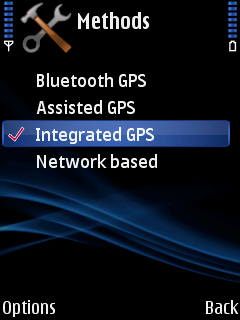
See the attached screenie for the GPS settings.
Also note that I have a 6110, which has no wireless. So if theres no data packets being sent (which there isnt), I have no connection to the net at all.
Yes, you have PURE RIGHT. But its a conflitct with what Nokia said in manual.So, how to use cell params without AP? what for is "network based" if the same will do "assisted" and maybe even assisted is better?
K.
So does that mean your finally not having any data transmitted?
If you had done what I asked a page or 2 ago this would have been a lot quicker. 🙄
Ok, heres your situation:
If your data costs are high, and you dont want to use any data at all, just have GPS ticked (as in my screenshot).
This means that it will take longer to get your fix.
If you want a faster fix, enable AGPS (as well as GPS).
This will cost you a tiny amount of data. Although oddly, it didnt use any when I had it turned on, whereas network positioning did *shrugs*.
So, you can either stomach the AGPS data charges, which I cant think are much. Or, you can just leave GPS only on and wait a bit longer sometimes.
Leave network positioning off, thats a completely useless thing for a phone with inbuilt GPS.
And no, theres no way of getting data free AGPS or network positioning. They have to use data, its the way it is.
bartmanekul wrote:What do you mean 'Wont connect'?Maps works fine for me without just GPS enabled.
No, because it needs to use a data connection to get positioning by cell towers, thats the way it works.
See the attached screenie for the GPS settings.
Also note that I have a 6110, which has no wireless. So if theres no data packets being sent (which there isnt), I have no connection to the net at all.
Ok, assuming you have right, both (assisted and network) methods use internet, right? If so, tell me what for is network based when you can have assisted which is much more usable coz it causes your GPS to get a lock and network based only approximates your position telling you the position of the BTS you actually use (not even triangulated by few BTS'es, but exactly what I wrote - position of one of them).
If i have to choose to use internet connection between those two, its obvious which one i prefer. And you can say that i can be in a place on earth where there's no three of the sattelites visible but the cellular network exists... Yeah, sure, show me such a place on earth 😊 (and dont tell me that its any building coz nobody needs approximated position inside building - if it would be GPS position, it would be usable but not cellbased 😊 ).
K.
bartmanekul wrote:Leave network positioning off, thats a completely useless thing for a phone with inbuilt GPS.
Just posted the same... Is that really true? Does cellbased always need inet? If so, it is REALLY stupid.
And yes, we would do it faster if I would read carefully your post but my mind likes to ignore anything thats stupid, and this cellbased is.
Uhh. So thanks for helping. Just cant believe it...
K.
And by the way....
If network based method needs internet to guess where is it near then I can imagine assuming that network based is simple... (prepare yourself....):
asking cellular provider by internet of a position of its BTS by the number/name/orsomething....
If its true, then its not even stupid, but VERY stupid. Its usable only for ppl which have no GPS, and more, even those ppl should use more spohisticated method using signal strength from few BTS'es and so on...
CRAP.
K.
I assume that "Network Based" used triangulation of cells to get an approximate location ( as Google Maps does with WiFi and cellsite locations on all phones ) where as assisted GPS uses triangulation of cells to aid in getting a precise GPS FIX by triangulating and downloading manifest data and calculated GPs data from a known source.
As I said earlier unless the mobile phone masts send out their GPS location or that information is available in the mapping data then it would be useless for triangulation.
If you know your 30m from transmitter A 5M from transmitter B and 60m from transmitter C but don't know where any of them are your still boned 😉 the easiest way would be to lookup a location over the internet.
Unplugged wrote:I assume that "Network Based" used triangulation of cells to get an approximate location ( as Google Maps does with WiFi and cellsite locations on all phones ) where as assisted GPS uses triangulation of cells to aid in getting a precise GPS FIX by triangulating and downloading manifest data and calculated GPs data from a known source.As I said earlier unless the mobile phone masts send out their GPS location or that information is available in the mapping data then it would be useless for triangulation.
If you know your 30m from transmitter A 5M from transmitter B and 60m from transmitter C but don't know where any of them are your still boned 😉 the easiest way would be to lookup a location over the internet.
Yep, i know, but i thought that its much more smarter and it would have a small database of bts's in at least home country, or at least should download it at first use or something. If i can use internet (im at range to do it) i will use assisted method, not the network based, so is useless.
Im disapointed at least. Thanks for explanations.
ADMINS: pleas, change the name of this thread to "BIG WARNING: network based method uses INTERNET CONNECTION".
Thanks again.
K.
OK so the final result was that you werent using your nokia maps correctly? so nokia software is NOT evil and causing problems, you just didnt have settings correct. so all these people were trying to help the original poster, but he was being very short and snippy, yet he was the problem and not us😊 just checking😊
RogerPodacter wrote:OK so the final result was that you werent using your nokia maps correctly? so nokia software is NOT evil and causing problems, you just didnt have settings correct. so all these people were trying to help the original poster, but he was being very short and snippy, yet he was the problem and not us😊 just checking😊
That seems to sum it all up pretty well, yep.
krzych wrote:ADMINS: pleas, change the name of this thread to "BIG WARNING: network based method uses INTERNET CONNECTION".Thanks again.
K.
Better still, change it to, "Sorry guys, I was having a bad case of the dumb and I will cease my wild rants and scaremongering now."
This thread is neither a BIG WARNING nor does it detail anything being used WITHOUT PERMISSION.
Unless we're warning against people who go into one when in actual fact it's their own lack of knowledge that is at fault 😉

This thread, I feel, is a testament to the forum and its members who have persevered with this guys problem, inspite of everything, to arrive at an answer to help him with his problem and I hope that he is grateful and learnt the meaning of humility.... I know I have!
Everyone give yourself a pat on the back. :icon14:
RogerPodacter wrote:OK so the final result was that you werent using your nokia maps correctly? so nokia software is NOT evil and causing problems, you just didnt have settings correct. so all these people were trying to help the original poster, but he was being very short and snippy, yet he was the problem and not us😊 just checking😊
Not quite, i was charged not to know how to install a map. I gave this guy a link that explaint than not me, but him lacks of knowledge about it.
So with this, Ive ended topic and no further comments.
And about the rest, i thank thanked ppl who helped me so i think its quite enough. I can even apologise all readers that this thread wasnt ONLY about the topic, but again, its not my fault, but sorry, will ignore any insults in the future.
Thanks again.
K.