Read-only archive of the All About Symbian forum (2001–2013) · About this archive

i think i've bricked my 5800! please help!!!

21 replies · 25,688 views · Started 06 April 2009

right, i copied over a .sis file called 'Carbon Fibre digital clock gkataria'

i then ran it on the phone and it worked, looked good, but i couldnt close the app,

i installed it in file manager so when i went into the file manager folder, the app would automatically load

i thought i could get around this by deleting it off the memory card but it was still active and the clock was still running so i thought i'd take the battery out but now the phone wont power up!

have i just shagged a 200pound phone in the space of about 5mins?

Ok, next step is full reset:-

Hold the Red, Green and Camera keys down and press the power button.
Keep the three keys held down until you (hopefully) see the Nokia handshake.

This will delete any user data in the phone, but I think that's better than a dead phone!!

Let me know if this works!

Not necessarily, but it'll need a bit of work on your part.

Give me a few minutes and I'll put a guide up here.....

take phone, insert inside pouch made from tin foil. place tinfoil pouch holding phone into bucket of soapy water ensuring pouch is full, pour in some salt and olive oil, next step add baking soda, and yep, u guessed it, some vinegar place pouch filled with phone, sopay water, olive oil and salt, vinegar and baking soda into freezer over night, next place frozen pouch filled with phone, sopay water, olive oil and salt, vinegar and baking soda into microwave and set to defrost, run for 18 hours, 34 minutes and 10 seconds, no more, no less. then remove smoldering pile of unrecognisable soemthing and place in a brown envelope, must be brown. smash with a hammer, then say the magic words and open the envelope to be greeted by a sparkling clean, fully functional nokia 5800.

biggruss wrote:take phone, insert inside pouch made from tin foil. place tinfoil pouch holding phone into bucket of soapy water ensuring pouch is full, pour in some salt and olive oil, next step add baking soda, and yep, u guessed it, some vinegar place pouch filled with phone, sopay water, olive oil and salt, vinegar and baking soda into freezer over night, next place frozen pouch filled with phone, sopay water, olive oil and salt, vinegar and baking soda into microwave and set to defrost, run for 18 hours, 34 minutes and 10 seconds, no more, no less. then remove smoldering pile of unrecognisable soemthing and place in a brown envelope, must be brown. smash with a hammer, then say the magic words and open the envelope to be greeted by a sparkling clean, fully functional nokia 5800.

Is this a recognised Nokia procedure? Can't find it in my service manual!:tongue:

Nobody likes a smart ass bigruss! 😉

Take it back to your local support centre (find it at nokia.com/support ).

Installing applications doesn't violate the guarantee, so you should be able to get the phone fixed for free.

Bigruss's suggestion is probably not the solution, though it would make a great youtube video.

Your phone's not necessarily dead, but it'll need a bit of work on your part.
First, you need to know your product code - it's under your battery.

WARNING: Use this mod at your own risk! You may damage your phone. Please read the whole thread before starting flashing your phone!

Update: For new firmware:

Press and hold GREEN + RED + CAMERA when powering up.Keep the keys pressed until you get the shaking hands. That should fully reset the device, with a lock code of 12345.

This is only available on phones with 20.0.012 or later.

----------------------------------------

Files needed.
1.Phoenix
2.Firmware file

Steps are simple
1.Download Phoenix here http://rapidshare.com/files/218265819/Phoenix_2008_44_5_v2.exe.html

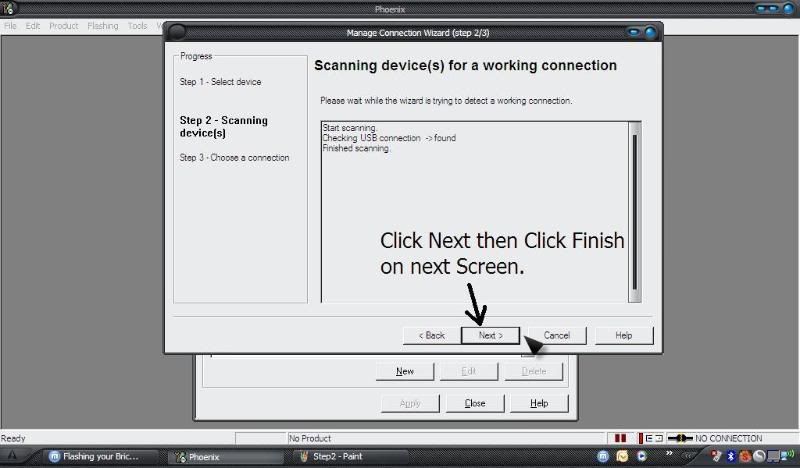
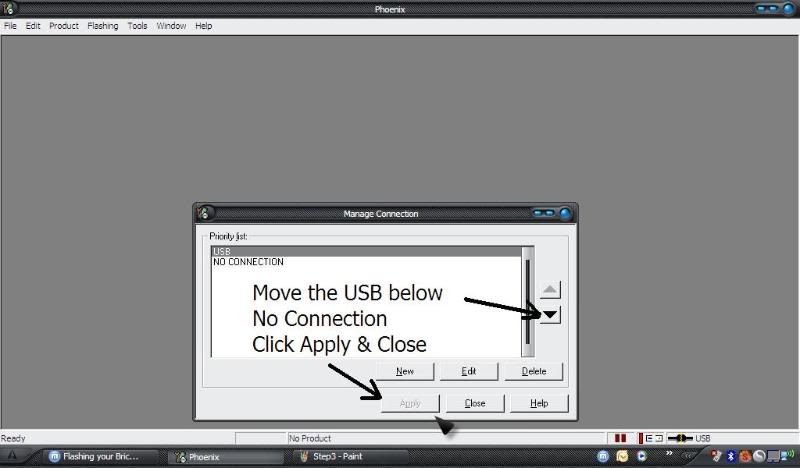
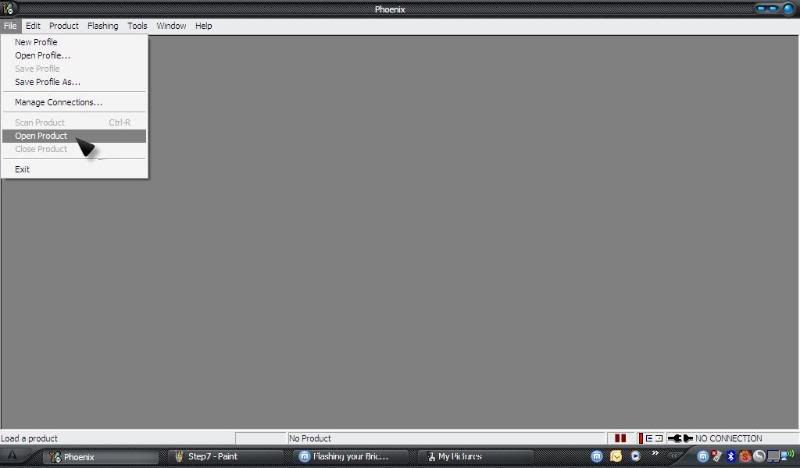
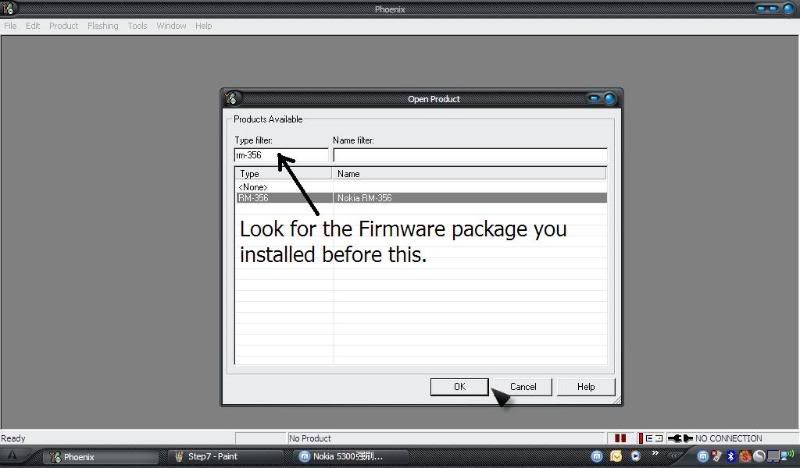
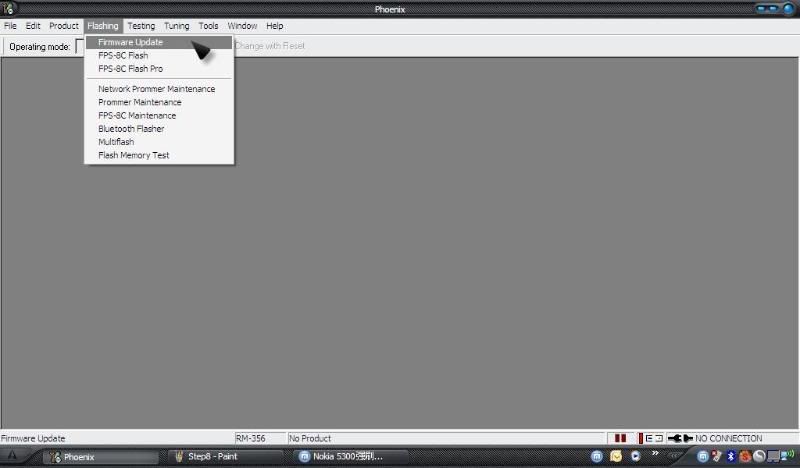
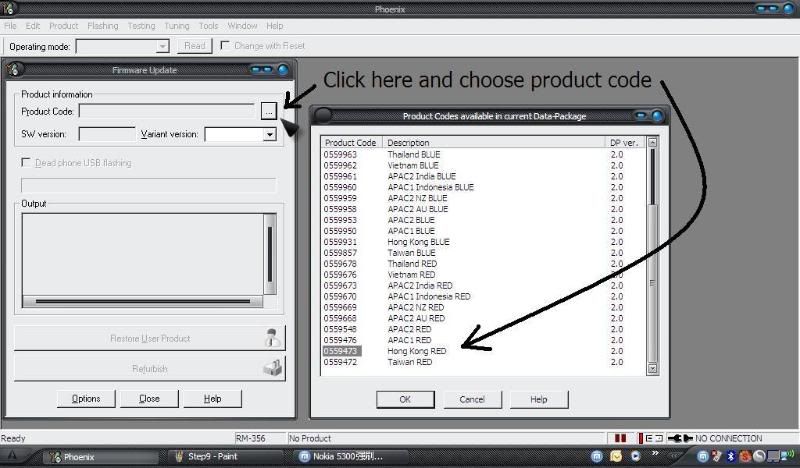
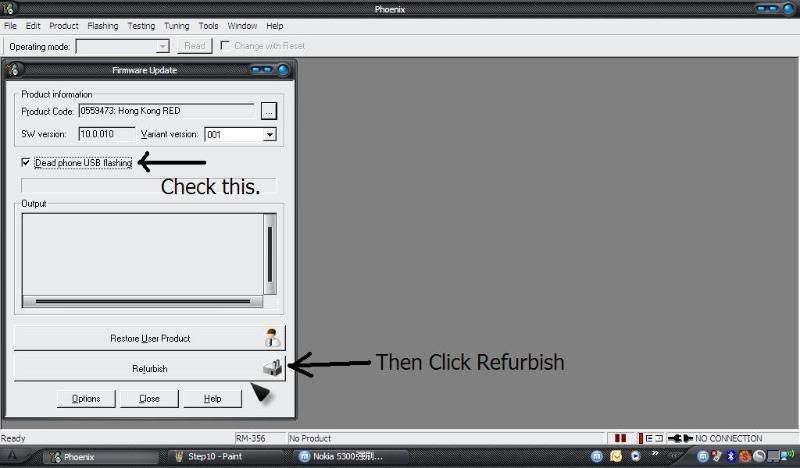
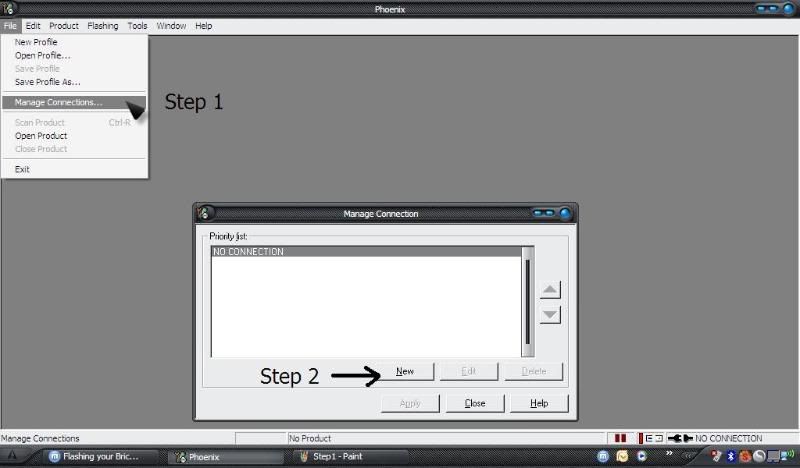
2.Download your firmware files and flash your dead phone. (Follow Picture guide)
Download your choice of Firmware package.
Nokia 5800 RM-356 EMEA(Europe) here ...http://rapidshare.com/files/218268993/RM-356_EMEA_20.0.012_v4.09.exe.html
Nokia 5800 RM-356 APAC(Asia Pacific) here ...http://rapidshare.com/files/218268994/RM-356_APAC_20.0.012_v4.0_5800XM.exe.html

Step by Step guide to flash your mobile, with pictures showing what to click.

Connect your phone with the USB cable. Leave it OFF. Remove your SD Card
User posted image

User posted image

User posted image

User posted image

User posted image

User posted image

User posted image

User posted image

User posted image

Wait for the message to Press Power On Button, then do so.

You're done! Phone Flashed/Revived.

Also works for other models if you have their firmware package.
Please reply if this helped you or if you have had any issues.

This guide is modified from an original by ElevenX - credit where credit is due!!
:icon14:

Tzer2 wrote:Yes. Vinegar isn't good for phones.

what, and salt, olive oil, baking soda, soapy water, being in the feezer and going in the microwave set to defrost for precisley 18 hours, 34 minutes and 10 seconds is good for a phone?

18 hours, 34 minutes and 10 seconds is not exactly XpressMusic is it?

Uncle Ben's would make a quicker one!! :tongue:

mafty wrote:18 hours, 34 minutes and 10 seconds is not exactly XpressMusic is it?

Uncle Ben's would make a quicker one!! :tongue:

fixed!

mafty, i owe you a pint!

I think I have a similar issue.

My 5800 won't charge or turn on. It just starts up with the white screen an suddenly turns off, on an infinite loop.

Can I try this too? The only difference is that my 5800 is rm-428, does anybody have the FW to flash my 5800?

My 5800 is rm-428 and FW 31.2.101.

I've already tried to change the battery and hard reseting it, but it won't even turn on!!!

Thanks in advance!

mafty wrote:Your phone's not necessarily dead, but it'll need a bit of work on your part.
First, you need to know your product code - it's under your battery.

WARNING: Use this mod at your own risk! You may damage your phone. Please read the whole thread before starting flashing your phone!

Update: For new firmware:

Press and hold GREEN + RED + CAMERA when powering up.Keep the keys pressed until you get the shaking hands. That should fully reset the device, with a lock code of 12345.

This is only available on phones with 20.0.012 or later.

----------------------------------------

Files needed.
1.Phoenix
2.Firmware file

Steps are simple
1.Download Phoenix here http://rapidshare.com/files/218265819/Phoenix_2008_44_5_v2.exe.html

2.Download your firmware files and flash your dead phone. (Follow Picture guide)
Download your choice of Firmware package.
Nokia 5800 RM-356 EMEA(Europe) here ...http://rapidshare.com/files/218268993/RM-356_EMEA_20.0.012_v4.09.exe.html
Nokia 5800 RM-356 APAC(Asia Pacific) here ...http://rapidshare.com/files/218268994/RM-356_APAC_20.0.012_v4.0_5800XM.exe.html

Step by Step guide to flash your mobile, with pictures showing what to click.

Connect your phone with the USB cable. Leave it OFF. Remove your SD Card
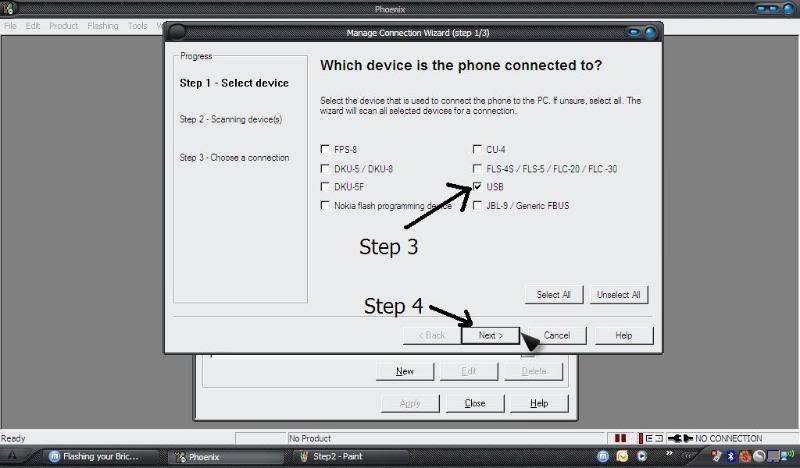
User posted image

User posted image

User posted image

User posted image

User posted image

User posted image

User posted image

User posted image

User posted image

Wait for the message to Press Power On Button, then do so.

You're done! Phone Flashed/Revived.

Also works for other models if you have their firmware package.
Please reply if this helped you or if you have had any issues.

This guide is modified from an original by ElevenX - credit where credit is due!!
:icon14:

Hey mafty, great post. I have a similar problem with my N97, I followed your tutorial and was able to reflash my phone, but I still have the same problem, the phone won't boot, I'm guessing that it is because the FW I used to flash it with, is not the one from the original Product code, cause the one with the original product code is not available yet on the latest version, so it won't let me flash with an older one from the original product code....

Do you know anything I can do to unbrick my phone?
Any way to force the complete flash? cause I read in some other forums that the flash takes around 5 minutes... But mine only took around 1 minute and something... It said flash Successfull, and all, but then the phone doesn't boot.
Also, when before flashing I press the options button, I can see that there are only 4 or 5 files loaded from the total of 7 or 8 files available from the FW...

Then what happens when I turn the phone on is, I see the NOKIA word... then it turns white... and then NOKIA again.... blank.... endless loop.....

Has anyone had a similar problem before?

Please, any help is appreciated!!!

Thanks to everyone for all the info posted already.

Oh, I just saw on the screen now, after a while that loop finally leads to a black screen dysplaying this error message: "Phone start-up failed. Contact the retailer."

Please help anyone.

Hi, new user here, just wanted to say thanks for posting these instructions. I had no idea why my 5800 died this week but I found this forum through a Google search and now it's flashed, up and running perfectly.

So... thanks! :icon14:

Hello all.
My daughter's 5800 was bricked during a recent upgrade. I have tried the steps in this post, but when I try to install the firmware file on my computer, I get a pop-up stating "Nokia firmware RM-356 EMEA 4 must be installed first". It appears that a major version must be installed before the minor can be installed so that phoenix can use it.

I have a couple of questions.

  • Does anyone have a working link to a major version?
  • Most recent I have seen is V.14 (51.0.006) I think, would it be best to use the most recent version I can get hold of, or just use any previous major version, and assuming it works, go through the update process through the newly resurrected phone?

many thanks
Kris