I have a question about how Maps v3.04 is meant to behave. I recently got a windscreen mount for my N97 so, to try it out, I used it on the way home from work. When my phone said I'd reached my destination, Maps closed.
I can understand it might close itself when the journey is over in order to save battery power, but considering all the bugs we seem to be finding on our phones these days, coupled with the fact this is beta software, I just can't tell.
Is this normal behaviour?
hello again chaps,
well I got back from Hungary, sadly I ran out of time before I left on that day to complete the task.
So:
You need to install Ovi Maps v3.03
Done that already, what I don't have are the actual maps, and I am still going round in circles on this one.
I don't have an internet connection on my phone so I am trying to download the maps to my PC and then to my phone, are there any problems generally with doing that?
I am hitting the same brick walls:
Then tried to Download maps, which then opens up the website, so I go to the Ovi maps page and tell it that I have an N97.
I click on OK which then opens up 'Download Map Loader'.
I select English and click on Download.
The file download screen comes up for NokiaMapLoaderSetup_ENU.exe
I click on Run.
The security warning comes up asking if I want to Run the software, I click on Run.
It tells me that it requires that another piece of software(Microsoft .NET Framework 3.0) is installed first so I click Install.
Then it tells me an error occurred while downloading the file and would I like to Retry.
I click on Retry.
It does this a couple of times and then fails to do anything.I have also tried following the other instructions on the nokia/support website which say:
Go to Menu � Applications � SW update on your Nokia N97
Select Ovi Maps from the list of available updates
Select Options � Start update
This gives me a screen which says Refreshing list of available updates.
Then Refreshing failed try again later.
Can anybody offer any help or are there any questions you need to ask me?
K300 wrote:
I don't have an internet connection on my phone
Before I start with your problem, can I just confirm that you have no data connection present on your phone as stated above. :con?
zxon wrote:I have a question about how Maps v3.04 is meant to behave. I recently got a windscreen mount for my N97 so, to try it out, I used it on the way home from work. When my phone said I'd reached my destination, Maps closed.I can understand it might close itself when the journey is over in order to save battery power, but considering all the bugs we seem to be finding on our phones these days, coupled with the fact this is beta software, I just can't tell.
Is this normal behaviour?
OK, had no response to my query so I tried it again with another short journey. This time, it stayed open when I reached my destination.
I guess it must've just crashed the last time.
zxon wrote:OK, had no response to my query so I tried it again with another short journey. This time, it stayed open when I reached my destination.I guess it must've just crashed the last time.
My apologies zxon. I thought I had replied to your post.
Will take more water with it in future. 😃
ironass wrote:My apologies zxon. I thought I had replied to your post.
Will take more water with it in future. 😃
No worries ironman... errm, I mean ironass 😃
I just discovered something about Ovi Maps on my 120 mile drive home from visiting the folks, and no it wasn't that it closed itself again when I reached my destination. It turns out Ovi Maps has Lane Guidance! I had absolutely no idea it had that!
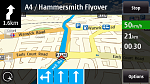
For those who don't know, Lane Guidance does just that... offers a guide as to which lane you should be in. This is often used on Motorways, where the road might split in two, with one heading one way and the other heading another. Ovi Maps tells you which lane(s) you should be following in order to continue on it's desired route, by showing the lanes as boxes with arrows in them along the bottom of the screen. Grey boxes are lanes you want to stay out of, and blue ones are ones you should stick to.
Obviously, I couldn't take a screenshot while I was driving, but below is an example from another site.
Attachments:
Ok so I have just installed Maps v3.04. After deleting cities etc.. etc.. as in updated post above. I then downloaded maps for Australia and Thailand and the English male voice. Now when I run the new maps it starts and I can see 6 icons (position, search, share location, favorites, drive and Walk). Then after 2 seconds it turns itself off...! It did come up with (more devices).
Anyone had this problem or know what to do to rectify this???
Cheers in advance
Robski
zxon wrote:No worries ironman... errm, I mean ironass 😃
Don't you start as well zxon!
(I'm beginning to wish I'd left it as my old email address :stupid😊
Well, they say you learn something new every day (like, don't eat the yellow snow) and I certainly have, thanks to your Lane Guidance posting.
Cheers!
ROBSKI wrote:Ok so I have just installed Maps v3.04. After deleting cities etc.. etc.. as in updated post above. I then downloaded maps for Australia and Thailand and the English male voice. Now when I run the new maps it starts and I can see 6 icons (position, search, share location, favorites, drive and Walk). Then after 2 seconds it turns itself off...! It did come up with (more devices). Anyone had this problem or know what to do to rectify this???
Cheers in advance
Robski
Hi Robski!
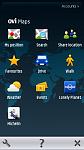
You say you only have 6 icons showing... it should be 10 (see attached screenshot).
To just open Ovi Maps you need about 19MB of RAM free (not to be confused with C: drive).
Your phone firmware has to be at least v20 (for classic N97).
Ovi Maps 3.04 installs over Ovi Maps 3.03 available here:-
http://maps.nokia.com/ovi-services-and-apps/ovi-maps
Hope this helps.
Attachments:
Hmm thanks Ian, it seems I can't make calls or recieve them now. It just says not allowed. I can get sms though strange. shows network coverage and provider on the screen. how do I do a hard reset again...?
Robski
Oh dear ROBSKI!
Here is a link for the hard reset (known as the Vulcan Death Grip) published by Biggzy on this forum:-
http://www.allaboutsymbian.com/forum//forum/thread/86049/
Good luck!
P.S. I would advise NOT restoring Settings after the reset and enter them manually.
Cheers for that, the old *#7370# did the trick. I can now make calls again...Few!
Maps has gone back to 3.01 so I will try and load the new version again.. Fingers crossed
Thanks again
Robski
ROBSKI wrote:Cheers for that, the old *#7370# did the trick. I can now make calls again...Few!
Maps has gone back to 3.01 so I will try and load the new version again.. Fingers crossedThanks again
Robski
I would still NOT restore Settings automatically (it was possibly a Setting that caused your problems in the first place).
I would also install Ovi Maps v3.03 first, using the link I gave you or Software Update in Applications, and then download and install Ovi Maps beta v3.04.
Good luck! :icon14:
All working now thanks mate... 😊
Just downloaded v3.04 and ran it over the top, all 10 icons there and from all accounts seems to work well. I only restored my contacts and restored other apps from scratch.
How do I check to see what maps I have? Earlier today I downloaded Aust and Thailand but will download them again if necessary.
Cheers Robski
I connect to the latest Ovi Suite and it tells me what Maps, etc. are installed on the handset.
If you saved them to E: or F: drives they should still be there.
A dumb question maybe, but if I don't have a data connection will Maps work at all? The integrated GPS or a BT GPS would work right? What does the login thing effect? I've tried Maps home in WiFi and there it somewhat finds my position but when I try without any connection at all it says Connection failed, try again. I'm changing this phone soon enough and was thinking about giving it to my dad since he wants GPS but will he be able to use it with only a BT GPS and no data connection?
Musten wrote:A dumb question maybe, but if I don't have a data connection will Maps work at all? The integrated GPS or a BT GPS would work right? What does the login thing effect? I've tried Maps home in WiFi and there it somewhat finds my position but when I try without any connection at all it says Connection failed, try again. I'm changing this phone soon enough and was thinking about giving it to my dad since he wants GPS but will he be able to use it with only a BT GPS and no data connection?
"In theory" you can use just the phones built-in Integrated GPS.
In practice this takes a lot longer (up to 20+ min's.) to achieve a lock by itself, if at all, and would not be suitable for turn-by-turn navigation.
To set this up, follow the steps in my original posting with the exception of step 2 in which you should only select Integrated GPS and leave the others un-ticked.
You also do not need to define the Access point or Server address.
Do make sure that you download Maps data to the phone, via your computer, for ALL areas you are traveling to otherwise the phone will attempt to download them over the air as you go.
Cheers, I've just enabled BT, Integrated and WiFi now. Will have to to get a lock on later when I'm out going somewhere... It still says Connection failed, try again when I start the app... Should I just ignore it?
Musten wrote:Cheers, I've just enabled BT, Integrated and WiFi now. Will have to to get a lock on later when I'm out going somewhere... It still says Connection failed, try again when I start the app... Should I just ignore it?
WiFi positioning requires a data connection.
Disable this as per my instructions.
Well I've done everything but it still says Connection Failed, try again. 😞 Well I'll have to try with the BT GPS but will I be able to get turn by turn navigation with that?
Musten wrote:Well I've done everything but it still says Connection Failed, try again. 😞 Well I'll have to try with the BT GPS but will I be able to get turn by turn navigation with that?
I don't understand "Connection failed" as you should not be connecting to anything provided that only "Integrated GPS" is ticked in Positioning methods in Location and providing you have downloaded the Maps Data to your phone via your PC.
Don't forget that initially, before downloading Maps Data, you must have completed Step 3 which will incur a small amount of data initially.
This is needed to create a limited map of your area and the required files, cities and qf, on C:.
I'm a new novice N97 Mini owner, and wonder if all (or most) of the advice you've been giving here also applies to the mini ...
(ps how can I find the FW version of my phone))
I've being trying to use MAPS on my N97 mini as a replacement for an old TomTom satnav in my car (New MINI) but when it is connected to the cars built in Bluetooth hands free it does not pass the sound from MAPS through the cars sound system or the phones speakers.
Is there any way I can still have the sounds from MAPs through the phone speakers while the phone sound is connected through the cars bluetooth, as I still get all the text & email message warnings through the phone speakers when connected to car hands free.
As it is now using the N97 mini I can have satnav with sound & no handsfree calling or silent satnav with handsfree calling.
I've checked all the cars setting & unable to alter anything to do with Bluetooth so are there any settings I can alter on phone?
Help anyone?
Cheers
Ian
Hello
I have a mini, and I use the iO Play for Bluetooth Hands Free and Music Streaming.
Maybe your Bluetooth Car Kit doesn't support A2DP (Advanced Audio Distribution Profile).

