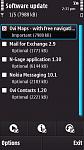
I don't know if this is breaking news or not, but I've just checked SW update and Ovi Maps 3.3 is in there! It's listed as "Ovi Maps - with free navigation 3.3" with a size just under 8Mb.
I'll post a screenshot in a bit... oh, and download it myself :tongue:
[EDIT] Screenshot attached now...
[UPDATE] Installation failed first time for me. Uninstalled Nokia Maps (beta) and tried again... with success 😊
Attachments:
Here too. I'm going to wait until tomorrow to see what the score is with new firmware though.
Seft wrote:Here too. I'm going to wait until tomorrow to see what the score is with new firmware though.
I'm not holding my breath with the new firmware. Even if it does come out tomorrow, it might not be available for UK unbranded models for a while (even longer for branded ones!).
same here, nothing yet for apac
I am doubtful now if there is a firmware upgrade in the pipeline? Why would they release this today and a FW version that does the same tommorrow? Maybe this is their solution and we have to take the hit on our c: drive.
Has anyone tried the install from the SW update screen?
Sounds like Steve Litchfield has stumbled across this as well, and comments that Nokia may not have got the firmware ready in time so they've released the app as an update instead. It's posted on the AAS front page now: http://www.allaboutsymbian.com/news/item/11042_Ovi_Maps_free_navigation_hits_.php
...I was first though 😃
boakesm wrote:Has anyone tried the install from the SW update screen?
Yeah... me :redface: Aren't the rest of you finding it in SW Update?
I had to unistall maps via application manager before i could install it...
bloody nokia... no fw for us tomorrow i'd say...
Yes I got it. How much space did you loose on your c:. I have 46MB free but am obsessed with protecting it - suppose could go down another 8mb....
boakesm wrote:Yes I got it. How much space did you loose on your c:. I have 46MB free but am obsessed with protecting it - suppose could go down another 8mb....
Mine went from <> 42Mb to <> 35Mb. The installation says 8Mb but I lost 7Mb instead :con?
Just thought I'd mention that mine seems to have installed fine first try and I did already have the beta installed. I don't have a huge amount of C space left now so time for a clearout I think.
Also I'm both happy and impressed that this has been given to us as a software update - if they release it integrated into the next firmware that'll be great, but considering how long 3 took to bring out v20 and how some people are still waiting it would have been a bit unfair to force everyone to wait for a network approved update.
Anyone know how to change the temp in the new maps from farenheit?
Farenheit means nothing to me.
dog-man
dog-man wrote:Anyone know how to change the temp in the new maps from farenheit?Farenheit means nothing to me.
dog-man
Try:-
Maps > Settings > Map > System of measurement > set to metric
(this however changes everything to metric, including distances).
Handy conversion tip:-
To convert from Fahrenheit to Celsius:
C� = (F� - 32) x (5 / 9)
* Begin by subtracting 32 from the Fahrenheit number.
* Divide the answer by 9.
* Then multiply that answer by 5.
Hope that helps.😃
zxon wrote:Mine went from <> 42Mb to <> 35Mb. The installation says 8Mb but I lost 7Mb instead :con?
Mine went from 40 to 26.3 - why the difference? Strange...:con?
could be voices, maybe? mine went down a lot too, and i uninstalled maps after that...too bad couldn't remove nokia maps which was included with v20..
jerm wrote:could be voices, maybe? mine went down a lot too, and i uninstalled maps after that...too bad couldn't remove nokia maps which was included with v20..
Nah the voices should be installed to Mass Memory by default, along with the Maps.
I'm very impressed with Nokia's move though, to give us all free navigation!! I tried it out for the first time when driving home. It got confused when I reached a junction from a road that ran parallel to, and only a few feet away from, the road I was heading towards. It thought I was on the other road going the opposite direction and recalculated itself.
Just think... all I need is a windscreen mount, an in-car charger, and to find out a way to get custom voices (if it's possible), and I'm set!
Why the hell can't they have seperate choices for metric, imperial, farenheit and celcius?
I prefer it in imperial with celsius, but that's not possible.
Bloody idiots!
dog-man
FFS, i've been unable to get a single update in the last few months, not the extra memory helpers, not the turn by turn (which would be a great update!)
Should i flash it back to my original UK code? Should i punch it in the face? After playing with my brothers nexus, i'm about one more decent update away from sending this to Mazuma and upgrading!
dog-man wrote:Why the hell can't they have seperate choices for metric, imperial, farenheit and celcius?I prefer it in imperial with celsius, but that's not possible.
Bloody idiots!
dog-man
In the UK we...
Buy beer in pints but spirits are millilitres
We drive in miles but run in metres
Milk is sold in pints but petrol is in litres
We talk about the tonnage of ships but weigh in kilos
We measure in acreage and fencing is sold in metres
I'm 6ft tall unless it's for official purposes when I become 1.83m
The list goes on and on...
More than half off the country was brought up on imperial measurements but have to use metric in part.
However, I do see where you are coming from dog-man.
Looks like Converter in Office then! 😊
Has anybody managed to successfully install the update if they were already using v20.0.019 firmware, which has maps 3.01 contained within the firmware?
You cannot uninstall maps because it is inherent to the firmware, but the 3.03 update will not install for me - I'm getting worried that most other people seem only to be able to install it if they uninstall their existing maps app first, which is not an option for me........
I didn't uninstall.
I wish they would include a male voice with street names as I have high frequency loss so can struggle with the tone of female voices.
dog-man
dim1980 wrote:Has anybody managed to successfully install the update if they were already using v20.0.019 firmware, which has maps 3.01 contained within the firmware?You cannot uninstall maps because it is inherent to the firmware, but the 3.03 update will not install for me - I'm getting worried that most other people seem only to be able to install it if they uninstall their existing maps app first, which is not an option for me........
I have used both the software updater method and a separate .sis file method (see link) on my v20 firmware successfully.
http://www.allaboutsymbian.com/forum//forum/thread/92463/
dog-man wrote:Why the hell can't they have seperate choices for metric, imperial, farenheit and celcius?I prefer it in imperial with celsius, but that's not possible.
You could always contact Nokia and ask for an enhancement in future versions of their (now free) GPS Navigation app. Maybe nobody has adked for this function?
Uninstalled my Maps Beta version and installed the 3.3 Free version via SU today with complete ease. Only a little bit more of the C Drive used up but not enough to affect perfomance.
I have updated Maps to version 3.03 but my location is now not detected. I have re-installed the maps but to avail. There is message that keeps coming while I am in maps,"connection to network position server required". What does this mean. Do I need to change the server. The other difference I noticed is the GPS signal indicator is not as strong as it was with the earlier version. Thanks.
Well I installed.
Went from 34mb to just over 18mb free C: space. 😞
The navigation isn't bad, it was just slightly behind where I was when I tried it out last night for the first time.
ajeet wrote:I have updated Maps to version 3.03 but my location is now not detected. I have re-installed the maps but to avail. There is message that keeps coming while I am in maps,"connection to network position server required". What does this mean. Do I need to change the server. The other difference I noticed is the GPS signal indicator is not as strong as it was with the earlier version. Thanks.
See step 2 of my posting here:-
http://www.allaboutsymbian.com/forum//forum/thread/90325/
Hi Ian, all the settings are correct exactly the same as it was with version 3.01, which worked very well.Which is not the case with 3.03. The GPS reception is also somewhat weaker now. If the my telephone signal is very poor or none I cannot view the maps on its own because the application exits itself. I might try re-installing maps and the country maps.
This something that I encountered before updating to V20 of the firmware. There maybe some bugs with 3.03
Since upgrading to v3.03 maps, I have been having problems with surfing the internet.
I can still surf, but the pages are loading very erratically with constant freezes.
Have done some reboots, but no better.
Don't know if this is a coincidence or related to the upgrade, but it was fine before the upgrade.
dog-man
ajeet wrote: I might try re-installing maps and the country maps.
That was going to be my next suggestion
I would recommend following step 1 here:-
http://www.allaboutsymbian.com/forum//forum/thread/90325/
Well, I gave Ovi Maps 3.3 a full work out today and I have to say, I truly believe this to be the best ever version of the Nokia/Ovi Maps product ever. Quite simply a joy to use and pinpoint accurate.
The fact that this baby is now free (even the traffic updates!) is just incredible! 😊
