kontraband wrote:you can take panorama ones tho can't you?
Do you mean the panorama app that's featured here:-
http://blog.gsmarena.com/nokia-n8-gets-a-pretty-impressive-panorama-feature/
It doesn't come with it out of the box but is a forthcoming app due to be released in future on the Ovi Store.
KKKooonnntttrrraaabbbaaannnddd!!!!
I've been moderated! :banghead:
LOL... its not me modding it... its the flppin system. Its going hostile!
I did indeed mean a panorama app... I saw it from the N8 competition app winners probably... hence thinking it was already there.
Panorama is in the Ovi Store now, I installed it this morning. You can change photo aspect ratio between 4:3 and 16:9 with a pinch gesture in the photo app.
What kind of lag are you seeing? I don't see much on mine.
strcmp wrote:Panorama is in the Ovi Store now, I installed it this morning. You can change photo aspect ratio between 4:3 and 16:9 with a pinch gesture in the photo app.What kind of lag are you seeing? I don't see much on mine.
I have been experiencing lags in lots of different areas, as though the handset is playing catch-up.
I was playing a song and hit the hard Menu key and then moved to the 2nd home screen and had to wait for a repopulation and redraw of the widgets.
On another occaision I was again playing music in the background whilst browsing Maps and then opened the camera and found that I could not exit camera even after half a dozen presses.
It's not something that happens every time under the same circumstances. I can sometimes open Contacts to scroll through and find that it sticks.
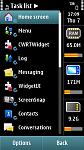
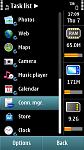
Having said that, unlike the N97, you do not have to close down every app before moving on to the next one. The attached screen shots show all the open app's (18) on the phone with 65MB of RAM to spare.
Attachments:
Fair enough, I guess it depends what you use on the homescreen - I don't have much on mine, I don't like to switch screens so everything I want is on the front.
I wouldn't have used maps and music and camera at the same time either, maps is usually an in-car thing for me, although I've had no problems with maps + music + FM transmitter. Guidance comes out of the phone, but that's fine.
Hi Ironass,
Can you tell me if it has a notification (breathing) light and if so can it be configured to flash indefinitely until ackowledged by the user?
Also, does the Exchange mail support push and calendar synch? Finally, does it support Yahoo mail push without the ridiculous requirement of using Nokia's mail servers?
Thanks for your time.
tulloch wrote:Hi Ironass,Can you tell me if it has a notification (breathing) light and if so can it be configured to flash indefinitely until ackowledged by the user?
Also, does the Exchange mail support push and calendar synch? Finally, does it support Yahoo mail push without the ridiculous requirement of using Nokia's mail servers?
Thanks for your time.
Breathing (notification) light, behind the Menu hard key, can be set to "No limit".
As for the second part of your question, I'm afraid I haven't got round to trying that out yet.
If you look back to my screenshot "Homescreen 2" it shows a mail setup widget for New mailbox which includes Ovi, Yahoo, Windows Live and gmail.
ironass wrote:I have been experiencing lags in lots of different areas, as though the handset is playing catch-up.I was playing a song and hit the hard Menu key and then moved to the 2nd home screen and had to wait for a repopulation and redraw of the widgets.
On another occaision I was again playing music in the background whilst browsing Maps and then opened the camera and found that I could not exit camera even after half a dozen presses.
It's not something that happens every time under the same circumstances. I can sometimes open Contacts to scroll through and find that it sticks.
Having said that, unlike the N97, you do not have to close down every app before moving on to the next one. The attached screen shots show all the open app's (18) on the phone with 65MB of RAM to spare.
Im asking a favour from u Iron. As u must have experience by now that whenever u try to send an sms to a group of ur contacts phones operatin and sms sending procedure becomes slow in sending and if u have kept delivery reports on then it bcomes real slow and pathetic. This is what is happening with me in N97. I jus wanna ask u Does the same happens in N8 when u try to send an sms to many people at a time by both Delivery report as YES and NO both. Plz help me bcoz i ve made up my mind to buy N8. So need a bit of advice.
Thanks for that. Looking forward to further comment from you.
So, on a slight tangent - when are we going to get a 'Nokia S^3' forum 😊 I think N8s are going to start rolling out next week in the UK - preorders first and operator sales the week after. Vodafone says they will be delivering on 22nd October, I'm hoping to go into a Vodafone shop on 23rd to get my second one although I'm not sure if I should wait for the C7 or C6-01. The second one is for my wife and she's not that great at focussing with our digital camera, so the EDOF camera will probably mean she gets better shots more often..
I presume there will be a few more readers either getting their hands on one or asking questions before getting one, so it'd be useful to have the forum ready..
Well I think the N8 is a great looking phone but they should have at least refreshed the icons and font. If anything not to remind people of the N97. Even though new Symbian works faster it looks old even though it's new. Nokia can be such buffoons!
The N8 will only connect to Ovi Suite and is not supported by Nokia PC Suite.
The N8 is certainly faster than the N97 and has RAM to spare without having to close each individual app.
As for Symbian ^3 I can't help but get the nagging feeling that it's just a stop gap between Symbian 3 and MeeGo to allow Nokia to carry on selling handsets.
Battery life is proving good, much better than the N97. I can go a whole day, even playing with it, without charging. Just as well as the battery is not designed to be changed but is screwed in.
Quite a nice cover flow (a la iTunes) in Music. See screenie.
I do agree that the themes and icons are now looking a bit tired and jaded when compared with other makers handsets. SPB Shell and Pizero themes should cure that though.
Attachments:

ironass wrote:Some screenies of the N8 showing the "new" UI on Symbian^3.
This is using the "Midnight Silver" theme that came, with 3 other Midnight variations, as a System Update when I received the handset!
There are now 9 themes on the N8.
I have read somewhere that there are themes where you can change the icons on the N8 and that seems like that is true. Can you show any more and can you change the font?
And if only Nokia mentioned this before I wouldn't have been so down on the icons and font. When I get mine the first thing I'm doing is changing the icons and font if possible.
S^3 is still symbian, you can change the font, icons, skins, transition effects etc. S^4, who knows yet - it's a new UI.
strcmp wrote:...you can change the font...
I'm considering to buy a N8 as soon as its out in Australia...but is anybody sure that I can change the font the system?
If somebody could try FontRouter for me that would be a huge help.
I sorta need to change the font and add other language support to the device...
One thing I have experienced with my N97 is that after a couple of days, it seems I have difficulty starting apps. Normally, this isn't an issue as every day I go to work and turn off my N97 and turn on my work phone. On long weekends like this weekend, I had to restart my phone as my Facebook app refused to start. I was wondering if you experienced any issues with the N8 if you leave it on with some apps open for days.
Its more a Hard Reset is a little different to previous models in what it 'doesnt' actually put back... You lose Maps and Store but seems some have got Maps back without issues and others havent.
But yeah, for now I'd stay away from fontrouter too
do a quick browse to http://www.yomiuri.co.jp/ (major Japanese news site)
and let me know if it renders ok (basically doesn't show nasty block fonts all over the screen)
TIA
seki wrote:do a quick browse to http://www.yomiuri.co.jp/ (major Japanese news site)and let me know if it renders ok (basically doesn't show nasty block fonts all over the screen)
TIA
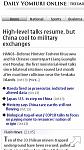
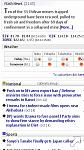
See screenies.
This is the website you mentioned I believe seki.
Attachments:
ironass wrote:See screenies.
This is the website you mentioned I believe seki.
That is the English site 😞
try specifically .. http://www.yomiuri.co.jp/index.htm
or http://www.mainichi.co.jp/ (another Major JP site)
or http://asahi.co.jp/ (ditto)
many thanks
Just for comparison seki.
This is how they render on the Nexus One.
ironass wrote:Sorry seki, my mistake.Try these:-
Many thanks .. looks like the age old problem .. with Nokia / Symbian ..
Cheers
That little excercise for seki has now made me withdraw my comment about Multi-touch (pinch and zoom) on the N8... it's not very good at all. Twice it froze the screen and the 3rd time it just left me with 4 or 5 partially drawn and partially zoomed amd overlapped screens all on the one screen.
Also the built-in browser is slow and as clunky as the N97's I'm afraid.
Couple of other things I've noticed are that ScreenSnap that I downloaded for the N8 off of the Ovi Store actually takes you to camera after the screenshot and then freezes everything up.
The other thing I've come across is that Handy Taskman only partially works on my N8 in that I cannot seem to close open app's with it in a lot of cases. Admittedly this was the same prog I used on the N97 so it may not be compatible with Symbian^3.
It's something to watch out for if you are considering going from Symbian 3 to Symbian^3. Your app's may not work or work correctly.
ironass wrote:That little excercise for seki has now made me withdraw my comment about Multi-touch (pinch and zoom) on the N8... it's not very good at all. Twice it froze the screen and the 3rd time it just left me with 4 or 5 partially drawn and partially zoomed amd overlapped screens all on the one screen.Also the built-in browser is slow and as clunky as the N97's I'm afraid.
Couple of other things I've noticed are that ScreenSnap that I downloaded for the N8 off of the Ovi Store actually takes you to camera after the screenshot and then freezes everything up.
The other thing I've come across is that Handy Taskman only partially works on my N8 in that I cannot seem to close open app's with it in a lot of cases. Admittedly this was the same prog I used on the N97 so it may not be compatible with Symbian^3.
It's something to watch out for if you are considering going from Symbian 3 to Symbian^3. Your app's may not work or work correctly.
My guess is the browser/OS was struggling to find fonts to render .. madly substituting block characters for what ought to be shown.
Sure they're double byte characters but the browser likely supports that .. the problem is no font support in the OS.
Roll on the proper browser .. and roll on decent font support.
/me looks shyly at his iPhone 4 .. I really don't want to like you this much ..
quietly .. I thought S^3 had better task management installed?
seki wrote:My guess is the browser/OS was struggling to find fonts to render .. madly substituting block characters for what ought to be shown.
Sure they're double byte characters but the browser likely supports that .. the problem is no font support in the OS.
Roll on the proper browser .. and roll on decent font support./me looks shyly at his iPhone 4 .. I really don't want to like you this much ..
quietly .. I thought S^3 had better task management installed?
This isn't the first time its happened though seki.
The screen redraw and overlaps I mentioned were actually on this very page when I tried to enlarge to click on your links. In fact I had no problems on pinch & zoom on the links that you gave me.
I've said it before on scrolling freezes and lags but, to a layman like myself, it's as though the system is trying to play catch-up... if that makes any sense.
Doesn't look good from where I am sitting .................
This all sounds strangely familiar :redface:
seki wrote:My guess is the browser/OS was struggling to find fonts to render .. madly substituting block characters for what ought to be shown.
Sure they're double byte characters but the browser likely supports that .. the problem is no font support in the OS.
Roll on the proper browser .. and roll on decent font support.
oh no.............why cant nokia install a universal font on the device......
its ok to have english system language, its ok to have no IME for other languages, at least make the device capable to display other languages 😞
If somebody can help to test existing ways of changing font, that would be great...or I'll have to buy a hongkong version for better CJK language support...


