Sorry but my english is poor.Eyecon need Internet Explorer?I formatted my computer one week ago and the Explorer doesn't installed yet.I unable to run eyecon.I wrote into command prompt but it doesn't worked.Maybe eyecon need explorer?And-what differen between eyecon trial and full version?Plz help!
NEW EYECON EYE/AVI converter!!!!!!!!!!
Sorry but my english is poor.Eyecon need Internet Explorer?I formatted my computer one week ago and the Explorer doesn't installed yet.I unable to run eyecon.I wrote into command prompt but it doesn't worked.Maybe eyecon need explorer?And-what differen between eyecon trial and full version?Plz help!
I followed the intructions and converted the file but when i convert it i get a error butthe video is converted but windows media player still does not play it.i have win 98.
I just tried to download the file but it couldn't resolve the web address??
[quote="Anonymous"]I just tried to download the file but it couldn't resolve the web address??[/quote]
The files have been temporarily removed from my server. I believe the very latest version of the Eyecon Converter application at http://www.eyemail.com.cn/Chi/camcoder/en_Download.html includes the updated GUI and everything else you need to get started.
Cheers
hi all, i got the converter working fine, but i dont seem to have audio, how do u get audio with the convertion?
I get the following error when using EYECON:
C:\EYECON> eyecon c:\eyecon\test.eye c:\eyecon\test.avi
EYE File to AVI Converter Version 1.0
Copyright(c) 2002-2003 EyeMail Technology, Inc.
Audio is linked to external file.
Failed to connect audio source to mux
Failed to run the graph
C:\EYECON>
Any suggestions? I downloaded ATI Camcorder in August, used it for a week in Europe, and now I am tring to convert the .eye/.ear to .avi.
Thank you. Steve
Hi all,
I am a new user to this forum so bare with me. I got a the nokia 6600 new. The guy at the shop installed for me the ETI CAMCORDER. Anyways when I transfered the files of the phone to the computer I end up with the .eye extension. I searched to the internet until I ended up here. The only solution I see is to get hte Eyecon eye/avi converter.
How do I get that program? I searched and can't find it anywhere!
Please help me out!
The EYECON gui comes in one package with ETI Camcoder,if you bought the software legally that is.
hi
i,m from Iran
can you please tell me that from where I can bring the files you said to unzip them. where the EyeCon download file is????
Please help me.
My mail : [email][/email]
thank U All.
where u download EYE File to AVI Converter Version 1.0 plz tell in website i also wnat to download
spbeever wrote:I get the following error when using EYECON:C:\EYECON> eyecon c:\eyecon\test.eye c:\eyecon\test.avi
EYE File to AVI Converter Version 1.0
Copyright(c) 2002-2003 EyeMail Technology, Inc.Audio is linked to external file.
Failed to connect audio source to mux
Failed to run the graphC:\EYECON>
Any suggestions? I downloaded ATI Camcorder in August, used it for a week in Europe, and now I am tring to convert the .eye/.ear to .avi.
Thank you. Steve
Gentelmen 😊
I get this error every time i try doing a eye convertion ,
I looked through thie topic , but found noting regarding this error :
See attached jpg file
Some has posted an error but it seem no replied to it. :icon4:
I followd the instructions as per the 1st topic published on this section . :?
Am using WindowsXP Pro - SP1 on a Compaq DeskPro PIII desktop. 🙄
Your assistance Plz 😊
Keep up & Thnax in advance ...
Attachments:
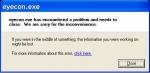

Audio is linked to external file.
Failed to connect audio source to mux
Failed to run the graph
I get this too... What could I be doing wrong?... :con?
how to download this software
shiva_shankar wrote:how to download this software
Give up guys and get phillips camcorder pro = it's much better, and saves as standard .3gp files..
willbrady wrote:Give up guys and get phillips camcorder pro = it's much better, and saves as standard .3gp files..
Well could could u assist me with my current issue , i've quated above with the clip of the error message.
Yes there is a new camcoder , but dose that mean that i have to get it, isn't there a software to work the cuurent file , i really need it to be converted. :con?
thanx willbrady in advanse ... :icon14:
girosky wrote:Iam sorry to ask but where will i download this from my phone or my pc? 😞
i want to download eyecon
i want to download eyecon
I have ETI loaded on my 6600 and it works fine. Unlimited video with full sound. I have taken many videos as long as 45 minutes. I'm sure it will record as long as there is empty space on mmc. However, make sure in settings of ETI that "audio codec" is set to "General". If audio codec is set to "Speech", recording with sound won't work because the "Speech" codec doesn't work properly on the 6600. That's why the "talk" or "talx" application doesn't work properly on the 6600. The cracked version of that application will cause audio codec problems as well. There are some versions of cracked eti camcorder that corrupt or limit the sound codecs in phone. These files on Symbian OS are just like "shared" .dll files in Windows.
Conversely, some "extended voice recorder" softwares and cracks may create corrupted or limited sound codecs in phone. PSIloc "Extender Voice Recorder" may cause conflicts as well. Also, some "answering machine" softwares and cracks may create sound codec conflicts that will limit any camcorder products when recording with sound.
That's why it works on some peoples' phones and some it doesn't.
Beware "WAREZ"!!!
It's not all that it's CRACKED up to be!!! lol, no pun intended.
That's why it's called WAREZ, as in beWAREZ! Get it?
I have also used EYE convertor on Windows XP sp1 to convert my videos without any problems. If I want to send video right from my phone to a friend with a pc, I have the EYE convertor software on my mmc in zip format. I just attach the convertor software and send it with the video. VIOLA, unlimited video with sound you can share with anyone right from your phone.
Advantages ETI has over Philips Camcoder Pro:
ETI can shoot full screen videos at 15fps. Full screen on Philps is 7.5fps which is useless video. If you want 15fps on Philips your screen size will be 128pixels compared to full screen on ETI, which is 174 or 176pixels. Video at full screen on phone is already small enough, the 128pixel video is too small. Philips Camcoder also ends any video you're shooting if your phone rings. ETI allows you to answer phone and video will keep going until you want to finish it. Another Philips drawback is that when video is completed it then "writes" the video to file, which sometimes can take as long as the video itself as "writing" performance progrssively degrades with longer videos. ETI "writes" as it records, therefore a "high transfer rate" mmc will produce higher quality videos. Philips is just flat-out overrated!
And oh by the way....
The footprint for ETI camcorder is only 34.5kb, Philips is 446.8kb.
Philips will also drain your battery at twice the rate of ETI.
To uninstall:
A purchased version of ETI contains the following files,
Intalled on phone memory the drive is C:
Intalled on memory card the drive is E:
All ETI application DIRECTORIES should be deleted...
\system\apps\ETICamcorder
\system\apps\ETIMovieAlbum
\system\apps\ETIPlayer
The following FILES only should be deleted:
\system\Libs\ETICodec.dll
\system\Libs\ETIEyeFile.dll
\system\Libs\ETITools.dll
Use FExplorer or Seleq to accomplish this task.
Do so at your own risk and make sure to make a backup before you attempt this.
Backup to your memory card.
This backup practice should be followed as a standard process before you install anything, that way a simple restore will act as a rollback process in case problems arise.
-Jz
Another good ETI conversation(search the forum for others),
http://www.allaboutsymbian.com/forum//forum/thread/12008/&highlight=ETI
Hope this helps.
-Jz
sir i wud like to know how to convert this eye file in my pc well i have nokia 6600 and i m looking for the software to download but i m unable to find it so can u help me out in downloading this eye n ear file converter to mpeg or avi.file i will be very thankful to you if u solve my this big problem
shadun wrote:sir i wud like to know how to convert this eye file in my pc well i have nokia 6600 and i m looking for the software to download but i m unable to find it so can u help me out in downloading this eye n ear file converter to mpeg or avi.file i will be very thankful to you if u solve my this big problem
Read the previous post.
hi
i have tried all of these but i had listen only the voice but the picture doesnt work
it converts but it brings to me agreen screen
hatem farouk wrote:i want to download eyecon
hello i want to download full version of eyecon .
so plz .
reply with quote.
i m also a registered user.
also tell me how can i download applications from that site.
Can you guys show me where is the attachment
Okay, i have a question:
Where can I download the "New Eyecon Eye/Avi Converter" ??????
I nowhere found a site to download it!
Please give me an Url where I can download it!
Thx!
How can I download the new EYECON software?Can you give me the link please. my old eyecon software cannot convert the total capacity of my .eye file. It can convert up to 4000+KB only using AVI.How can I convert the complete .eye files.I need your help guys. Thanks
Woll_Tasse wrote:Okay, i have a question:Where can I download the "New Eyecon Eye/Avi Converter" ??????
I nowhere found a site to download it!
Please give me an Url where I can download it!
Thx!
wheres the link??
I followed the intructions and converted the file but when i convert it i get a error butthe video is converted but windows media player still does not play it.i have win 98.
hi
http://www.eyemail.com.cn/Chi/camcoder/EYECON.zip <- is the latest version of eyecon software.
Quick Q though. I have been looking at houses and have been recording without audio (to conserve space) but when i convert it with eyecon it will only convert 7mins 9secs, but i have converted a video with audio to a file longer than 20 mins no problems. any workaround? possibility of a option in next converter to not bother with audio? thanks for the help.