www.stefanorussello.tk
In world-wide exclusive right the presentation of a new software for PC that will allow in automatic rifle the preparation of the topics for the new one finishes them Nokia 6600; The Theme Editor developed from Stefano Russello in collaboration with Corrado Parisoli personalizes the topics for Nokia 6600. In practical the program particular configurabile to the inside of the graphical system Symbian creates the topic step to step personalizing every of finishes them Nokia 6600, the interface is simple and immediate and leads little to the creation of the topic in time and with it turns out to you splendid, the commercialization of this program is previewed for the November end 2003/beginning December 2003; it is possible to insert or to unload the topics from created you on the situated one www.themes6600.tk . The best ones will come inserted in the program!
Excuse me for bad english! 😛
If the author(s) want some free webspace / website (without the banners on the current one) please contact me and i'll set something up for you.
Otherwise nice job 😊
With tools like this we'll see a lot of theme's comming soon.Great job.Let the theme storm begins......
New graphics for Theme Editor!! View it to www.stefanorussello.tk
How do i install the themes? Please help
New screenshot of THEME EDITOR 6600!!
Go to www.stefanorussello.tk to view it!
For download and upload themes for nokia 6600 go to www.themes6600.tk ! 😉
when will we get the theme editor ?
oh.. cool !!! good job!!
btw, is it in english ?
please be so kind to post the themes editor for download
😃
Nokia will release a theme editor for free soon.
Where did u heard that nokai will do so?
What abut the other one? it's supposed to come out soon (this week).Hope it's not in italian.
Look forward fo it 😃
Some guy talked to a manager at Nokia and the dude sayed that it will be out december 10. It remains to be seen if its true. And the other one that the italian guy is working on is going to cost a little bit of cash.
I got all the theme to work together nicely.
All you need to do is to create new directory in the E:/system/skins similar to 101f861c, 101f862c, etc then modified the original Climber.skn and 101f860C.ini and put them in the new directory together with the new mbm file. I cannot explain how to do it but I cam email anybody who want the .skn and .ini file associated with the new skin.
The next time you open the theme the new theme will be listed.
How can I attach a jpg pic in post?
OK I got it now. Here is the screenshot!
Attachments:
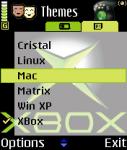
hi, can you send me the .skn and .ini to my email [email][email protected][/email]
many thanx
Yes me too
[email][email protected][/email]
OK Someone asked me for .skn and .ini files for Crystallize.mbm
Download the attached file. There are two files inside 101F865C.ini and Cristal.skn
Create new folder named 101f865c under E:/system/skins,
Rename Crystallized.mbm to Cristal.mbm(Dont ask me why I renamed it this way. I just want to make it the same length as the name Climber)
Copy the files: Cristal.mbm, and the two .ini and .skn files to the directory
That is all. The next time you open Theme, you will see Cristal.
Now if you want to know how to modified the ini and skn for other themes all you need is just a hex editor. Compare the original Climber.skn and 101F860C.ini to the modified Cristal.skn and 101F865C.ini
or
You can wait for the Theme Editor.
Attachments:
101f865c.zip (3 KB)
Next one is Linux
Create directory the same name as the .ini file.
Rename Linux the same name as .skn file
Attachments:
101f861c.zip (3 KB)
I hope Nokia going to release Theme Maker(Not Editor). Editor just upen up readily made .mbm file and modified it. A Theme Maker can create a theme from scratch, simplest theme to the most sophisticated theme including the font color, etc. We dont want to base all of our themes on the Climber.mbm right?
Where I can get ini & skn file for Matrix, Mac, Windows XP and Xbox. Smokinman your sending please
Goddamn. I tried with hex editor. Replaced every linux / linuxer word with xboxx or xboxxer, but no.. also folder path changed but still no. It just wont show up in theme list. What am i doing wrong? Could you give more accurate instructions, plz 😊
Hello to everyone,
I have a little problem, when i use a different theme like Cristal or Xp theme the icon under SMS menu not change I have the icon of the Default Theme. Like this, when i write an sms i have for one second the defaul icon and after change with the one modified.
Any one know why?
I need to format my phone to resolve it?
thank you,
v.
Smokinman u are the source 😉
big Moogely 4 u,
u make a old man like me very happy.
regards
S�mi
