warfab wrote:Hi. Have already extracted the mbm file from the sis file and opening them with mbmwizard (have also tried Theme Editor 6600) but all I get is "Not a valid archive". Have tried the open and import options already.If this is due to copy-protection, is there any workaround?
:icon14: the rules :
1. use windows 2000 pro 😎
2. copy this 2 files comctl32.ctx and comdlg32.ocx to c:\winnt\system32 :?
3. working on one folder for running "mbm wizzard" and extract *.mbm files to the same folder e.g c:\mbm\tempextract :icon4:
(always use "UnMakeSIS" to extract *.mbm files from *.sis files) :tongue:
4. Now u can creates ur own 6600 themes with "Series60 Themes Studio" from Nokia :icon14:
5. Have fun 😃 😃 😃
Attachments:
comctl32.zip (289 KB)
I have both unMakeSIS and Total Commander with the SIS view plugin... both work and I am able to extract the *.mbm and *.skn file. My problem is that I cannot get MBM wizard to work. When I click on the app it opens; however when I try to do anything (i.e. new, open, etc) I get this error message : Run-time error '76': Path not found.
I am using a windows xp desktop.
Please help thanks in advance 😊
i have downloaded total commander 6.03a
And i have downloaded the sis viewer file and installed it
i have opened up my sis in there but i don't know what too do too extract the file to mbm
please help
WiseOne wrote:if u get 'comdlg32.ocx' missing error. Than copy this file 2 ur system/system32 folder!enjoy 😉
tried it but no luck...
heres the error: "comctl32.ocx"
can any body send me this file... tnx
Attachments:

heres the screenshot of the error..
pls help me guys... thanks.
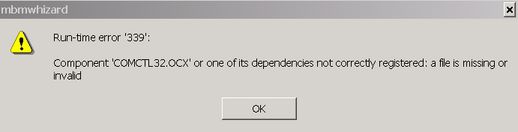
uh-oh!!! im so sorry i dint see.. its already posted by wizwize"
damn.. stupid me... 😡 :deal: :rock:
In order for the wizard to extract from mbms, you need to have bmconv.exe located in the same folder as the wizard 😊
Oh yes you do. I have been mucking around with MBM whizard for hours and this was the key!! Place BMCONV.EXE in the same directory as the wizard and all is well 😊
hi,..
I'm new in this forum...
I've tried all the tips and the trick that post in this forum to import mbm files with mbmwizard but it won't work. still got the error 'not valide archiev'.....
can you give me an mbm file that can be opened with mbm wizard please.....
here's my email : [email][email protected][/email]
sorry for my bad english.....
thank you very much...
Raynold-Indonesia
GeoffM wrote:Oh yes you do. I have been mucking around with MBM whizard for hours and this was the key!! Place BMCONV.EXE in the same directory as the wizard and all is well 😊
Well thats strange?
I have been "Mucking around lol" with mbm whizard for a Year!,and this is not the case for me.
I do have an old version of mbm whizard tho and i have read recently of a few people having problems with it.
Looks like this is the reason then 😊
hi elton,
if you do have an old mbmwizard, I really hope that you dont mind to share it to us ?
thanks..
were can I found bmconv.exe to download ???
:con?
I have downloaded a pack from emule with the unmakesis and the mbmwizard with bmconv.exe but when i'm opening the mbm file with mbmwizard hangs up the system. It's because i'm running under xp? it's 100% necessary to run under w2k?
????
Raynold wrote:hi elton,if you do have an old mbmwizard, I really hope that you dont mind to share it to us ?
thanks..
I dont mind at all.....................😊
Unmake sis is in there too,purely coz i can be bothered to make another zip 😊
Attachments:
Theme Tools.zip (266 KB)
Orios,
If you download the zip i attached above it contains,mbmwhizard and unmake sis,
Both of these versions work fine on Xp (sp1+2) and the info provided in this thread about bmconv.exe is un-necessary. :icon14:
still don't workink, when i'm opening the mbm file with the mbm wizard " not a valid archive " 😡 😡
I did the above things but i am having a problem in how to inzip the WCK to the wincmd directory.
The second thing is that when i click on the packer of the Total Commander then instead of 'Configure packer extension DLLs' its coming as "Configure packer extension WCK's".
So plz help me and let me know that because i want it very badly..........
Waiting for the positive response ........................ Thanks in advance..........
nickg78 wrote:OK it is very easy. Actually you do not convert the sis file to mbm file, but you extract the *.mbm from the *.sisHere is how:
1. Get Total Commander (previously known as Windows Commander) from http://www.ghisler.com/download.htm and install it.
It is a very good shareware, but fully functional file manager for Windows, with no time limit.
2. Download SisView from http://www.dalibor.cz/epoc/sisview.htm
It is a free add-on for Total Commander that allows you to see the contents of .sis archives. Read the readme.txt included in the zip you downloaded for instructions. It is very easy to use
Then, using Total Commander with the SisView add-on, you can find the .mbm in the .sis theme file and extract it to your hard disk.
100% tested and working for all .sis files (apps or themes) 😊
hey. I tried everything on this thread and it seems that the bmvconv.exe trick is the way to prevent the "File Archive Invalid" error.
To find the file just search your hard drive and then copy it in to the same folder as the wizard.
unzip and place this in the same dir :icon4:
Attachments:
bmconv.zip (35 KB)
Hey forget MBM and so on .. This is what i've seen in a german forum 😊
* Open Nokia Theme Editor (I've got 1.21)
* Open your favoriteTheme with "Browser" on the right side
when your Theme is opened:
* Push "Create New Theme" at the bottom and make a new empty theme
when your new empty Theme is opened:
* Push "Gallery" at the Top and switch to your FavoriteTheme
---> Now you can press Theme->EDIT in the Menu !!!
Have fun !
Mabotu
Question about MBM Whizard program..
why when i import the mbm file from unmake sis program 'theme skin' ..
i get this message ''not a valid archive'. ???
okay never mind i just downloaded the file 'bmconv' and i put it in the same mbm whizard program folrer and i think its okay now.. 😊
Finally i can make theme of nokia6600
conclusion1 winxp for the platform,no need to be win2000
2 both file of".comctl32 "paste to the folder c/windows.system32
3 select any ".sis"file [for the theme ,i download from http://www.zedge.no] and change to be ".mbm "file by UnmakeSis prog.
4 extract all".mbm"file u can find all .bmp and etc. by "MbmWhizard & bmconvert"in the same folder......thats the point
[DON'T USE MBMWHIZARD ONLY!!!!!!!!]
5 select any file u want and save it then make your theme with photoeditor program
finally I can extract mbm file and make a very simple themes with themes studio. And I thank you all for all the tips and tricks...... thanks a lot ...
by the way, why does themes studio run so sloowwww?
I tried to use The Themes Editor 6600 from microforum, success making mbm file, but It cant finish making sis file, always stop in 90% proggres.
is there anyone can help me ?
Thanks Elton.it works fine! 😃
