Continuing our series of guides for beginners, AAS takes an in-depth look at how to use RSS feeds on the Nokia 5800 XpressMusic, and also has a quick mini-tutorial on how to set the home page on the web browser. Don't forget that our entire library of tutorials can be accessed from the AAS 5800 Tutorial Index page.
Read on in the full article.
Just a word of caution, i entered around 3 of my usual feeds, and the rss function just failed to work anymore. Trying to enter the Rss function just gives a error message, and a hard reset is required to restore functionality.
In the end, I just went back to using Opera Mini's RSS function. Disappointing on the built in RSS functionality.
I see AAS is now trying to appeal to the masses. I thought phones come with user guides, don't they?
Guys, please don't forget about us in your niche audience. Let's see in depth articles on issues that matter, not on how to put a bookmark in the browser.
Unregistered, I haven't had any problems with multiple feeds on the 5800. Just to make clear, I do try out features quite a lot before writing about them. I just tested the feeds again by adding five more feeds in a row and it worked absolutely fine. Maybe you need to update your firmware?
Arthur, I know a lot of long-time AAS readers will be nervous seeing articles intended for beginners, but there's no need to worry. 90% of articles on AAS are still intended for hardcore and professional users. My own previous "how to" article about OPML feed directories last week assumed a fair amount of knowledge for example, and was intended for people who create podcasts which is obviously a very niche audience.
The reason we're doing these 5800 beginners articles is because:
1. The 5800 is clearly bringing a lot of new people to S60 thanks to its relatively low price, high res touchscreen and strong feature set. We want to help these newcomers get to grips with S60, which is ultimately good for the ecosystem as a lot of these new people will go on to be advanced users.
2. The manuals which come with phones generally aren't very good. There are a lot of things the 5800 manual misses out, fails to explain properly or explains very badly. For example Nokia insists on using the name WLAN without ever saying this is effectively the same thing as Wi-Fi. I've tried complaining to Nokia in the past about this, but they insist that they have a "house style" and will not deviate from it.
3. Nokia's manuals don't talk much about third party services, which is something beginners need to know about. For example third party memory cards are usually much cheaper than Nokia's own, yet Nokia implies that people should only use Nokia-branded cards. We tell the truth about this, that people can confidently use third party cards.
4. The tutorials are very popular. We've had a consistently high flow of traffic to the tutorials and their index page, so there's clearly demand for them. If people want tutorials for beginners, then we'll write them.
5. Even experienced users can get something out of the tutorials as they detail exactly how the 5800 works. Anyone considering buying a 5800 can use the tutorials to see what the 5800 is like as a phone.
Tzer2 wrote:Unregistered, I haven't had any problems with multiple feeds on the 5800. Just to make clear, I do try out features quite a lot before writing about them. I just tested the feeds again by adding five more feeds in a row and it worked absolutely fine. Maybe you need to update your firmware?
I'm Unregistered...didn't log in because using another browser. It's rare, but it exists.
http://my-symbian.com/forum/viewtopic.php?t=38819
http://dailymobile.se/forum/index.php?topic=1239.0
i also have problem with rss feeds ,but little different. everything was ok,but now i cant even open rss feeds with built in nokia browser,it says "unknown error".when i try again it says "opening",and nothing happens. does anybody knows where are those feed files stored on memory?
My firmware is updated to latest v20. And this is not a new problem. Somehow, there are some feeds that basically makes the whole feed system in the phone fail catastrophically, sadly. I can't even go in to delete and see which are the culprits. Anyone knows where the RSS info resides on the phone so that I can delete it?
Here's a video I uploaded, sorry for the quality, but I guess it should suffice.
http://www.youtube.com/watch?v=tt2n7Vs-elc
Just a word of caution, before everyone goes trigger happy adding RSS feeds and facing a brick wall like me. 😞
As I've stated before, a hard reset solves it, but I've too much installed to bother with that unless necessary. Also have found several 3rd party rss readers that work better anyway, besides I don't use the contacts bar, so built-in rss has even less meaning for me. It's just a thorn in the side as to why it's giving me this trouble when most people are having no problem. 😞
edit : i've left the "Opening" message on for 3hrs and it's still the same, so it's basically a dead end.
Kenkiller, first of all I've snipped the photo out of your last post as it was enormous! 😊 For those who didn't see it, it was just a picture of a 5800 displaying its firmware version.
As for the feeds, I have tried adding lots of feeds to my 5800's browser and there hasn't been any problem at all, it works totally fine.
Maybe it would help if you told us specifically which site's feeds have caused you problems? I can then try those feeds on my phone and see if I get the same problems.
The links you gave were both people with the old firmware version, which is why I'd like to see what happens on the latest firmware.
I can't even go in to delete and see which are the culprits.
You originally said there were only 3 feeds when your phone crashed, so surely you remember what they were?
The N96 had some great BBC news video podcasts in the video centre application. Is it possible to set these up in the 5800 ? I've done a bit of research but have drawn a blank so far. Any help would be appreciated.
I'm not exactly sure which was the exact one, tried different ones but ended up the same.
some of these i guess
http://www.mrbrown.com/
http://www.mrbrownshow.com/
http://www.engadget.com/
There was probably more (not more than 5), but the fact that the system couldn't handle it was disappointing. 😞
Or can anyone tell me the best way to do a backup, hard reset and restore to maintain everything except the offending rss bookmarks?
Chazzle, if you're in the UK you might want to try the iPlayer, that works really well on the 5800. You should find it in the "Download!" icon, but you may need to update your firmware for it to work properly.
Kenkiller, thanks for the info, I'll try them on my 5800 and report back to you.
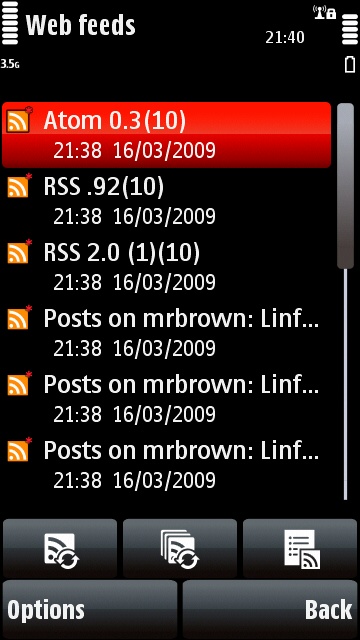
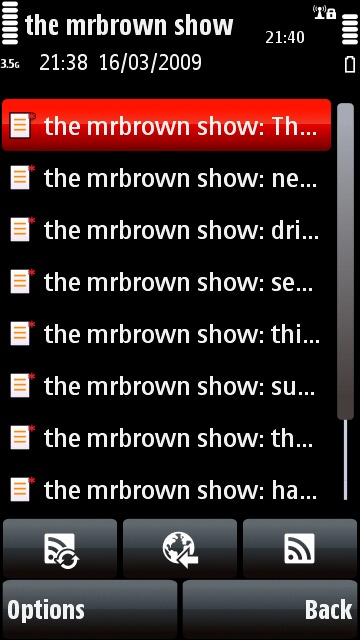
Kenkiller, UPDATE: I've subscribed to all the feeds from all those URLs, including all the atom and RSS 2.0 versions on the Mr Brown sites, and all my existing feeds too, and they all work fine together. It takes about 20 seconds to update them all, but they do update properly.
This makes me wonder if your problem isn't in the feed reader but elsewhere, because those feeds work fine for me.
Here's a screenshot of the feed test with all those sites feeds running simultaneously:
Tzer2 wrote:Chazzle, if you're in the UK you might want to try the iPlayer, that works really well on the 5800. You should find it in the "Download!" icon, but you may need to update your firmware for it to work properly.Kenkiller, thanks for the info, I'll try them on my 5800 and report back to you.
Kenkiller, UPDATE: I've subscribed to all the feeds from all those URLs, including all the atom and RSS 2.0 versions on the Mr Brown sites, and all my existing feeds too, and they all work fine together. It takes about 20 seconds to update them all, but they do update properly.
This makes me wonder if your problem isn't in the feed reader but elsewhere, because those feeds work fine for me.
Where else could it be? I don't have any trouble besides the Web feeds portion.
Arrgghhh....It's obviously not a hardware flaw, but it's damn freaking irritating.
I don't think I've ever read a Nokia user manual. Just poke the phone and see what happens and it always seems to work. Is a user manual necessary at all?
Where else could it be? I don't have any trouble besides the Web feeds portion.Arrgghhh....It's obviously not a hardware flaw, but it's damn freaking irritating.
Well it COULD be a hardware flaw on your phone but not mine. Even if they have the same firmware and model number, it could be that your phone is physically damaged in some way? 😞
There's also the unpredictability of firmware updates, if they preserve user data they may run into unexpected problems because not everything was updated properly.
Have you tried totally wiping the phone with a firmware update through your PC?
Or maybe you should take it back to get a repair or replacement under the guarantee?
Tzer2 wrote:Well it COULD be a hardware flaw on your phone but not mine. Even if they have the same firmware and model number, it could be that your phone is physically damaged in some way? 😞Maybe you should take it back to get a repair or replacement under the guarantee?
how can it be a hardware flaw if it used to work fine until some feed was added (which i have forgotten, sadly)
And a hard reset makes it work again, but one never knows when it hits the same problem again.
It could be a subtle hardware flaw that causes the phone to behave strangely in certain situations. I'm not an engineer, but there are flaws which can do that.
Another possibility, if some other application or process is running in the background it may conflict with the feed reader in some way and cause the phone to get stuck.
Do you have any other apps running when you check your feeds?
I didn't have anything else running when I did the feed test so I wouldn't notice any potential conflicts.
Tzer2 wrote:It could be a subtle hardware flaw that causes the phone to behave strangely in certain situations. I'm not an engineer, but there are flaws which can do that.Another possibility, if some other application or process is running in the background it may conflict with the feed reader in some way and cause the phone to get stuck.
Do you have any other apps running when you check your feeds?
I didn't have anything else running when I did the feed test so I wouldn't notice any potential conflicts.
Anyway, I just gave up on it, so it doesn't matter. There are better RSS readers out there, so it isn't a pain, and I'm not the only person facing it, so i really doubt it's a hardware problem.
So, no usage of it, no pain. My intention was just to highlight that the bug exists, in case it is raised by someone else in future. Thanks for the check, but it just doesn't seem to be worth the trouble to troubleshoot it. 😃
Kenkiller, I hope you find a solution to your problem.
Tzer2 wrote:Kenkiller, I hope you find a solution to your problem.
Yeah, that solution is called a hard reset. 😃
In the first few weeks with my 5800, I too had system errors using the RSS feeds. Restoring the RSS feeds from the backup after a deep reset turned out NOT to be the way to go, as the errors kept reappearing. In the end, I chose to do a partial restore of just my calendar, contacts and notes, and to re-enter manually all the remaining data, including the RSS feeds. It was quite time-consuming, but I haven't had a single issue since. I'm currently subscribed to 19 RSS feeds.
The only (minor) problem I have with the RSS reader of the 5800 is that the font in the article view is too small. On S60 3rd ed. is way bigger. Many people have complained about this, and hopefully it will be fixed in the next fw revision.
Unregistered, thanks for that.
I've only ever used the 5800's feed reader with the latest firmware version, and that's perhaps why I haven't had any problems. I never had any feed settings in older firmware versions, so there was nothing to interfere with the feed settings on the newer firmware.
Restoring the RSS feeds from the backup after a deep reset turned out NOT to be the way to go, as the errors kept reappearing
That's sort of what I was trying to say earlier. Quite often restoring settings created under an older firmware version causes problems in a new firmware version.
As you say, sometimes it helps to only restore a small amount of user settings, and manually re-enter the rest.
Sadly, mine occurred on a fresh set. Nothing to do with backups either on phone or pc.
Looking forward to see if anyone suffers the same fate. 😃
I originally posted the issue on my-symbian and have found not fix as of yet.
I have over 35 feeds I view daily and other 3rd party apps such as resco news and handy rss read the feeds with no issue.
The corruption seems to happen if the browser exits when updating causing a corruption in the database. I have looked at the files in folders and deleted stuff to no avail. I have hard reset the phone restored from a backup and the corruption still exists. This would indicate a database corruption issue and not hardware. I have read of a similar issue on the n80 and n95. Also on the 5800 the music player which can freeze on refreshing a database if there are corrupted music files. For these issues I use third party apps - handyrss or resco news or in the case of the music player - lonelycat jukebox.
Its a shame that there is no option to clear all feeds and wipe the database which would be easier than a hard reset. Due to the amount of apps I have installed a hard reset is impractical even though I tend to be doing one every two weeks with the phone. I have also noticed the web browser slows down but after a hard reset it is quicker - again a missing menu option to clear cache might help with this. Possibly a clear cache option on the rss reader might assist as well. Also it would be good to be able to select were you can save the cache for the rss reader or browser either memory card or phone memory. Lastly I won't bore you with the 16gb memory card issues....
In all, these shortcomings and issues can be got around buying third party apps but we should not have to as it should work out the box...period.
However the issues are surely wetting my appetite to get rid of the 5800 when the N97 arrives - then I have issues of trying to transfer software licences....
Regards,
Craig
kenkiller wrote:I'm not exactly sure which was the exact one, tried different ones but ended up the same.some of these i guess
http://www.mrbrown.com/
http://www.mrbrownshow.com/
http://www.engadget.com/
There was probably more (not more than 5), but the fact that the system couldn't handle it was disappointing. 😞
Or can anyone tell me the best way to do a backup, hard reset and restore to maintain everything except the offending rss bookmarks?
when you restore from a backup on the phone don't restore your bookmarks and this will allow you use the rss reader again. Obviously you lose your browser bookmarks but better than a full reset!
craigc88 wrote:when you restore from a backup on the phone don't restore your bookmarks and this will allow you use the rss reader again. Obviously you lose your browser bookmarks but better than a full reset!
Yup, thanks for the tip. Did that and it's working. But I'm wary about inputting any feeds in the event of a relapse again. 😞
And can I ask you about the 16gb problems? Heard it only works with 16gb class 4 cards iirc...do correct me thanks.
I only have a class 2 16gb card and have not seen any class 4 for sale. Again I posted about the issue first on my-symbian and then someone posted on the nokia forums and there has been mention that 16gb class 4 work. However, after my experiences with the class 2, the corruptions, losing data, hard resetting and reinstalling several times I ditched the card and stuck an 8gb one in. This is class 4 and seems to work. Again, until there is official communication as to what 16gb sd cards it does support I am not spending any more money. I am sick of testing of what is mean to be a full production version! Crazy thing is the 16gb worked in my innov8 again another phone that is currently on ebay due to lack of compatibility and bugs.
BTW I do like Symbian and S60, but think I purchase the phones too early which is why I get the issues.
I have also noticed the web browser slows down but after a hard reset it is quicker - again a missing menu option to clear cache might help with this.
There already is a clear cache option in the web browser:
1. Select Options
2. Select Clear Privacy Data
3. Select Cache
BTW I do like Symbian and S60, but think I purchase the phones too early which is why I get the issues.
I did a long article all about the perils of being an early adopter:
http://www.allaboutsymbian.com/features/item/Why_do_so_many_gadget_fans_buy_devices_on_their_launch_day.php
Basically, every gadget is at its worst when it launches, because it will still have all the bugs that escaped the pre-release testing. Launch gadgets are also at their most expensive.
It's much cheaper and much more reliable to wait 6 months or a year before buying anything electronic, but of course gadget fans can't wait that long. 😊
I have over 35 feeds I view daily and other 3rd party apps such as resco news and handy rss read the feeds with no issue.The corruption seems to happen if the browser exits when updating causing a corruption in the database.
That would explain why most people don't have problems because they're unlikely to exit the browser at exactly the same time that the feeds update.
There already is a clear cache option in the web browser:1. Select Options
2. Select Clear Privacy Data
3. Select Cache
- how did i miss this? many thanks.
re:
That would explain why most people don't have problems because they're unlikely to exit the browser at exactly the same time that the feeds update.
It would only quit if it expectantly closed by itself.
I did a long article all about the perils of being an early adopter:http://www.allaboutsymbian.com/featu...launch_day.php
Basically, every gadget is at its worst when it launches, because it will still have all the bugs that escaped the pre-release testing. Launch gadgets are also at their most expensive.
It's much cheaper and much more reliable to wait 6 months or a year before buying anything electronic, but of course gadget fans can't wait that long. 😊
Very interesting article. I can testify to owning one phone for the past 18 months - Nokia E90, this with the 9500 when I had them worked out of the box where myself owning it for the 18 months says a lot about the stability. Since having this phone from new, I have had an iphone, palm treo, HP IPAQ Voice Messenger, samsung innov8 and now the 5800. All but the treo have been passed on through ebay. I know there is a significant price difference between the 5800 and e90 but the switch from s80 to s60 (9500 to e90) was less painless than the Innov8/5800 phones I have used.
Yes, the browser is very prone to crashing. I tried loading Engadget and ram dropped from 40+mb to around 3-5mb. And once in a while it crashed.
That being said, Operamini is also quite crash prone. 😞
Seems like I'm complaining too much, but it's really a nice fun phone, just that when the bugs occur, it's irritating.
kenkiller wrote:Yes, the browser is very prone to crashing. I tried loading Engadget and ram dropped from 40+mb to around 3-5mb. And once in a while it crashed.That being said, Operamini is also quite crash prone. 😞
Seems like I'm complaining too much, but it's really a nice fun phone, just that when the bugs occur, it's irritating.
You are correct, the bugs are annoying when they happen but over time you recognise to use the phone within its own limitations. It is fun to use and I like having touch on the S60. Just a little bit more ram, faster processor and better web browser experience would round it off nicely. It will be interesting to see what opera finally does with their full browser.