Another Nokia 5800 tutorial for beginners, this time we're taking a look at the e-mail options currently available on the 5800. We cover the basics of how to set up a POP or IMAP e-mail account on the phone's built-in messaging app, how to make new e-mails alert you just like text messages, how to set up multiple e-mail accounts on the same phone, and more. (We haven't covered the dedicated Nokia Messaging e-mail client or Gmail's Java client because they don't yet have proper 5800 versions.) As always, you can see a complete list of these how-to articles on our 5800 tutorial index page.
Read on in the full article.
Incidentally, if anyone from Nokia is reading this, can you please call your SMS/POP e-mail client and push e-mail client different names?
At the moment there's:
"Messaging" which handles SMS texts and POP/IMAP e-mail on Nokia phones
but there's also:
"Nokia Messaging" which can be installed to provide push e-mail and IM on Nokia phones
I can tell you right now that if Nokia Messaging becomes widely used, lots of people are going to get these two confused all the time.
Even when you know the difference, it's extremely difficult to talk about them clearly:
"I used to use Messaging on my Nokia phone, but now I use Nokia Messaging instead."
-"You have to pay to use Messaging on Nokia phones?"
-"No, you have to pay to use Nokia Messaging. Messaging is free."
-"Aren't they the same thing?"
-"No, they're totally different."
-"Why are they called the same name?"
-"Because Nokia is crazy."
I thought "Nokia Messaging" was now "Nokia Email"? Or not? Or...?
Rafe did a summary recently when we were talking about something else. It's an utter shambles.
"Nokia E-Mail" is now part of "Nokia Messaging":
http://betalabs.nokia.com/betas/view/nokia-messaging
And then on top of that Nokia offers a totally separate online e-mail service called "Ovi Mail":
http://betalabs.nokia.com/betas/view/ovi-mail
...though to be fair Ovi Mail is a webmail and POP/IMAP e-mail account service, whereas Nokia Messaging is an e-mail client and push e-mail service, so they're not overlapping as much as it seems.
And there was "Nokia Chat" which is now called "Ovi Contacts"... which is a totally different thing from the "Contacts" application built into S60, and also a totally different thing to the "Ovi Contacts" website.
It's a bit of a nightmare keeping track of all this, even if you follow it closely. The names are too similar, too generic, and change too often.
Guys,
Any chance of a tutorial on how to keep desktop client, web client and phone in sync - not just for email, but contacts, to do lists, calendar etc.....thanks
Broken IMAP IDLE on gmail:
One problem with the built-in 5800 messaging client which I have found is that it doesn't properly support IMAP IDLE. It should be possible to leave it connected to gmail via IMAP and auto-check for email periodically as per this tutorial. It can work almost like "push", with minimal data or battery costs. However in my experience my 5800 just drops the connection to the IMAP server after a few minutes, and then never reconnects ever again unless you force it manually. So this feature is totally broken.
I've seen this complaint from loads of other folk on various forums so it's not just me. AND it's not apparently a gmail problem since people seem to have no problem with certain other Nokia phones, or even with Profimail on a 5800. So it just seems to be a bug in the 5800 email client. And as of v20 firmware it still doesn't work for me.
If they fixed that IMAP bug, I would consider my 5800 virtually perfect for me (OK, apart from all the other bugs - eg. the random screen colour changes implemented by v20...). But that is the only important functionality that I feel is now missing. The BBC iplayer download facility would be nice, but I don't think that is Nokia's fault.
Just my hap'orth 😉
CC
Update - I've just seen this:
http://www.symbian-addict.com/2009/03/sneak-preview-nokia-messaging-for-nokia.html
Sneak (alpha!) preview of Nokia Messaging client for the 5800. I can't wait!
CC
It can work almost like "push", with minimal data or battery costs. However in my experience my 5800 just drops the connection to the IMAP server after a few minutes, and then never reconnects ever again unless you force it manually. So this feature is totally broken.
Coffeecat,
I've just tested IMAP idling on my 5800 and my Gmail account using the method in the tutorial and it works fine. I've received several emails at the expected intervals (including the maximum of every 5 minutes), and they come through fine even if I've shut down the Messaging app. I'm using a Gmail account with POP disabled and IMAP enabled, and I verified from the phone mailbox's settings section that it was using IMAP.
Try this:
Are you following the tutorial method exactly, point by point, letter for letter? I say this because it's very easy to accidentally switch off the automatic retrieval if you try doing things a different way. There's a section of the settings labelled "E-mail notifications" which needs to be DISABLED if you actually want notifications of new e-mail.
Yes, that sounds counter-intuitive and it's Nokia's fault for using such deceptive terms, but that's the case. If you disable "e-mail notifications" and enable "e-mail retrieval", IMAP and POP should work fine even when you've exited the application. When I first tried using the 5800 I had notifications enabled and wondered why I didn't get told about new messages, it's a very easy mistake to make.
These are my e-mail settings which work with my GMail IMAP mailbox:
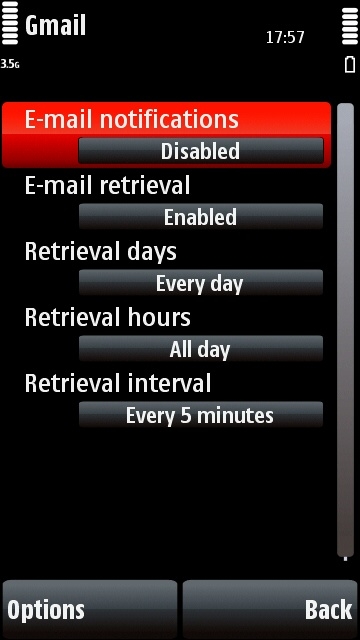
More things to try:
-Are you sure your mailbox is set to check itself often enough? You have to set the checking interval every time you add a new mailbox, it won't remember your interval setting from another mailbox.
-Have you enabled IMAP properly in your Gmail account? As you probably know you've got to enable IMAP in your gmail.com settings section before you can use it on IMAP clients.
-If you still can't get IMAP to work, try POP. You can get exactly the same push-esque functionality from POP, I've used it quite a lot while writing this tutorial, and never had any problems.
eg. the random screen colour changes implemented by v20...)
Haven't noticed anything like that on my 5800 (and I am running the v20 firmware).
Guys,
Any chance of a tutorial on how to keep desktop client, web client and phone in sync - not just for email, but contacts, to do lists, calendar etc.....thanks
Do you mean the desktop Ovi client?
Unregistered wrote:Guys,
Any chance of a tutorial on how to keep desktop client, web client and phone in sync - not just for email, but contacts, to do lists, calendar etc.....thanks
1. The best app for GMail data unification (Email, Contacts and Calendar) in my opinion, is System Seven.
2. System Seven synchronises Google Calendar to (and from) your calendar in your S60 phones.
3. System Seven also syncs your S60 contacts to (and from) your Google Contacts.
4. And of course, it push your Gmail emails. Not only the Inbox, but all your Gmail labels (appear as folders), and Sent items.
5. System Seven also works for Yahoo, Hotmail, AOL and OWA as well as regular POP and IMAP emails.
6. I have used Seven for more than a year and perfectly manage my GMail and Google Apps data on my Symbian phones.
Cheers!
Asri - Thanks for the post i'll look into it
Tzer2 - I'm looking for an alternative to the Outlook / Outlook Web Access combination. You mention Ovi desktop - again thanks for this
I mentioned Ovi because it covers all of the things you mentioned: to-do, calendar, contacts, e-mail, maps etc, and of course it's compatible with the 5800.
If you register at ovi.com and try it out you can see if it suits your requirements. Try registering through your PC browser to see all the features.
The thing that frustrates me to no end is that there doesn't seem to be a way to search your email on the device. Searching through messages only brings up SMS messages and no emails. Or maybe I just don't know how to work it?
When configuring your email account, you should be aware that it will send your credentials to Nokia's server even if your email account has nothing to do with Nokia.
Check this page for more details:
mobilitics.blogspot.com/2009/03/why-nokia-wants-my-email-password.html
Yes, the email setup feature tries to use Nokia servers to auto configure your pop3/smtp settings.
No matter, Profimail is streets ahead.
Configuring your settings shouldn't require your username and password though, that sounds very very odd if it's true. I'm going to try and look into this if I possibly can.
The most that Nokia's setup wizard should be sending to its own servers is your address's domain name, that's all that's required for looking up the appropriate settings.
EDIT: Sorry, did you mean that Nokia themselves log onto people's (for example) Gmail accounts to switch on their IMAP or POP service? If that's the case Nokia really should be asking for user consent before starting the wizard, because that kind of action doesn't sound legal without consent.
@Tzer2...
I was inspired by your comments on having gmail/IMAP working OK so I've tried 3 things:
1. Like you said, I have disabled POP3 access to my gmail a/c
2. I turned off my desktop PC client in case gmail didn't like being simultaneously accessed by 2 different IP addresses or clients etc
3. I changed the email connection setting on the phone from "default connection" to "O2 Mobile Web".
So far, it's stayed connected via IMAP quite happily for about 4 hours - some kind of record for me (previous best about 4 minutes...).
So thanks!
I don't know yet what made the difference - I'll have to investigate when I get some time. I wonder if it's turning off POP3? Can't see why though...
Cheers,
CC
Coffeecat, glad to hear you got it working! 😊
I suspect most of the people having problems have some kind of setting problem rather than a software bug or hardware fault.
I'm not necessarily blaming users, like I said above Nokia have some extremely unclear labels in the e-mail settings section, and deceptively-labelled settings ought to be treated as a bug by manufacturers. That "notification" option had me confused for weeks, it was only when I switched it off that I got e-mail to work, and I'm still not sure what the notification option is there for!
But if it is a settings problem, it does mean that the application should work once you set it up correctly.
I turned off my desktop PC client in case gmail didn't like being simultaneously accessed by 2 different IP addresses or clients etc
Okay, I've tried out Gmail IMAP on my phone while logged in to the same account on my computer, it worked fine, the mail arrived on both devices.
3. I changed the email connection setting on the phone from "default connection" to "O2 Mobile Web".
My e-mail connection settings are for my mobile phone provider's internet access point, and NOT "default connection". It sounds like switching it away from "default connection" is the key thing that solved the problem for you?
My mobile network provider sends me a settings SMS the first time I put my SIM card in a new phone, and they're usually pretty thorough about making sure all the settings are correct. Perhaps O2 haven't been as thorough, and they've left the e-mail section set to the wrong access point?
Try switching it back to "default connection" and see if it stops working, that would prove whether it was a factor.
I don't know about Gmail, but the whole point in IDLE is that you don't have to poll so often...which is what the 'check for messages' thing does.
My IMAP provider says that their server keeps IDLE connections for 30 minutes, and so recommends setting clients to check for messages every 28 minutes or so. They say that doing it more often than that loads their servers unnecessarily.
Of course, with mobiles, your IP address could probably change depending on how much you move; in which case, you'd need to connect again anyway. I wish it had a separate option to automatically immediately connect again when the IP address changes.
Checking every 5 minutes seems quite excessive, IMO.
Checking every 5 minutes seems quite excessive, IMO.
Are you saying if I set the phone's IMAP account to check every 30 minutes and send myself a message, the message won't take 30 minutes to arrive?
I don't use IMAP very much so I'm really not up to speed on its features... 😞
Just did a test of my IMAP Gmail account with the checking set to 30 minutes... and it takes 30 minutes for a message to arrive.
The only way to speed things up is to make the checking more frequent, so setting it to 5 minutes does seem like a reasonable thing to do.
Tzer2 wrote:Just did a test of my IMAP Gmail account with the checking set to 30 minutes... and it takes 30 minutes for a message to arrive.The only way to speed things up is to make the checking more frequent, so setting it to 5 minutes does seem like a reasonable thing to do.
But that's not how IMAP IDLE is supposed to work.
@Tzer2:
Yes you are correct - my tests have now confirmed that the single problem with auto-checking my IMAP gmail account on my 5800 was setting the email connection to "Default Connection". Because under the connection settings for the whole phone (not email specific), "Default Connection" was set to "always ask". Now I have changed it to "The Internet", the email app auto-connects to either a WLAN (for preference if available) or O2 Mobile Web, and it all works perfectly, as you say, even if the email app is not running.
As for IMAP IDLE, I think I have confused things, because now I suspect that the 5800 email app doesn't actually support IMAP IDLE at all. I think the posts I read on other forums assumed incorrectly that it is meant to. Hence you can't get email notifications at any quicker than the period you tell it to check at. We'll have to wait for the "Nokia Messaging" client for push email. Although that's likely to be a pay-for service once it exits beta, so I may not go for that anyway, unless it's cheap.
And yes - I totally confess the thing about user error - my original post started off by accusing the Nokia software of not working properly, when in fact it was just that I hadn't set it up properly... my bad... But I also agree with you that the set up is a little bit byzantine.
Many thanks for your help and time - my email now works fine! I'm a very happy 5800 user again! It's a good job that forums like this exists, because most modern gadgets are so complex, and the manufacturers' tech support is either useless or non-existent. So "communities" are the only way people can get useful help (apart from RTFM of course, but that's often not much use).
CC
Also, one bug that has been present very long is that using IMAP servers only allow you to download the headers of the emails. You still have to attempt to open the email, before the client acquires the actual mail. This actually delays email checking.
Using POP allows you to set a limit to how much data of each email should be downloaded, and it actually downloads as much of each email as subjected to the limit set by the user.
I wonder why there is this disparity between IMAP and POP3.
coffeecat wrote:@Tzer2:Yes you are correct - my tests have now confirmed that the single problem with auto-checking my IMAP gmail account on my 5800 was setting the email connection to "Default Connection". Because under the connection settings for the whole phone (not email specific), "Default Connection" was set to "always ask". Now I have changed it to "The Internet", the email app auto-connects to either a WLAN (for preference if available) or O2 Mobile Web, and it all works perfectly, as you say, even if the email app is not running.
As for IMAP IDLE, I think I have confused things, because now I suspect that the 5800 email app doesn't actually support IMAP IDLE at all. I think the posts I read on other forums assumed incorrectly that it is meant to. Hence you can't get email notifications at any quicker than the period you tell it to check at. We'll have to wait for the "Nokia Messaging" client for push email. Although that's likely to be a pay-for service once it exits beta, so I may not go for that anyway, unless it's cheap.
And yes - I totally confess the thing about user error - my original post started off by accusing the Nokia software of not working properly, when in fact it was just that I hadn't set it up properly... my bad... But I also agree with you that the set up is a little bit byzantine.
Many thanks for your help and time - my email now works fine! I'm a very happy 5800 user again! It's a good job that forums like this exists, because most modern gadgets are so complex, and the manufacturers' tech support is either useless or non-existent. So "communities" are the only way people can get useful help (apart from RTFM of course, but that's often not much use).
CC
Of course, if you require really quick email notifications, System Seven is very good and comprehensive. It's still in beta of course, but it's my client of choice on my past 4 S60 devices.
Here's a very informative page on S60 and Gmail IMAP
http://www.xargs.com/s60/imap.html
Something to note:
Gmail's IMAP servers support IDLE and work with the S60 email client. However, my testing (April, 2008) shows that the Gmail IMAP servers often disconnect after IDLEing for as little as 15-20 minutes. This problem was confirmed on a desktop machine with a wired Internet connection, so it is not an issue with the S60 email client. The IMAP protocol does not permit an inactivity timeout of less than 30 minutes, so this behavior is violating the RFC. The S60 email client will not automatically reconnect after such a disconnect, unless E-mail retrieval is enabled. There's no notification that this disconnection has occurred if E-mail retrieval is disabled.
The built-in S60 email client on phones such as the N95 can provide something very close to "push" email without installing any additional software. By using the IDLE feature of the IMAP email protocol, the S60 email client can provide notification of new emails within seconds of their arrival in your inbox. If an IMAP server and client both support the IDLE feature, the server will "push" a new email notification to the client immediately. This notification allows the client to retrieve the email and notify the user. The contents of the email itself is not "pushed", only a notification is. It is the client's responsibility to act on the push notification.
IMAP IDLE requires a continuous data connection to the server in order to receive immediate new email notifications. As such, it is sometimes not considered "true" push; other push systems don't require a data connection for new email notification, but use another channel such as SMS.
To configure push email on an S60 device, simply configure your incoming mailbox type as IMAP4. If your mail server supports IDLE, the S60 client will use it automatically, and you will get immediate email notifications. It is not necessary to configure the Automatic retrieval settings; even the E-mail notifications setting can be left at its default value of disabled. To maintain the connection to your email service, do not exit the Messaging application. Just press the menu button or use the task switcher to return to the Standby screen. If you attempt to exit, you will be warned that you are about to disconnect the active mailbox. If you do exit, you will not get email notifications until you connect again.
Some of the settings for the S60 email client are poorly documented, if at all. I've done some testing to figure out exactly what some of them do:
Mailbox in use. This specifies which mailbox's Outgoing e-mail settings will be used when sending an email from somewhere other than the Messaging application. For example, if you are in the Gallery and do a Send...Via e-mail, the server specified in the Mailbox in use setting will be used. When you are composing an email in the Messaging application, the outgoing mail server for that mailbox will be used, not the one specified in Mailbox in use.
New e-mail alerts. This specifies whether or not you'll get an audio alert and the "New e-mail" dialog box on the Standby screen when a new email arrives. It does not affect the @ indication on the Standby screen, nor does it affect "push" behavior.
E-mail notifications. This option enables Open Mobile Alliance Email Notification (OMA EMN). OMA EMN uses WAP Push to notify the phone of a new email without having an active data connection. OMA EMN requires server-side support to send the WAP Push message. This option has no effect when using IMAP IDLE. Whether this option is enabled or disabled, the S60 email client provides immediate notification of new emails when connected to the server that supports IMAP IDLE. This setting is only available on FP1 and later phones.
E-mail retrieval. If this option is enabled, the S60 email client will connect to the mailbox when the phone starts, and will continue running in the background so that it can't accidentally be exited. This setting was called "Header retrieval" on pre-FP1 phones.
When the Retrieval interval is set to 5, 15, or 30 minutes, the email client will remain connected to the mailbox, and perform an IDLE. However, it does not behave the same way as when this option is disabled. When a new email comes in, the email client will retrieve it, but it may choose not to give a notification. It's not entirely clear how this feature works (it may be a bug), but emails that arrive closer together than the Retrieval interval don't always appear until the next email arrives. I think the intent was that a setting of 5 minutes means, "I don't want to be notified of new emails more often than once every five minutes," but that isn't quite how it works. This option also causes the email client to reconnect to the server if it is disconnected. Other than the time it would take until a reconnection if the server closed the connection, there is no functional difference between the 5, 15, and 30 minute settings when IDLE is being used. The email client will never poll the server for new email when an IDLE is active.
When the Retrieval interval is set to 2, 4, or 6 hours, the email client connects at the specified frequency, but it disconnects after checking for new email. An IDLE is not performed, so there is no immediate notification of new email.
Thanks for all the detailed info Kenkiller. It'll take me a while to digest all that - looks like good stuff.
I'm now a bit under happy again though - since I got auto-retrieval working OK, the phone no longer does anything at all to notify me of new mail. No mail icon on home screen, no sounds, nothing. And yes, I have got the new email alert notification option (or whatever it's called) set to "on" in the "user settings" dialog of "email settings". And set the messaging alert sound in the profile settings. It was working before, but now it's not.
Can anyone else (Tzer2 maybe...) confirm whether they have got both things working - auto retrieval and alerts? It's a pain because now you've got to open the messaging app to see whether you've had any new mails.
CC
, the phone no longer does anything at all to notify me of new mail. ... And yes, I have got the new email alert notification option (or whatever it's called) set to "on"
You have to set notification to OFF if you want to be notified of new email! 😊
That's why it's so confusing, the labels in the settings section are totally counter-intuitive.
As I said before, if you use the following settings, the phone will tell you that there are new emails, in exactly the same way that it tells you there are new text messages.
These settings are for a single mailbox, if you use several make sure they all have correct settings:
It looks like my assumption that it would somehow cause higher load on the imap server may be incorrect. I guess it's only some MUAs that do that. In which case, it makes sense to make the interval as small as possible so that it'll reconnect quickly if the IP connection is lost (dhcp lease timeout, or temporarily lost cell/wifi connection). I'm changing mine to 5 mins or smaller, if there is one.
@Tzer2:
Sorry - very bad choice of words from me. I do have "E-mail notifications" disabled in the "automatic retrieval" dialog, and also "New e-mail alerts" set to "on" in the "user settings" dialog, on both mailboxes I use. But no alerts appear.
Anyway - you've confirmed that it works for you, so I'm still doing something wrong as it is clearly possible...!
CC
You said you had it working earlier today Coffeecat, so it's clearly possible for you too. 😉
Something must have changed for it to stop working. After you got your phone successfully showing alerts, did you make any further changes to the settings? If so, what changes did you make AFTER you got it working?
I would have another look at the access points, make sure it hasn't reverted to "default connection".
Or you could try creating a totally new mailbox using the instructions in the tutorial...?