Tzer2 wrote:Coffeecat,I've just tested IMAP idling on my 5800 and my Gmail account using the method in the tutorial and it works fine. I've received several emails at the expected intervals (including the maximum of every 5 minutes), and they come through fine even if I've shut down the Messaging app. I'm using a Gmail account with POP disabled and IMAP enabled, and I verified from the phone mailbox's settings section that it was using IMAP.
Try this:
Are you following the tutorial method exactly, point by point, letter for letter? I say this because it's very easy to accidentally switch off the automatic retrieval if you try doing things a different way. There's a section of the settings labelled "E-mail notifications" which needs to be DISABLED if you actually want notifications of new e-mail.
Yes, that sounds counter-intuitive and it's Nokia's fault for using such deceptive terms, but that's the case. If you disable "e-mail notifications" and enable "e-mail retrieval", IMAP and POP should work fine even when you've exited the application. When I first tried using the 5800 I had notifications enabled and wondered why I didn't get told about new messages, it's a very easy mistake to make.
These are my e-mail settings which work with my GMail IMAP mailbox:
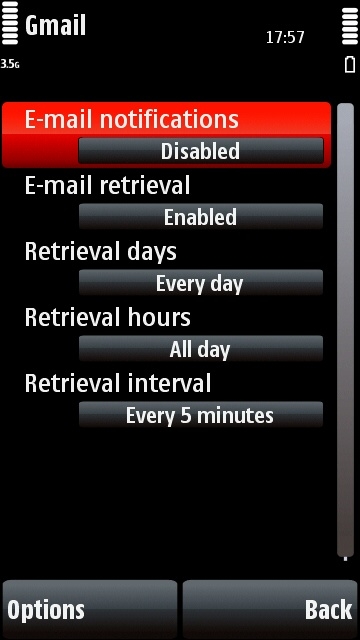
More things to try:
-Are you sure your mailbox is set to check itself often enough? You have to set the checking interval every time you add a new mailbox, it won't remember your interval setting from another mailbox.
-Have you enabled IMAP properly in your Gmail account? As you probably know you've got to enable IMAP in your gmail.com settings section before you can use it on IMAP clients.
-If you still can't get IMAP to work, try POP. You can get exactly the same push-esque functionality from POP, I've used it quite a lot while writing this tutorial, and never had any problems.
Haven't noticed anything like that on my 5800 (and I am running the v20 firmware).
Do you mean the desktop Ovi client?
so, i have set my phone to ork like this, and seems ok
i have an @btinternet.com mail address, which as far as i can make out only works for pop3,not imap. i am not a heavy user of email on my phone, so am wondering if these settings are a bit ott for me.
what i would like to know is if set for every 5 minutes checking, i have it set to headers only, access point as internet which will be as default my wlan at home for about 50% of the time and over 3g the rest of the time. is this going to drain the battery a lot, and will it use up lots of data, i get 500meg as part of my package and don't want this eaten away by checking for emails when i don'y use them that often, but like the conveniance of almost instant email delivery