Read-only archive of the All About Symbian forum (2001–2013) · About this archive

Its here!! V20.0.019

121 replies · 37,436 views · Started 27 October 2009

Wahoooo!!! I've upgraded....... to version 12. :frown:

Not sure how long this has been available because I found it in the software update app, it's never shown up on NSU at all for me.....

I don't get why this is? If an update was available, why wouldn't NSU tell me?

Does this mean I need to check the update app too from now on in case version 2 is released on this and not NSU?

I updated a couple of hours ago and guess what...... on the first call I received, when I finished, the phone got stuck with no option to hang up. I have never had problems like this with the phone before so am somewhat perplexed. GPS still does not work properly. Scrolling seems ok. Can't really see any more changes. Seems an awfull long time to wait for not very much to be honest. Still love the kit though.

Cheers,

Barrie

finally remembered my log in!! lol

just updated my product code and downloading as we speak......

hope its better than before!!!

Installing now. Changed code back to Euro. Its already warranty void because I wanted 12 early. If anything insurance covered.

Glad its out, I know its not going to be the bees knees, but I HOPE there is enough improvement to warrant me keeping it.

MrAaronVenn wrote:Oh dear.
The Idiots at Nokia have outdone themselves this time.
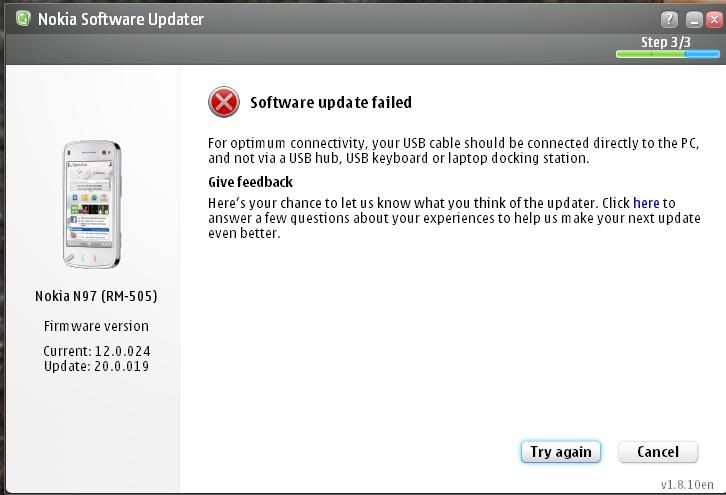
Now, after using NSU, it tells me:
"Software Update Failed. For optimum connection your cable should be connected directly to your PC"
Mmm, insightful words.
Because you see, it is plugged into my laptop. I have 4 USB ports, none of them work with NSU.
Do you know why?
Because i've been told that Nokia have blocked majority of Laptops because apparently "HUBS" lead to Bricked Phones.
Um, they're not Hubs. They're USB ports.
and the NSU has bricked this phone 3 times in a row.

So AGAIN, for a 3RD time, Nokia have inconvenienced me beyold reproach.
I can't even flash the C**t of a thing.

Does anyone know to brick a working phone?
Then i'll install it properly via JAF.

NSU is a f**king joke.
Nokia are c**ts and need to work out how to release products that work.
No wonder they lost so much profits last year, people have finally caught on that they're all useless.

This is EXACTLY what happened to me, BUT on the first attempt, I had got 138mb downloaded out of 140. It was a very slow connection speed and up til then had already taken me nearly two hours to download.

Since then, it just won't even start the download again, get the same message as above. And I have to agree, I do think NSU is a typical Windoze rickety piece of kit. Don't even got the option to downlaod it OTA on the phone.

it's awesome hey. I love how the NSU Identifys the phone then goes "oh, actually, no its not plugged in now, oh, I can't recognize it"

i hate nokia now
and all because of this phone
everything bad that could possibly happened has happened to this phone
and because they've told me to "update" it to make it better.

oh, and funny thing you'll all notice, if you uninstall Ovi & PC Suite,
then re-install it, it does not recognize your N97.

Brilliant Nokia.

So whatever the f**k they've done recently has f**ked up
NSU, PC SUITE, OVI, and even maps.

Good work Nokia. YOu guys are awesome.
Your phone is shit and needs constant updates that make it worse
I'm seriously going to stand in the middle of Sydney telling people to buy iPhones or indeed any other phone from any other company
because never have I been so disgusted with a company for wasting my time and money than I have with this f**king N97

I've had mixed experience with the N97 when it comes to connecting it to PCs. It used to be flakey on my home PC but it never missed a beat on my work PC, and they've both got the same OS (Vista Business). Now I've upgraded to v2 of Ovi Suite at home, it detects it every time.

bsimpson wrote:I updated a couple of hours ago and guess what...... on the first call I received, when I finished, the phone got stuck with no option to hang up. I have never had problems like this with the phone before so am somewhat perplexed. GPS still does not work properly. Scrolling seems ok. Can't really see any more changes. Seems an awfull long time to wait for not very much to be honest. Still love the kit though.

Cheers,

Barrie

I've been having this problem for the last couple of weeks, so am a bit dismayed to find v20 hasn't sorted it out. As I said at the time, what is the point of a 'phone', if it cannot handle phone calls properly. One day in particular, had to re-boot the phone about four times.

The reason? I got too many phone calls. The phone just couldn't handle it and went into a panic. Almost had to tell people to stop ringing me, as my mobile phone was utter rubbish at handling , errrm, mobile phone calls.

MrAaronVenn wrote:it's awesome hey. I love how the NSU Identifys the phone then goes "oh, actually, no its not plugged in now, oh, I can't recognize it"

i hate nokia now
and all because of this phone
everything bad that could possibly happened has happened to this phone
and because they've told me to "update" it to make it better.

oh, and funny thing you'll all notice, if you uninstall Ovi & PC Suite,
then re-install it, it does not recognize your N97.

Brilliant Nokia.

So whatever the f**k they've done recently has f**ked up
NSU, PC SUITE, OVI, and even maps.

Good work Nokia. YOu guys are awesome.
Your phone is shit and needs constant updates that make it worse
I'm seriously going to stand in the middle of Sydney telling people to buy iPhones or indeed any other phone from any other company
because never have I been so disgusted with a company for wasting my time and money than I have with this f**king N97

You know, if it wasn't for the saving grace of my old N95, I would not touch another Nokia again.

On NSU, I had downloaded 98.5% of v20 when it decided - like the phone used to do - it had enough and couldn't bothered working any more, and crashed spectacularly.

After that, I plugged in the phone, connected it to NSU, which promptly told me there were no new updates for the phone, and v12 was the most up to date. WTF? What are you on about NSU? You've just been d/loading v20, you idiot.

Then after trying for the umpteenth time, it just failed to even start the download. Doesn't even say why. Just treats you like an idiot, basically. Something like 'The software update has failed'.

Ooh, how terribly useful. What would I have done without that on screen description.

Ok, so it's failed - what can I do now? Hmmm, lets see the options....oh yes, there it is....and the option is Try Again or Cancel

Yes, I can see it has failed - but WHY has it failed, and HOW can I get it to work? Does it offer any information on that. No. Only option is to Exit. What is the use in that? Oh ok, lets play along....Let me Try Again at something that has just failed, without doing anything differently and without being any the wiser. Of course it's going to fail again, you total moron NSU.

I'm exactly the same. Used to be a great lover of Nokia and their phones, and always used to tell everyone to buy a Nokia. Not anymore. Hope their next quarter shows an even bigger loss. Wnakers, they deserve it.

The word frustration doesn't even begin to describe my experience with this phone and it updating. FOUR months I've had this things, and it's still sh!te. A third of a year. Four months later, and they still can't get it to work properly.

If I had a Nokia representative here in front of me right now, I know exactly where I'd put that phone.

Sideways.
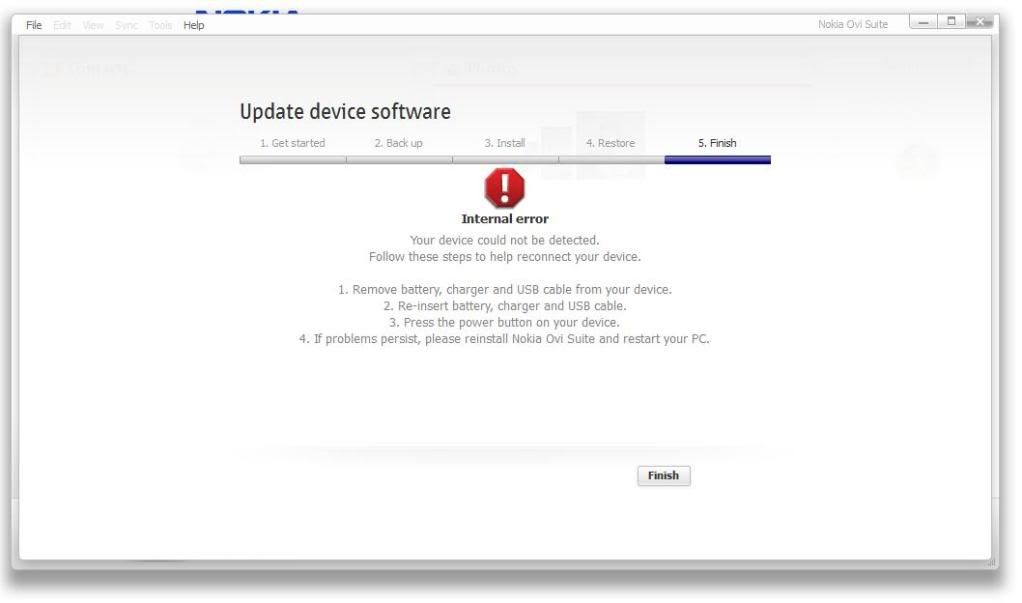
Here's a laugh...

Install Ovi Suite 2.0

Did that "Check For Updates" thing, it says Update Available for Nokia N97, cos yes, there is.

Does all that, identifies that phone is connected, as obviously it is.

Gets my hopes up. Quickly offends me yet again.

Oh,
Internal Error.
Device Could Not Be Detected.
If problem persists re-install Ovi Suite.

User posted image

Um, how about making a f**king program that works?
instead of TWO that don't. NSU AND Ovi Suite don't work.
I don't want to re-install or in face install anything if Nokia have anything to do with it.
Next major phone release from any other company, i'm supporting.
I've given up on Nokia.
Can they do anything right?
At all?
Really?

No, they cannot.
Nokia used to be cool.
But that was back in 1998.
Times have changed.
They can't make a phone that works, or indeed offer programs that work either.

As has already been stated elsewhere, this seems to be a problem with those of us who have changed product codes, sure someone will come up with a fix soon enough.

Zyyb wrote:As has already been stated elsewhere, this seems to be a problem with those of us who have changed product codes, sure someone will come up with a fix soon enough.

I take your challenge with glee.
I will change it back to its original HK product code right now and see what
happens.

Cos as you'd all know if you read my old posts, every firmware update via NSU would brick my phone.

I'd actually prefer my N97 was bricked right now, cos i could flash it with ease in JAF.

But as it stands, working, Jaf won't let me flash it.

I changed my HK product code to the Aus code to get the v12 firmware, now on the v20. All went smoothly however now I can't make phonecalls. I press the green call button and nothing, just sits there. Any ideas?

re changing product code back to its original HK

User posted image

Funny that, did nothing.

So no, has nothing to do with what product code I have.
My friend above did what I did, changed it to AUS, and his worked.

It's an OVI/NSU issue with either laptops or just cos they don't know
how to make working phones/programs cos they're idiots.

Clearly, it's the latter.

If anyone out there claims they "rebranded" "flashed" "updated" their firmware using JAF,
can they please private msg me step by step exactly how you did it to a working phone.
Because not that I don't believe you...but I don't believe you.

I've flashed phones without issue in the past, but trying to flash it while its working has never worked.
Ever. There's always some problem.

Zyyb wrote:As has already been stated elsewhere, this seems to be a problem with those of us who have changed product codes, sure someone will come up with a fix soon enough.

Ah, that's the thing. I haven't changed product codes, I bought phone sim free handset only, and bought it out here in Saudi, so it has the right product code. The first two updates worked fine to v11 then to v12, but when I really wanted and needed the newest, it fails to deliver.

Had reverted back to using my N95 a few days ago, and sorely tempted just to stick with it and flog the N97. Or throw it at a Nokia rep. Very hard.

MrAaronVenn wrote:re changing product code back to its original HK

User posted image

Funny that, did nothing.

So no, has nothing to do with what product code I have.
My friend above did what I did, changed it to AUS, and his worked.

It's an OVI/NSU issue with either laptops or just cos they don't know
how to make working phones/programs cos they're idiots.

Clearly, it's the latter.

If anyone out there claims they "rebranded" "flashed" "updated" their firmware using JAF,
can they please private msg me step by step exactly how you did it to a working phone.
Because not that I don't believe you...but I don't believe you.

I've flashed phones without issue in the past, but trying to flash it while its working has never worked.
Ever. There's always some problem.

I have had to do this, I was having the smae problem as you people. You just have to flash it with JAF as if it's a dead phone. Took me all last night and half this morning to do it.

For those of you who are struggling to get your firmware upgraded...

Let me give you an inkling of what you have waiting for you ahead.

My C: drive now has 4.2 MB free (after cache purge!).

It seems that all the "bloatware" is loaded on C: after v20 upgrade.

Worse yet, it looks like they put Quickoffice and MfE there which are real memory hogs.

Looks like I'm going to have to do a lot of uninstalls/reinstalls to get things on E: instead.

Also wondering...

-why the Java Runtime upgrade wasn't included in the firmware update?

-why QuickOffice/AdobeReaderLE licenses seemed to have carried over, but give errors on running about "Previous Installation Failed"?

-why Facebook and Accuweather no longer appear in the list of running applications even though they are online on the homepage?

Lasikie wrote:I have had to do this, I was having the smae problem as you people. You just have to flash it with JAF as if it's a dead phone. Took me all last night and half this morning to do it.

Yeah, as I said, it doesn't work.
I keep getting
"Error reading init data"

or

"Searching for phone...Found
Reading SW version...Error reading rap ver!"

I know how to flash dead phones.
They always work and reflash.

Working phones do nothing in Jaf , no matter what.
They come up with pointless errors that work without issue when the phone is dead.

@rdcinhou

did you restore your data?

Do a hard reset after the upgrade. I had almost 60MB free, now, after some installations still have more than 50MB available.

MrAaronVenn wrote:Yeah, as I said, it doesn't work.
I keep getting
"Error reading init data"

or

"Searching for phone...Found
Reading SW version...Error reading rap ver!"

I know how to flash dead phones.
They always work and reflash.

Working phones do nothing in Jaf , no matter what.
They come up with pointless errors that work without issue when the phone is dead.

I have done two working phones with this method now, using pkey v3 and jaf .62 with .64 ini files

For those who asked or are interested...

I sent my RM-507 N97 off for GPS/lens scratch repair.

When I got it back, the NokiaCare center has wiped the E: drive and reinstalled the latest factory distro of v12 firmware (including Spore, Guitar Hero, etc.).

I then did a restore from backup saved on my F: (excluding messages).

Then I did the v20 firmware install last night.

I'm now down to 3.7 MB on C:, most things are running fast and fine, except...Adobe Reader has bombed on me trying to open a recently downloaded .pdf file giving an error message about Incompatible Security Manager.

My licenses for Adobe Reader LE and QuickOffice seem to have persisted (from the RESTORE to v12 process?) through the v20 upgrade, but act a little funny on opening files compared to the previous installation. I'm keeping notes and will comment on those programs on separate threads.

Right now my biggest concern is the major loss of C: drive space.

Do a hard reset and restore ONLY contacts, calendar, bookmarks and messages. Do NOT restore settings, user files etc. If you do this you'll restore all the crap that wastes your precious C: drive space.
Reinstall the applications and you should be fine.

Wildsau,

After the v12 distro reinstall by the service center and after my restore from backup I had 20 MB on C:

It was the v20 firmware install that knocked me down to less than 4 MB!!

I went to the voda store at lunch time and they updated the phone for me. Now I'm waiting for my 4000 songs to be found again. I may have to reformat tonight when I get home.
50 MB free on C: and everything seems to be running faster, even with the music scan going on in the background. Watch this space...

Lasikie wrote:I have done two working phones with this method now, using pkey v3 and jaf .62 with .64 ini files

Sorry, but I don't believe you.

I'd like Step By Step Instructions on how it is done to a working phone.

I have to exact same keys, programs, ini's, everything.
Sure, they work fine when the phones bricked or if I needed to change a product code, but other than that, No.

The 5800 or N97 have never been able to be flashed without error while working.

If it was so simple, everyone would have reflashed working v20's right now.

MrAaronVenn wrote:Yeah, as I said, it doesn't work.
I keep getting
"Error reading init data"

or

"Searching for phone...Found
Reading SW version...Error reading rap ver!"

I know how to flash dead phones.
They always work and reflash.

Working phones do nothing in Jaf , no matter what.
They come up with pointless errors that work without issue when the phone is dead.

Yep, that's exactly what i was getting from JAF "Error reading rap ver"

Also

Can't detect flashing server.

So gave up!

mraaronvenn wrote:sorry, but i don't believe you.

I'd like step by step instructions on how it is done to a working phone.

I have to exact same keys, programs, ini's, everything.
Sure, they work fine when the phones bricked or if i needed to change a product code, but other than that, no.

The 5800 or n97 have never been able to be flashed without error while working.

If it was so simple, everyone would have reflashed working v20's right now.

dont treat it as a live phone , turn the phone off then switch it on when you start flash , like you do with a dead/bricked phone , many users have flashed live phones with jaff , it wont work if the handset is on you have to switch it off and boot it at the right time

sorry for caps lock not intended

buxz777 wrote:dont treat it as a live phone , turn the phone off then switch it on when you start flash , like you do with a dead/bricked phone , many users have flashed live phones with jaff , it wont work if the handset is on you have to switch it off and boot it at the right time

sorry for caps lock not intended

:icon14: As it states in the guide which I followed.

I don't care if you believe me or not, there are now two n97's in our house running V20, both updated using this method.

Here is my JAF log file.

28:10:2009  11:54 -> JAF version 1.98.62
Detected PKEY: 90009699
28:10:2009 11:54 -> Card life counter: 99.99%
28:10:2009 11:54 -> P-key nokia module version 01.02
28:10:2009 11:54 -> FBUS INTERFACE NOT CONNECTED!!!
28:10:2009 11:54 -> USB Cable Driver version: 7.1.17.0
28:10:2009 11:54 -> Changing mode...28:10:2009 11:54 -> Done!
28:10:2009 11:54 -> FILES SET FOR FLASHING:
28:10:2009 11:54 -> MCU Flash file: NONE
28:10:2009 11:54 -> PPM Flash file: NONE
28:10:2009 11:54 -> CNT Flash file: NONE
28:10:2009 11:54 -> APE Variant file: NONE
28:10:2009 11:55 -> Searching for JAF saved location of ini...
28:10:2009 11:55 -> Checking path: C:\Program Files\Nokia\Phoenix\Products\\
28:10:2009 11:55 ->
28:10:2009 11:55 -> Searching for default location of ini...
28:10:2009 11:55 -> Checking path: \Products\\
28:10:2009 11:55 -> Searching for JAF saved location of ini...
28:10:2009 11:55 -> Checking path: C:\Program Files\Nokia\Phoenix\Products\\
28:10:2009 11:55 -> No ini files found...
28:10:2009 11:55 -> FILES SET FOR FLASHING:
28:10:2009 11:55 -> MCU Flash file: NONE
28:10:2009 11:55 -> PPM Flash file: NONE
28:10:2009 11:55 -> CNT Flash file: NONE
28:10:2009 11:55 -> APE Variant file: NONE
28:10:2009 11:56 -> Searching for JAF saved location of ini...
28:10:2009 11:56 -> Checking path: C:\Program Files\Nokia\Phoenix\Products\RM-505\
28:10:2009 11:56 ->
28:10:2009 11:56 -> Searching for default location of ini...
28:10:2009 11:56 -> Checking path: \Products\RM-505\
28:10:2009 11:56 -> Searching for JAF saved location of ini...
28:10:2009 11:56 -> Checking path: C:\Program Files\Nokia\Phoenix\Products\RM-505\
28:10:2009 11:56 -> Scanning ini files...
28:10:2009 11:56 -> Searching for default location of ini...
28:10:2009 11:56 -> Checking path: \Products\RM-505\
28:10:2009 11:56 -> Checking path: C:\Program Files\Nokia\Phoenix\Products\RM-505\
28:10:2009 11:56 -> FILES SET FOR FLASHING:
28:10:2009 11:56 -> MCU Flash file: C:\Program Files\Nokia\Phoenix\Products\RM-505\RM-505_20.0.019_prd.core.C00
28:10:2009 11:56 -> PPM Flash file: C:\Program Files\Nokia\Phoenix\Products\RM-505\RM-505_20.0.019_prd.rofs2.V01
28:10:2009 11:56 -> CNT Flash file: C:\Program Files\Nokia\Phoenix\Products\RM-505\RM-505_20.0.019_C01_prd.rofs3.fpsx
28:10:2009 11:56 -> APE Variant file: C:\Program Files\Nokia\Phoenix\Products\RM-505\RM505_507_20.0.019_uda_1_001.uda.fpsx
28:10:2009 11:56 -> Languages in ppm: English,German,Russian,Bulgarian,Romanian,Ukrainian
28:10:2009 11:57 -> Detected P-KEY: 90009699
28:10:2009 11:57 -> P-key nokia module version 01.02
28:10:2009 11:57 -> Init usb communication...
28:10:2009 11:57 -> Searching for phone...28:10:2009 11:57 -> Found
28:10:2009 11:57 -> Reading SW version...28:10:2009 11:57 -> ICPR72_09w17.6 12.0.024
28:10:2009 11:57 -> Reading battery value...28:10:2009 11:57 -> 4049 mV
28:10:2009 11:57 -> Init usb flashing...
28:10:2009 11:57 -> Reading flashid... 28:10:2009 11:57 ->
CMT: 004000EC <=> SAMSUNG (SEC) -> KAT00F00RA
APE: 00000000 <=> Flash -> not detected
28:10:2009 11:57 -> Verifing ADL communication... 28:10:2009 11:57 -> Status byte 7
28:10:2009 11:57 -> Rebooting to flash mode...
28:10:2009 11:57 -> Waiting for the phone to reboot...
28:10:2009 11:57 -> Searching for phone...
28:10:2009 11:57 -> Phone rebooted but not in flash mode...
28:10:2009 11:58 -> Detected P-KEY: 90009699
28:10:2009 11:58 -> P-key nokia module version 01.02
28:10:2009 11:58 -> Init usb communication...
28:10:2009 11:58 -> PRESS POWER ON NOW!
Searching for phone...28:10:2009 11:58 -> Found
28:10:2009 11:58 -> Sending RAW loader...
28:10:2009 11:58 -> Using 009.008.003
Elf2flash 09.24.000
CMT RAW loader...
28:10:2009 11:58 -> Patching RAW boot step1...
28:10:2009 11:58 -> Patching RAW boot step2...
28:10:2009 11:58 -> Patching RAW boot step3...
28:10:2009 11:58 -> Sending RAW Loader...
28:10:2009 11:58 -> .28:10:2009 11:58 -> .28:10:2009 11:58 -> .28:10:2009 11:58 -> .28:10:2009 11:58 -> .28:10:2009 11:58 -> .28:10:2009 11:58 -> .28:10:2009 11:58 -> .28:10:2009 11:58 -> .28:10:2009 11:58 -> .28:10:2009 11:58 -> .28:10:2009 11:58 -> .28:10:2009 11:58 -> .28:10:2009 11:58 -> .28:10:2009 11:58 -> .28:10:2009 11:58 -> .28:10:2009 11:58 -> .28:10:2009 11:58 -> .28:10:2009 11:58 -> .28:10:2009 11:58 -> .28:10:2009 11:58 -> Loader Sent!
Stage 2 starting...28:10:2009 11:58 -> .28:10:2009 11:58 -> .28:10:2009 11:58 -> .28:10:2009 11:58 -> .28:10:2009 11:58 -> .28:10:2009 11:58 -> .28:10:2009 11:58 -> .28:10:2009 11:58 -> .28:10:2009 11:58 -> .28:10:2009 11:58 -> .28:10:2009 11:58 -> .28:10:2009 11:58 -> .28:10:2009 11:58 -> .28:10:2009 11:58 -> PUBKEYS already sent...
28:10:2009 11:58 -> PUBKEYS already sent...
28:10:2009 11:58 -> .28:10:2009 11:58 -> .28:10:2009 11:58 -> .28:10:2009 11:58 -> .28:10:2009 11:58 -> .28:10:2009 11:58 -> .28:10:2009 11:58 -> .28:10:2009 11:58 -> .28:10:2009 11:58 -> .28:10:2009 11:58 -> .28:10:2009 11:58 -> Phone prepared OK!
28:10:2009 11:58 -> Waiting for the phone to boot...
28:10:2009 11:58 -> Searching for phone...
28:10:2009 11:58 -> Status byte: 8000
28:10:2009 11:58 -> Selecting CMT flash...
28:10:2009 11:58 -> Result: 0000
28:10:2009 11:58 -> Phone is in flash mode...
28:10:2009 11:58 -> CMT blocks: 599, APE blocks: 0
28:10:2009 11:58 -> Erasing cmt...
28:10:2009 11:58 -> Processing C:\Program Files\Nokia\Phoenix\Products\RM-505\RM-505_20.0.019_prd.core.C00...
28:10:2009 11:58 -> Erasing cmt zone 00040000 - 00082FFF ... 28:10:2009 11:58 -> Erase result: 0000
28:10:2009 11:58 -> Erasing cmt zone 00083400 - 003FFFFF ... 28:10:2009 11:58 -> Erase result: 0000
28:10:2009 11:58 -> Erasing cmt zone 00800000 - 00D5FFFF ... 28:10:2009 11:58 -> Erase result: 0000
28:10:2009 11:58 -> Erasing cmt zone 00D60000 - 0AB9FFFF ... 28:10:2009 11:58 -> Erase result: 0000
28:10:2009 11:58 -> Partition result: 0014
28:10:2009 11:58 -> Processing C:\Program Files\Nokia\Phoenix\Products\RM-505\RM-505_20.0.019_prd.rofs2.V01...
28:10:2009 11:58 -> Erasing cmt zone 070A0000 - 09C9FFFF ... 28:10:2009 11:58 -> Erase result: 0000
28:10:2009 11:58 -> Processing C:\Program Files\Nokia\Phoenix\Products\RM-505\RM-505_20.0.019_C01_prd.rofs3.fpsx...
28:10:2009 11:58 -> Erasing cmt zone 09CA0000 - 0AB9FFFF ... 28:10:2009 11:58 -> Erase result: 0000
28:10:2009 11:58 -> Processing C:\Program Files\Nokia\Phoenix\Products\RM-505\RM505_507_20.0.019_uda_1_001.uda.fpsx...
28:10:2009 11:58 -> Erasing cmt zone 0ABA0000 - 0F71FFFF ... 28:10:2009 11:58 -> Erase result: 0000
28:10:2009 11:58 -> Send CMT CFG...
28:10:2009 11:58 ->
28:10:2009 11:58 -> Writing cmt...
28:10:2009 11:58 -> Processing C:\Program Files\Nokia\Phoenix\Products\RM-505\RM-505_20.0.019_prd.core.C00...
28:10:2009 11:58 -> Sending CMT HASH for ADA
28:10:2009 11:58 -> Sending CMT HASH for KEYS
28:10:2009 11:58 -> Sending CMT HASH for PRIMAPP
28:10:2009 11:58 -> Sending CMT HASH for RAP3NAND
28:10:2009 11:58 -> Sending CMT HASH for PASUBTOC
28:10:2009 11:58 -> cmt->PAPUB_CERTIFICATE_DATA_BB5 block detected
28:10:2009 11:58 -> cmt->PAPUB_CERTIFICATE_DATA_BB5 block detected, sending...
28:10:2009 11:58 -> cmt->PAPUB keys already sent...
28:10:2009 11:58 -> Sending CMT HASH for SOS*UPDAPP
28:10:2009 11:58 -> Sending CMT HASH for SOS*DSP0
28:10:2009 11:58 -> Sending CMT HASH for SOS*ISASW
28:10:2009 11:58 -> Sending CMT HASH for SOS+CORE
28:10:2009 11:58 -> Sending CMT HASH for SOS+ROFS1
28:10:2009 11:59 -> Processing C:\Program Files\Nokia\Phoenix\Products\RM-505\RM-505_20.0.019_prd.rofs2.V01...
28:10:2009 11:59 -> Sending CMT HASH for SOS+ROFS2
28:10:2009 11:59 -> Write result 27: 1701
28:10:2009 11:59 -> Processing C:\Program Files\Nokia\Phoenix\Products\RM-505\RM-505_20.0.019_C01_prd.rofs3.fpsx...
28:10:2009 11:59 -> Sending CMT HASH for SOS+ROFS3
28:10:2009 11:59 -> Write result 27: 1701
28:10:2009 11:59 -> Processing C:\Program Files\Nokia\Phoenix\Products\RM-505\RM505_507_20.0.019_uda_1_001.uda.fpsx...
28:10:2009 11:59 -> Rebooting...
28:10:2009 11:59 -> Finishing CMT session...
28:10:2009 11:59 -> Restarting CMT...
28:10:2009 11:59 -> Pooling phone...
28:10:2009 12:00 -> MCUSW: V ICPR72_09w28.6
09-09-09
RM-505
(c) Nokia
28:10:2009 12:00 -> APESW: v 20.0.019
28:10:2009 12:00 -> VariantSW: v 20.0.019
28:10:2009 12:00 -> Prodcode: 0570817
28:10:2009 12:00 -> Setting test mode...
28:10:2009 12:00 -> Setting FULL FACTORY...
28:10:2009 12:00 -> Operation took 0 minutes 7 seconds...
28:10:2009 12:00 -> Done!