
Towards a new N-Gage app
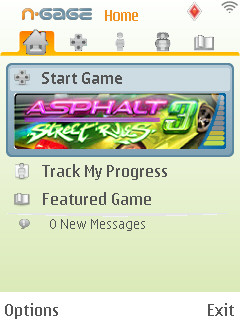 As we noted earlier in the year, the N-Gage application is well-designed and intuitive, but it still needs a LOT of tweaking to make it work properly.
In general Nokia tends to release software in a rather raw first version, then improves it based on the feedback from that first version. That's exactly what they've done recently with the new Nokia Maps 2.0 app, a radically overhauled version of the original Nokia Maps. The new version of Maps has received a much more positive reception than the original, with features such as satellite photos, lock-on times of just a few seconds, pedestrian navigation, a clearer interface and various other improvements. It's a much better and more polished product than its predecessor, and makes people more likely to use the Nokia Maps service.
How could Nokia do this with N-Gage? How can the N-Gage app be made better and more polished?
1) A Horizontal Mode
Almost all N-Gage games support horizontal/landscape mode, yet the N-Gage application only displays itself in vertical/portrait mode. This means if you have the phone in horizontal mode you have to turn it to use the N-Gage app, then turn it back again if you want to play the game in horizontal mode. If you connect to the Arena while using a game, the connection dialogue box appears in vertical mode even if the game is in horizontal, which looks cheap and silly. It's annoying and could be easily fixed.
The N-Gage app should automatically work in whichever screen orientation mode the phone is currently in, just like other Nokia apps such as the music player or message writer. It should also be possible to switch between orientations while using the N-Gage app.
2) A Clearer Login Page
At the moment there's no proper login page if you want to sign in with your N-Gage account. The only way to log in with an existing account is to try and create a new account, then tell the phone you've already got one, which isn't exactly obvious or intuitive.
If you're not logged in, there ought to be familiar-looking username and password text boxes on the "My Profile" section of the app, with a "create new account" link below the boxes. This would look and work just like the sign-in pages used by webmail and other online services, which almost all internet users are extremely familiar with.
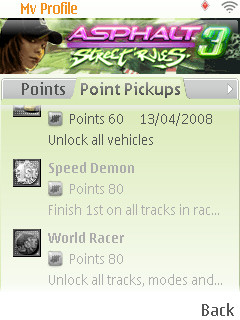 3) Point Pickup Descriptions You Can Actually Read
One very frustrating design flaw still in the current application is that you can't read the entire description of a game's point pickups. This means that for some games no one knows how you earn a particular bonus, because they're not even explained in the game itself.
Surely scrolling text in the point pickups section wouldn't be too difficult to implement?
4) A Reformed And More Intelligent Showroom
There are only 12 N-Gage games released at the moment, but there are over 30 announced and it may even increase to 50 - 100 titles by the end of the year. That means the N-Gage showroom section on the application could get extremely crowded and difficult to navigate, and that's why it needs to be reformed now before the overcrowding happens.
For a start the showroom shouldn't display games the user has already bought, it's pointless and takes up valuable screen space. If the user is logged in the showroom app should check that user's list of purchases and remove them from the showroom list automatically.
To make it easier to navigate through dozens or hundreds of games, titles ought to be organised into a hierarchical directory organised by genre (and perhaps with optional alternatives such as by rating or in alphabetical order). People are used to such hierarchies in online shops, so they'd expect to see it on the N-Gage app's shop too. There could also be a search box if people are looking for a particular title.
5) Smoother Transitions
While it doesn't cause any practical difficulties, the rather rickety transitions between the application and its games need fixing. At the moment if you start a game from the N-Gage app you get presented with a rapidly flickering screen that briefly appears to be in the wrong orientation and makes it seem as though the phone is about to crash.
A smoother transition, especially some sort of "loading" animation, would make the whole platform seem much more reliable and professional. Even just a black screen would be better than the current mess.
 6) Saved Game Backup And Restore
At the moment there's no reliable way of backing up your saved games, and many people lose them when updating the phone's firmware.
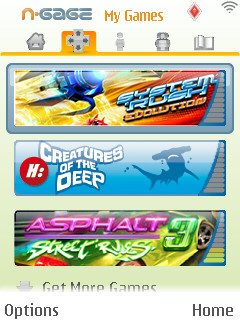
There ought to be manual "back up my saved games" and "restore my saved games" options in the "My Games" section. Saved game files take up hardly any room at all, and there wouldn't be any DRM issues because the save files alone wouldn't contain any copyright material.
There might be an increased risk of cheating in online league tables, but the pain of losing your saved games is far greater, and affects people who don't even play online.
7) Game Transfers To New Phones
As some of you may have noticed, All About N-Gage's article on game transfers from one phone to another got quite a bit of attention. Nokia's eventual response was to allow game transfers by people contacting their local customer service line, with a "longer term solution" in the works.
We don't know exactly what this long term solution will be, but it ought to involve logging in to your N-Gage account so that Nokia's server can verify which games you've purchased and authorise your phone to unlock the full versions.
In practical terms it ought to be as simple as an "update games" option in the My Games section, which would unlock the relevant games if the demos are installed, or offer to download them if they're not. If you have many games it would take a while to complete this process of course, but you wouldn't need to do it very often, only when you're changing to a new phone.
If Nokia wants to lock the account to one phone at a time, and allow you to move the account when you upgrade to a new phone, the "update games" option could be made to only appear when you're using your account on your currently authorised phone.
8) Easier To Restore Removed Games
At the moment you can delete games from the phone without deleting their saved games by selecting them from My Games and then selecting the "Remove" option. This leaves a ghostly version of the game's icon to remind you that you still own it but that it's no longer installed on the phone. To restore the game, you bizarrely have to go to the Showroom and re-download its demo version, which automatically turns into the full version when you install it.
Instead of messing around with the Showroom, there ought to be a "restore" option in My Games which automatically downloads the demo of the currently selected uninstalled game, and then automatically unlocks it into the full version (which is what it does anyway if you manually download the demo).
9) Game Orientation Should Match App Orientation
The default screen orientation of games should be the same as whatever the N-Gage app is using when the game is launched.
For example, if you start the N-Gage app in horizontal mode and launch a game, the game would also be in horizontal mode (with the exception of titles like Mile High Pinball which can only work in one mode). If you launch a game while in vertical mode, the game itself should be in vertical mode. You could still change screen orientation while in the game, this feature would only affect the game's default orientation.
10) General Increase In Speed
Though the N-Gage application is well-designed, its response time is quite slow when trying to select a new section. Moving the cursor from one side of the app to the other feels like walking through mud. The games themselves have much faster menus, so it's difficult to know why the main app is so slow.