
N-Gage: is it REALLY out of beta?
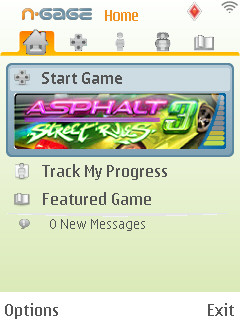 The
N-Gage application finally came out of beta testing recently and has
officially launched for the N81, N95 and N82. The application is free
to download from the official N-Gage site, which also has instructions
on how to install it, and in the near future it will be
built into the firmware of compatible phones.
The
N-Gage application finally came out of beta testing recently and has
officially launched for the N81, N95 and N82. The application is free
to download from the official N-Gage site, which also has instructions
on how to install it, and in the near future it will be
built into the firmware of compatible phones.
The
public beta testing of the N-Gage app took place earlier this year
under the name of "First Access", and it worked surprisingly well for a
beta version. There were problems, bugs and various odd design
decisions but those were understandable in what was an unfinished
product. However, the N-Gage app which is now available is being touted
as a finished product, so we are entitled be a little more harsh about
any shortcomings it may have.
Hopefully this
article will provide some constructive criticism on how to improve what
is the gateway to the new N-Gage platform. The software is generally
very well designed and has a lot of potential, but it needs some fixing
and polishing to convince people that the N-Gage brand stands for
quality. The original gen N-Gage did serious damage to the N-Gage
name's reputation, so the new generation N-Gage platform has to try
extra-hard to make up for that.
Some of the
following problems are more serious than others, but they all
contribute to the feeling that the N-Gage app isn't working 100%
properly. In no particular order:
1) Where are my games, exactly?
One of the big challenges to any online service which sells downloads
is how to convince people that their purchase is safe and easily
accessible. Purchasers of downloads are often very uneasy about paying
for something that doesn't physically exist, so it's very important
that they can easily see where their purchases are and how to access
them.
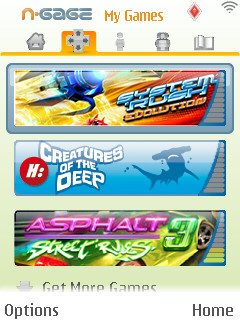
The "My Games" section shows which games you have purchased. If you select a game's "Remove" option, for example if you
need space on the phone's memory card, the game leaves behind a ghostly version of its icon.
When you click on this ghostly version you'd expect it to offer to
reinstall the game, but it actually offers to delete all your scores in
that game, and there's no option for restoring the game at all. The only way
to get the game back is to go to the showroom section and click on the
"Download Demo" option, which isn't exactly the most intuitive way of doing things.
 Once you've bought a game, it ought to appear on a list of your
purchased titles which you'd see every time you log in with your N-Gage
username. Clicking on a game's icon in the "My Games" section should automatically
launch it if it's installed on the device, or install it if it isn't.
It shouldn't be any more complicated than this.
Once you've bought a game, it ought to appear on a list of your
purchased titles which you'd see every time you log in with your N-Gage
username. Clicking on a game's icon in the "My Games" section should automatically
launch it if it's installed on the device, or install it if it isn't.
It shouldn't be any more complicated than this.
2) Error messages and other bugs
Almost
inevitably when you launch a new application or online service you're
going to see error messages pop up now and then, but they seem
particularly common on the N-Gage application compared to other phone
software. This reviewer has had three separate error messages since
installing the release version of the N-Gage app a few days ago.
While
reviewing Asphalt 3, the rankings board doesn't seem to exist at all,
yet the game and the N-Gage app give you the option of viewing the
rankings. Not an awful problem, but yet another feature that doesn't
work properly.
Incidentally, if you run into
a technical problem on N-Gage, the best thing to do is write down
exactly what it says and post about it on the official N-Gage support
forums. The people who run N-Gage do read those forums, so
that's the most direct way of letting them know about problems.
3) The "Oh no is it about to crash?!" transition screens
One
of the most messy-looking things about the new N-Gage app is the way it
transitions from the app itself into the game. It rapidly flickers
between the phone's wallpaper and the app itself in various screen
orientations, then finally manages to calm down and bring up the actual
game. It looks very cheap and makes the software feel like it's
unfinished and unstable.
This happens every
single time we've tried to load a game or visit the app from the game,
and the problem was present on the beta version of the N-Gage app many
months ago. Quite why this hasn't been fixed yet is unclear. S60 games
launch without this problem, and N-Gage games are technically just S60
games, so this shouldn't be difficult to fix.
4) Has it started yet? Launching
the N-Gage app is a slow process, it takes several seconds to actually
launch which is taken up by the phone's blank wallpaper. It might be
nicer to have it display the N-Gage logo during the start-up, as the
blank wallpaper hints at some kind of instability or crash.
Launching
the N-Gage app is a slow process, it takes several seconds to actually
launch which is taken up by the phone's blank wallpaper. It might be
nicer to have it display the N-Gage logo during the start-up, as the
blank wallpaper hints at some kind of instability or crash.
This
isn't a big problem at all in itself, but together with all the other
glitches it adds to the feeling of "is this really going to work?"
5) Where do I log in?
When this writer installed the N-Gage application and tried to log in with an existing username and password... it just wasn't possible. There's no obvious login screen or login
option anywhere in the app. N-Gage is an online service now, so there
needs to be some clear way for users to access their account on the
device. Gmail has a login screen, Skype has a login screen, why not N-Gage?
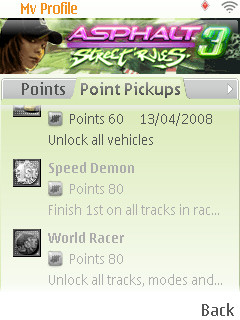
6) The Point Pickup explanatory texts are cut off
One
of the features of N-Gage which is meant to enhance the games and tie
them together is the "point pickup" system, where certain in-game
actions add to your account's total N-Gage points score. Each pickup
for a game you own is listed in the application, but unfortunately the
text which explains what you have to do to earn it is too long to fit
on the screen, and there's no obvious way to scroll the text.
7) The games showroom includes games you've already bought
There's not that much room on a phone screen, so anything which uses the space more efficiently is a good idea. The N-Gage app's
showroom where you buy games has large icons for all titles currently
available, but rather annoyingly this includes games you've already
bought. It would be nice if these were automatically filtered out when
you view the showroom.
8) The screen orientation of the app doesn't match the screen orientation of the game
You
always have to use the N-Gage app before and after playing a game (you
can even consult the app during a game if you want to). This ought to
be seamless, with N-Gage acting as a sort of all-in-one game management
system, but it's made needlessly annoying because the N-Gage app's
screen orientation bears no relation to the orientation of the game
itself. If you consult the app while playing a game in horizontal mode,
you have to turn the phone because the app only works in vertical mode.
The more often you have to do this, the more annoying it becomes.
Even
if you don't consult the app, when you submit a score in some games
(for example Asphalt 3) the app appears anyway telling you it's
connecting to theinternet, but it does so in the wrong orientation, adding to the cheap and unfinished feel.

It's not all bad! :-)
Just
in case anyone thinks this is some kind of nitpicking hatchet job, we
ought to emphasise that most of the N-Gage application is really good.
Most of the time it does work properly, it's been laid out in a very
intuitive way where you can navigate by just pressing left or right,
and the general look of the interface is wonderfully bright and clear.
There are also lots of lovely individual touches such as putting a
direct link to the last played game on the front page so you can get
back to it with a single click, and the bar charts next to each game
that indicate how much of it you've played.
On top of that, the whole concept of selling games directly to a
portable device is a very good one, and it's perfect for mobile phones
as they always have access to an internet connection.
We think Nokia is definitely on the right track with the new N-Gage, it
genuinely has the potential to revolutionise gaming because of the sheer number of devices that may carry it. However, Nokia do need to maintain very high quality control
so that they can wipe out the bad repuation of the first generation
N-Gage. Nowhere is this quality control more important than in the N-Gage application, because it's the one thing that all N-Gagers use, and it's
where new users get their first impressions of the platform.