Nice!! Really good!! Just one point - (like Vicky said)-
It cant display the pound sign!!
It took some time for me to notice the font remover app.... I thot u just had to restart after installing it!! it doenst really matter anyway tho...
I was first scared phone wont start properly, but its working really well with the modern font!! It gives a nice change!!
Rohit
EDIT : by the way Vicky, I now know why u dont really see a diff. in the fonts! The modern font reminds me of a normal 6600's font [small and neat sort of way]!
Change Fonts for S60
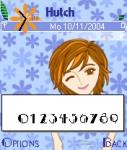
And one more difficulty is there abt the Number.
Just look at the number its 0123456789
it is with Modern Font
Attachments:
.jpg)
i dont get this.. could any1 please post on exactly what to do and how to change the font? isnt there any application that can do that simply by selecting which font u want? so many different files uploaded! i downloaded all of them and successfully changed the font but when i remove it the whole folder of fonts gets removed! some are in .sis format and others .gdr! :s! help!
Just Download the Zip file attach by Kamalayan and unzip it and install only one file .ie modern or other font files and then restart it and your font will change
Install it in Phone Memory.
i want the comic sans .sis file.. any1? any way to make any of the ms word font into a font that can run on 7610? 😃
No u can't use MS Word font in 7610.
wow nvr come in check for a few days and u guys got such cool fonts already.
gonna go home and try it tonight 😊
can some1 help me?
i installed the .sis file in c: and restarted phone but the font does not change...
where am i doing wrong?
What Happen Can u Please Explain Clearly wht did u do?
lastdance wrote:can some1 help me?i installed the .sis file in c: and restarted phone but the font does not change...
where am i doing wrong?
i installed each .sis file but nothing happens even after resetting my phone.
i tried putting the .gdr files inside c:\system\fonts it also don't work after resetting phone
me using 7610 v 4.0421.4ch
any idea where i went wrong?
Well i am using the same version but working fine.
Jus do one thing Just delete that folder which u have created and uninstall the the .sis file related to font in app manger.
no just unzip the file attach by Kamal and install only Modern or any other font file only.
and install it in Phone memory and then re start
it will surely change the fonts.
Vicky wrote:Well i am using the same version but working fine.
Jus do one thing Just delete that folder which u have created and uninstall the the .sis file related to font in app manger.
no just unzip the file attach by Kamal and install only Modern or any other font file only.
and install it in Phone memory and then re start
it will surely change the fonts.
i've removed all installed files and deleted the c:\system\fonts folder
now i make new folder c:\system\fonts and pasted comic.gdr unzipped from attachment by Kamal and restarted phone and it's still the same...
god help me... :con? :frown:
lastdance wrote:i've removed all installed files and deleted the c:\system\fonts foldernow i make new folder c:\system\fonts and pasted comic.gdr unzipped from attachment by Kamal and restarted phone and it's still the same...
god help me... :con? :frown:
The Comic sans font doesnt work. Try using a different font.
There are only 3 working files which r in .sis format try them
Rest are of 80 Series and r not fully compitable with 60 Series
ok let me start from scratch
i create c:\system\fonts folder
install modern.sis to phone mem? that's all? nothing to do with the *.gdr files?
lastdance wrote:ok let me start from scratchi create c:\system\fonts folder
install modern.sis to phone mem? that's all? nothing to do with the *.gdr files?
No need to create folders just install the modern.sis file and it will do the rest just remember to install it in phone memory.
Kamalayan wrote:No need to create folders just install the modern.sis file and it will do the rest just remember to install it in phone memory.
i installed modern.sis to phone memory and restarted phone but it's still the same...


Just forget abt the .gdr and creating folder as Kamal said just install the modern .sis and reboot and use font remover to remove it.
U just delete all the files u have created regardng fonts like u said that u created a folder delete it and simple install .sis nothing else and then just reboot the phone.
Vicky wrote:Just forget abt the .gdr and creating folder as Kamal said just install the modern .sis and reboot and use font remover to remove it.
yeah that's wat i did i only installed the modern.sis and the folder was created after the installation of the .sis file...
[QUOTE=lastdance]i installed modern.sis to phone memory and restarted phone but it's still the same...
QUOTE]
This might be the first issue of modern font not working on 7610. Well, i cant do anything else that may help with that.
Try this as last resort:
install the font remover
remove the font using the font remover
restart
then install modern.sis
then restart
if that fails, then consider yourself number one on the list of users who cant get the modern font to work. 😃
Sorry.
Kamalayan wrote:[QUOTE=lastdance]i installed modern.sis to phone memory and restarted phone but it's still the same...
QUOTE]
This might be the first issue of modern font not working on 7610. Well, i cant do anything else that may help with that.Try this as last resort:
install the font remover
remove the font using the font remover
restart
then install modern.sis
then restartif that fails, then consider yourself number one on the list of users who cant get the modern font to work. 😃
Sorry.
wow wat good luck for me
well i'll try the other fonts now... god bless me
Did U able to do now or not.
hey guys thanks for your help
tried on my fren's 7610 as well and it doesn't work as well
you guys does your sets support chinese?
Thanks kamal for shareing your views u the only guy know .
we all apprecite u.
well done /
I Don't why it not working u r making some mistake
i using 7610 and the screen shot posted by me are also from Nokia 7610.
i don't understand why it is not working on u.
Vicky wrote:I Don't why it not working u r making some mistake
i using 7610 and the screen shot posted by me are also from Nokia 7610.
i don't understand why it is not working on u.
i just installed only the modern.sis file and installed to phone memory on 2 sets of 7610 and restarted both and both dun have the new fonts
where have i gone wrong here? :frown:
Vicky wrote:I Don't why it not working u r making some mistake
i using 7610 and the screen shot posted by me are also from Nokia 7610.
i don't understand why it is not working on u.
Same query here vicky, Could it be that the file downloaded is corrupt. Some one must check this just to remove and filter reasons why it doesnt work on the above peoples phones.... Given that its not corrupt, could it be that the fonts doesnt work on the asian release of 7610? Can anyone confirm this as well?
I just have download the file "Font+Font Remover" it is fine.
And i have tried on the ASIAN VERSION of Nokia 7610 V 4.021.4.
It is perfectly fine and i just tried on Nokia 6600 is also working fine.
Vicky wrote:I just have download the file "Font+Font Remover" it is fine.
And i have tried on the ASIAN VERSION of Nokia 7610 V 4.021.4.
It is perfectly fine and i just tried on Nokia 6600 is also working fine.
Maybe he can do a format then test the font again. Thats just about all the troubleshooting i can think of. :con? And its drivin me nuts already.