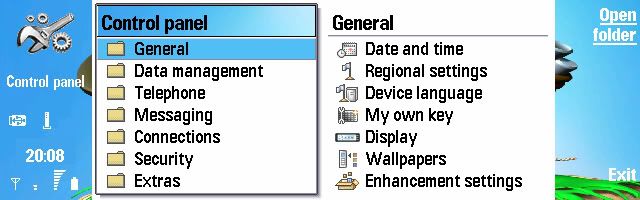
how about these backgrounds to skins??? :icon14:
Attachments:




how about these backgrounds to skins??? :icon14:
Well, the image needs to be much bigger (think computer wallpaper size) and preferably of better quality.
How about this one. i think all the text will also be clear on this one, including all the highlights etc.
:icon14: 😉
this used to be my old wallpaper..

HyPeR,
Sorry mate, your wallpaper is still too small... I have to use a 755x200 source and your picture is only 640 pixels wide. So, I would have to stretch the picture and thus the skin wouldn't turn out very well.
Btw, I expect to have several more skins ready soon. 😊
Hi all! I'm a new user of Communicator, so please be gentle with me.. 😃
Is there any way that I change text color into white instead of black?
thx in advance..
btw great job for Switchblade n Raven..! Salut! 😊 :icon14:
Hi weera, welcome to the forum.
Where is it you want to change the text colour?
Raven wrote:Hi weera, welcome to the forum.Where is it you want to change the text colour?
Joe9500 wrote:I would really "kill" for that matrix skin 😊I' actually working on one myself, but I'm still checking out how to actually do the process
On a skin note the easiest skin to make is one based around the standard colours and just changing the pictures, much the same as the 9210. Otherwise things do become ludicrously complicated with all the colour options to track down and correct. As much as I'd like a skin with a dark background myself it's just not possible to do and make it look complete.
hi raven and switchblace..
thanks to your tutotial on this thread, so I can make a skin based on raven's tux2 skin for my friend's 9500 (I'm using 6600... hik..hik..)
but I have to modify image#5 in skinapptitle into 595 x 200 pixel image with starting point (92,0)pixel dan wallpaper 463 x 194 pixel with starting point (92,6) pixel to make these 2 images macth each other.
and I still have black border that saperate wallpaper image and top of image#5 skinapptitile.mbm, what should I do ?
how to change text color ?
thanks a lot... sorry for my bad english
Just a word of caution to those of you who are making skins... Be careful when you edit the skin (SKN) file. I made a stupid mistake where I forgot to change the paths in the 'bitmap section' (forgot to replace some B's with C's...) and ended up killing my phone. And to add to the stupidity I didn't have a back-up ready. And if that wasn't enough, I discovered after doing a hard reset that the skin I was working so hard on (the one that rendered my commie useless) turned out rather badly...
:banghead:
Raynold wrote:but I have to modify image#5 in skinapptitle into 595 x 200 pixel image with starting point (92,0)pixel dan wallpaper 463 x 194 pixel with starting point (92,6) pixel to make these 2 images macth each other.
Hmm, I think I left out the CBA panel when I made #5 in 'skinapptitle'. You can just use the CBA (200x200) from 'skincommandbar' and paste that into the source and then cut from point 92,0 so you get a part of the CBA at the end... Bah, forget it, I'll just upload it here.
how to change text color ?
You have to edit the .SKN file. It's explained at the end of SwitchBlade's tutorial.

weera wrote:Hi raven, thx.
I mean text colour in the commy display, like when I use your wood skin, the text colour is black while your tux2 skin has black text. (hope you know what I mean?) 😊
I think I know what you mean. I've attached the modified orange.skn file to this post with white text in stead of black. Just go to C:\System\skins\0x101F8EDB and replace the orange.skn file with the one I've attached here (remember to unzip first), and reboot your Communicator.
Wow, they get nicer all time! Keep it up Raven!!!
thanks for the explaination, raven....
very nice bliss skin.....love it
Glad you liked it. 😊 Personally, it just reminds me too much of Windows (oh the nightmares!), but I knew others wanted it so...
Anyway, I'm running out of ideas here... I was thinking about a Mac skin, but can't seem to find any decent pictures to work with. Any ideas are most welcome! 😉
Raven wrote:
Anyway, I'm running out of ideas here... I was thinking about a Mac skin, but can't seem to find any decent pictures to work with. Any ideas are most welcome! 😉
What about the classic azul(of the default wallpapers of Win Xp)?
I find it quite interesting(bright and nice colors etc)...
Also any "nature-related" skin would be nice... 😊
I've install bliss skin,....
but it gives some questions..
1. I got blackline on top of wallpaper that not appears on your bliss's screenshot..
2. text color still black,
did I do anything wrong?
:redface: I dont how to put a screenshon on this thread, I'm new in this forum....
really, I dont know how to put an image on this thread...
raven, I hope you dont mind to see screenshoot of bliss skin that I put as attachment...
thanks man..

Raynold wrote:I've install bliss skin,....
but it gives some questions..
1. I got blackline on top of wallpaper that not appears on your bliss's screenshot..
2. text color still black,did I do anything wrong?
Hehe, no you didn't do anything wrong. That little black line on top is there in the default Desk application (haven't found a way to get rid of it). However, I only use PowerDesk as my desktop, and in PowerDesk you can change the text colour and there is no black line.
Cheers
hi raven, thanks for the quick reply.
oh...... I thought I did something wrong about installing the skin
I've made 3 skin, but still dont know how to put them here...(stupid of me)
I put a master image on attachment, hope you like the backgroud image

Raynold wrote:I've made 3 skin, but still dont know how to put them here...(stupid of me)
You have to upload the file(s) to a server and then put a link here. As for posting images, you also have to upload them to a remote server (I use the free service @ http://photobucket.com ) and then link to the images here by putting; in your post.
here's one of my skins
I need feedback guys... 😊
Raven wrote:I think I know what you mean. I've attached the modified orange.skn file to this post with white text in stead of black. Just go to C:\System\skins\0x101F8EDB and replace the orange.skn file with the one I've attached here (remember to unzip first), and reboot your Communicator.
Thx alot Raven. 😊
btw your making great progress in skinning 9500
:icon14: :icon14: :icon14:
help me i don't find C:\System\Data\SkinConfig folder
can i create it myself??
Follow these three steps to install the Worms skin:
1. Transfer the folder '0x101F8EDC' and the file 'skinpath.txt' to your Communicator.
2. Use the File manager in your phone to locate the files you just transfered and
copy/paste the file 'skinpath.txt' to C:\System\Data\SkinConfig. Then copy/paste the folder
'0x101F8EDC' to C:\System\skins\ (if you don't have a 'skins' folder, just create one).
3. Reboot your phone.
hey Raven!!! can you help me edit this skin...
can you please remove the box containing the clock... and make the orange color blend in...(light blue) dunno...
and can you please change the orange skin.txt to blue.... tnx
I cant upload it... can u just give me ur email and i send it to you... tnx
Raynold wrote:here's one of my skins
I need feedback guys... 😊
It would be nice if you provided a screenshot or two. 😉
veepeejii wrote:help me i don't find C:\System\Data\SkinConfig folder
can i create it myself??
Yep.
bassist_x wrote:can you please remove the box containing the clock... and make the orange color blend in...(light blue) dunno...
and can you please change the orange skin.txt to blue....
Which skin are you talking about? You can find a 'blue.skn' file in one of my skins like; 'Bliss' or 'Worms'. If you tell me the RGB value of the colour you want around the clock, I'll change the file and upload it here.
Hi guys, i try to modify the themes. . . . but the wallpaper cannot cover up the screen . . as you guys can see in the my attachment . . .
Is this a hardware problem . . or the size of the wallpaper are not match . . .
Cause every picture which are posted in this topic didnt have any gap . . .

In the default Desk application six pixels from the top are used by the system, leaving the wallpaper to a resolution of 463 x 194 pixels. When you follow SwitchBlade's skinning tutorial, that is solved be changing #5 in 'skinapptitle'.