any of you guys know how to edit .ske/.skn file in PC?
what program do I have to use?
thx in advance 😊
any of you guys know how to edit .ske/.skn file in PC?
what program do I have to use?
thx in advance 😊
NotePad/WordPad etc.
Ei Raven can you please put the blue.skn txt here so i can download it and change the orange.skn!!! tnx!!!
😎 Hmmmm... perhaps u guys need some help from the old AAS master jedi of skin... He has been long lost forgotten...
🙄 in the swamp???
Nosferatu wrote: Hmmmm... perhaps u guys need some help from the old AAS master jedi of skin... He has been long lost forgotten...in the swamp???
Glad to have you back, Nos old boy! 😊
We'll be looking forward to see what you can come up with. I'm sure you've read the tutorial? If not, here it is again: http://allaboutsymbian.com/features/viewarticle.php?id=144
bassist_x wrote:Ei Raven can you please put the blue.skn txt here so i can download it and change the orange.skn!!! tnx!!!
Here you go. It's the one I used for the 'Tux' skins.
Ei Raven can i have the original uneditted blue.skn file... pls
bassist_x wrote:Ei Raven can i have the original uneditted blue.skn file... pls
this maybe?
@raven: thx for the tips 😊
cant seem to make the blue.skn work...
do i have to change the skinpath txt???
Ei Raven can you please be the one to post the original blue.skn and an instruction how to replace an orange.skn in a 0x101F8EDB folder... Thanks!
Hi Raven my name is Ferry Can you give me the step for make skin for my nokia 9500 please e mail me to [email][email protected][/email] Thank You
bassist_x wrote:Ei Raven can you please be the one to post the original blue.skn and an instruction how to replace an orange.skn in a 0x101F8EDB folder... Thanks!
You need the 0x101F8EDC folder with all the MBMs from the default Blue skin. You can't just change the .SKN file and expect the entire skin to change too. Just download my 'Bliss' skin and use the 0x101F8EDC folder from that skin. Just replace the 'skinapptitle', 'skinappview' and 'skincommandbar' files with the ones you want to use, and use the blue.skn that weera uploaded.
Ferwah wrote:
Can you give me the step for make skin for my nokia 9500
Very nice Raven!
keep up the good work.😊
Nicely done mate, I should really sit down and make some skins....
Ei Raven! I did what you said... but it does not work... i downloaded your bliss theme... then i pasted weera's blue.skn then i replaced the skinappview, skinapptitle, and the skincommandbar... then i rebooted my phone.... it does not work.... why oh why???
BTW your bliss theme works and my theme(where i got the skinapp, skincom etc.) also works but whe i combine the it does not work...
Raven, I tried to change the skinappview skinapptitle and skincommandbar without changing the default blue.skn file on your bliss theme and it works!!! so i guess weera's blue.skn is a dud... can i just send you my skin and edit it for me?
If you currently use the orange.skn file, remember to also change the 'skinpath.txt' file. I don't think there's anything wrong with the 'blue.skn' file weera uploaded.
no there is no problem with the skinpath.txt... i tried your blue.skn and it works...
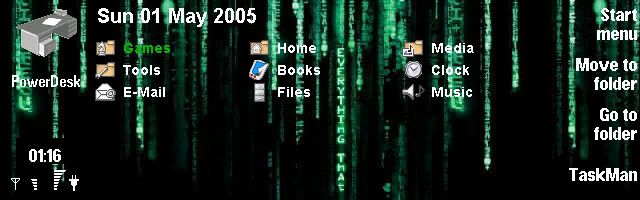
hey...raven, you're right. Powerdesk makes everything looks fine. hehehe...
oh.. Reven's New Skins..... so.. so.. cool abis deh.. (eng, "very cool"😉
bassist_x wrote:no there is no problem with the skinpath.txt... i tried your blue.skn and it works...
Alrighty then. So what you want to use is the unedited, default blue scheme, correct?
Try this one (attached).
Hi Raven.
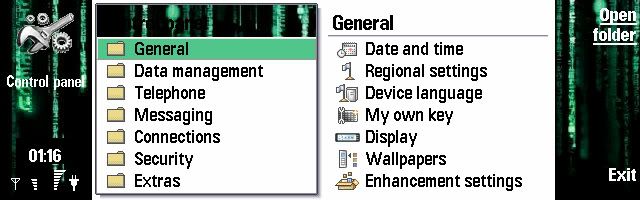
I tried to apply the new matrix skin to my 9500.
However,when i reboot my device,to apply the skin, the startup process stack and this can only be solved with a format.
And i am asking...
Did you,or anyone else, experienced this problem when applying these skins?
This problem is being shown with both new skins(darknes & matrix),but with none of the older skins,so is their any problem with them?
Thanks.😊
Really? Damn, I'll look into it right away.
I faced that problem once, but it was only because I forgot to change some paths in the .SKN file.
Anyway, sorry about that. I'll remove those two skins right away in case anyone else faces such problems.
Mykhalis,
Are you sure you didn't do anything wrong when you applied the skins? Because I just installed the 'Matrix2' skin again and everything worked like a charm...
If anyone else have tried either the 'Matrix2' skin or the 'Darkness' skin, I'd really appreciate your comment.
EDIT: I've uploaded Matrix2 again and applied some changes which should make it more usable. Please try it again, mykhalis.
EDIT2: Both skins are back on-line as I couldn't find anything wrong with them.
What a @#$#&^$^ i am.😃
I used to send the zip file directly on the device and extracting them directly into the "critical" directories,and pressing "replace all" to replace each folder contents(of skins and skinconfig).
It seems that older skins had more files than the new ones.And so by presing "replace all" some files which were in the folders form previous applied skin were not deleted.
So the new skin had some files in the directory from the older one,and this cause the startup process to fail.
I realised that(after a few unsuccesive tries), and i first deleted the folder, containing the mbm images etc,and after extracting the files into them...and it simply worked like a charm.😊
Glad you got it sorted. 😊 Started to get worried there for a second... Can't have my skins going around killing people's phones. 😃
Raven wrote:If you currently use the orange.skn file, remember to also change the 'skinpath.txt' file. I don't think there's anything wrong with the 'blue.skn' file weera uploaded.
Great work for those new skins man! you made my friends (9500 users) shock when they see my 9500 😃 :icon14: :icon14: :icon14: :icon14:
thx alot! 😊
Hi guys! when are you gonna be posting new skins??? I cant wait! weeeeee!
hi raven! how do I change the clock box color with the same as my theme is gonna be? what file do I have to change those RGB value?
thx 😊