Hello then I can't install themes in my N73 not know how the stages to me gives me always on the mobile certificate expired and I bag the themes of many sites and emule and I never could installed them comment thanks.
Post N73 Issues/Problems Here
Arcane85 wrote:Hi all. Just bought the n73. Installed themes and worked perfectly. Until i tred to remove them. I installed the themes using the Mcard. and when i loaded the themes, there was the mcard icon at the side confirming it. and so when i changed to a new mcard(1gig) and tried to install the themes. the phone just told me it was unable to install them. However when i selected different themes, they installed just fine. I restored factory settings to the phone and formated the Mcards (both of them) and tried to install the initial themes using the 1gig Mcard but it still wouldnt work.I'm thinking that the phone cant overwrite themes and it saves an image of the theme in the phone registry or something. I cant find out how to erase that image. if there's such a thing.
Anyone with the experience or expertise, i would greatly appreciate ur help/advice. =)
i have a N73 music edition and i can't installed themes it gives me everry single time certificade caducate please help me tanks :con?:icon4:
What you need to do is before you install the theme set your date back 1 year 😊
Once the theme is installed you can then change the date back to normal 😃
Your Welcome 😉
i already updated my nokia firmware to new bef few days. from that day when i type the letter capital R (By pressing button 7, 3 times) to add a contact or to make a note etc it displays only P and jumps to next place. at next place it works well. the problem happens only if i select shift key (#key). can anybody faced this prob?? can anybody help??
I updated my N73 software on 3 Apr (4.0747.31.0.1) and since then I only get text messages if I reboot the phone (any queued come in then). Is anyone else experiencing this? Any suggestions for a cure? thanks
-H
Strange... Obvious, should not occur. Just repeat the upgrading process, and see what happens.
After installing the latest PC Suite (6.86.9), the program won't recognize my N73 phone anymore. I plug it in, select PC Suite on my phone and XP gives me an error that there was a problem installing the drivers and your device may not work properly...basically it can't install the drivers but when I switch to Data Storage Mode, it works without a problem.
And now that I updated the program, I can only go to my PC Suite that came with the phone which is ancient (but works). Help? :con?
PS: I also have the latest (legit) update on my phone (non-ME)
EDIT: Firmware is Nokia N73 (RM-133) 4.0735.3.0.2
aitchsee wrote:I updated my N73 software on 3 Apr (4.0747.31.0.1) and since then I only get text messages if I reboot the phone (any queued come in then). Is anyone else experiencing this? Any suggestions for a cure? thanks
-H
Just to follow up, this turned out to be a memory card problem, presumably unrelated to the upgrade. The messages were set to be stored on the memory card and the card was evidently failing because a few days later it was unusuable - couldn't even format it in linux 😡
But since I replaced the card there seem to have been no problems.
-H
seanski44 wrote:Hi all,first post here, have read through the 7 pages of this post to see if anyone has the same prob I have.
I have a 'sticky' voicemail symbol. Having spoken to a couple of people at Orange customer services they finally accepted its a bug and that there isn't a known fix at present. As they're not known for their technical expertise I wondered if anyone here could help.
The voicemail notification symbol doesn't go away ever, even having got a voicemail and deleted it, so each time I start the phone I get a 'new voicemail' notification.
The other main problem is the general sluggishness of the phone - its not exactly easy to use...
Also, some of the other sporadic probs other people have, i.e. camera not always activating when you open the slider, zoom memory issue etc...
I also, sometimes get a beep in my ear which I haven't been able to identify - not call waiting or text or battery warning or anything - not sure what this is.
I'm not sure how to find firmware version, but a mate who has one checked and reckons its on the latest one - I have searched the site on how what the keypresses are but I've come up empty handed...
btw also, what is 'packet date connection active' as after a phone call I often get this message.
ok beep you hear could be the message which u just recieved.Packet data connection means gprs , means when you use gprs to send and recieve info it ineracts with you through packet data.its a mean of carrying information.
Hi all, first timer here.
A few days ago I thought it would be a good idea to update my N73. After the update however I saw that Greek had been removed from my phone. After a lot of searching, I found out about product codes and how to change them. I changed the product code to a Greek one (the original was the standard european, 0539335) with NSS and then went on to upgrade with NSU. But because I updated to the latest version before I changed the product code, NSU is saying that I have the latest version so it is not possible to update again. 😡
So, my question is this: can I roll back to a previous firmware version? And if not, how can I simply load Greek to my phone again?
pgrigorakis wrote:Hi all, first timer here.A few days ago I thought it would be a good idea to update my N73. After the update however I saw that Greek had been removed from my phone. After a lot of searching, I found out about product codes and how to change them. I changed the product code to a Greek one (the original was the standard european, 0539335) with NSS and then went on to upgrade with NSU. But because I updated to the latest version before I changed the product code, NSU is saying that I have the latest version so it is not possible to update again. 😡
So, my question is this: can I roll back to a previous firmware version? And if not, how can I simply load Greek to my phone again?
No! You can�t! To have the wright software zone, in your case, go to a Nokia Service, and with a pay service they can do that.
Hi, I recently purchased a N73. It didn't come with a USB cable as the owner of it broke his. I bought an USB Cable off the internet. It isn't of the nokia brand. I installed Nokia PC Suite. Now when I connect the phone, It brings up a box that says problems with infrared connection. This is a problem as I don't want to connect it via infrared. Please help. Here is a screen shot of the box http://farm3.static.flickr.com/2382/2470457552_491cc88d64_o.jpg
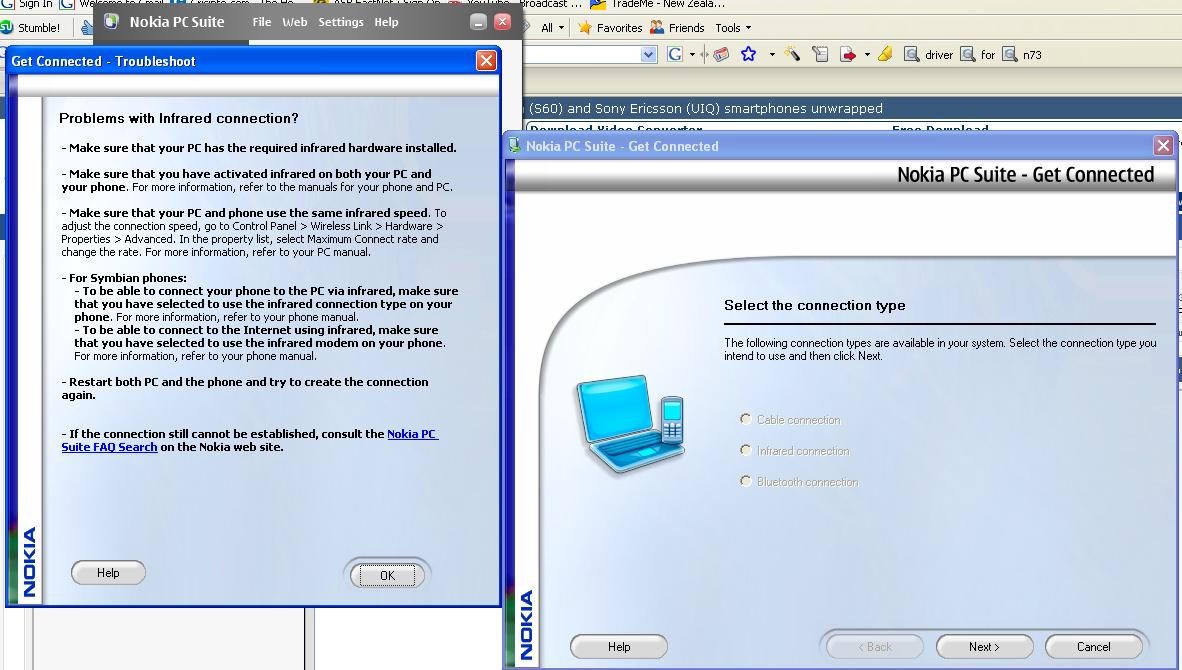
n73man wrote:Hi, I recently purchased a N73. It didn't come with a USB cable as the owner of it broke his. I bought an USB Cable off the internet. It isn't of the nokia brand. I installed Nokia PC Suite. Now when I connect the phone, It brings up a box that says problems with infrared connection. This is a problem as I don't want to connect it via infrared. Please help. Here is a screen shot of the box http://farm3.static.flickr.com/2382/2470457552_491cc88d64_o.jpg
Weird... Before try another things, try find an original cable and see it it works well.
Hi all, I just got myself a N73ME. Everything is great except that I couldnt get the Quickoffice to work. When I opened the appls (eg: Quickword), the screen show "No Data" and I have no clue of how to load my file as no option is available.
I hv actually copied some xls and ppt files into the briefcase and synchronised with the N73.
Pls advice. Thank you.
if it's app error, try find the quickoffice again and reinstall it...
but you can always format back your phone to the original state.. the quickoffice should be fine after that..
*#7370#
Yesterday i tried to update to the Music Edition in my Nokia N73 with this product code 0539343 and i went to the nokia software updater and it said no update available!!! i wanna now whats my factory product code for my nokia n73
V 4.0738.3.1.1
18-09-2007
RM-132
Nokia N73 (36.01)
Please help me out!!!! and if you guys know how can i update to the nokia n73 music edition
hi guys i ve n73 ,thing is i ve dwnloaded one game from nokia provided sites in internet---> download--->try for free section .but first it did not download (error during download) but icon of games appears in application when i tried to delete that one it says cant delete.so in order to replace it i download same game this time it downloaded completely but another icon came now its not deleting too...its irritating to c useless icons ...
can any bdy help me in removing these icons..thans in advance.
V 4.0727.2.2.1
04-07-2007
RM-133
Original product code is located under the battary, only reason i can think of that you couldn't upgrade to ME is caus the firmware version for that product is older than your current firmware. Try 0539265 for ME 4.0812.4.2.1
Sticky icons? Backup your stuff and format 😃
ok format is one option any other suggestion...
Hi guys,
Since yesterday night for all incoming calls my phone is not displaying the phone numbers or the names of the contacts who are calling me.
Then i updated the Firmware version of my phone.
Previously it was - V4.0736.3.2.1
I updated it to - V4.0812.4.2.1
But the same problem is there... :con? Any suggestions ??? :frown:
dez_borders wrote:You could try the last resort FORMAT of the phone's memory *#7370#Be warned this will clear all youe contacts, calnedar entries, connection settings, etc., so make sure you have backed them up. The Mcard contents will NOT be affected.
Dez
thanks for this info..i can not delete my themes as well..😡
did the hard reset of both phone and mem card..🙄
now all's cleared...😊
yeah...now be weary of installing themes coz it can never be deleted or located thru apps manager and file manager and all.what a waste...
The problem on my N73 was because of the CLIP service deactivated by my Provider. 😡
Sorry for bothering you guys !!! :redface:
i was trying to back up my N73 contents using nokia PC suite 7. the back up did not complete and had some errors but the lo file showed that it copied 2590 messages. so, just to check if i have thos emessages i tried restorin messages and to be on the safe side i had put my messages int he folders and have made inbox empty and made the settings to memory card memory... after restoring it gave message that can not access card memory, switch to phone memory... i did yes and after that all mah messages got erased. even from my folders which are never accessed by PC suite... what do i do now. please help me as those messages mean a hell lot in my life... that is why i wanted a back up.is there any way to get those messages back... please please please help
hi, i just got my another n73 and when i try to download opera mini message shows unable to install. where as i have it in my other two n73s. version is 4.0812.4.2.1 and old ones are v3. how can i go for it. please help. thanks..
BUDDY.
Query about Nokia PC Suite For Nokia N73....
Does the Backup restore tool in PC suite restore the data in the phone and the memory card by replacing the old data or by appending to the old data??? Please help!!! :frown:
jasnav wrote:i was trying to back up my N73 contents using nokia PC suite 7. the back up did not complete and had some errors but the lo file showed that it copied 2590 messages. so, just to check if i have thos emessages i tried restorin messages and to be on the safe side i had put my messages int he folders and have made inbox empty and made the settings to memory card memory... after restoring it gave message that can not access card memory, switch to phone memory... i did yes and after that all mah messages got erased. even from my folders which are never accessed by PC suite... what do i do now. please help me as those messages mean a hell lot in my life... that is why i wanted a back up.is there any way to get those messages back... please please please help
try any disk recovery software on your memory card.... i am not sure about this.... but may work!!! :redface:
Dear the latest is V.4.0812.4.2.1 dated 21-03-2008 (12).
I have it in my mobile.
fullboosteg wrote:Yesterday i tried to update to the Music Edition in my Nokia N73 with this product code 0539343 and i went to the nokia software updater and it said no update available!!! i wanna now whats my factory product code for my nokia n73V 4.0738.3.1.1
18-09-2007
RM-132
Nokia N73 (36.01)Please help me out!!!! and if you guys know how can i update to the nokia n73 music edition
You have to check it beneath your phone's battery, it starts with code 053..... and then check it through the updater
guys, i really need your help... i have nokia n73 music edition and yesterday i downloaded and installed via nokia updater new software update for the first time since i purchased my phone... nokia updater told me that this version down here
4.0736.3.2.1
04-09-2007
RM-133
is the latest one for my n73me, so i installed it... everything went well but then i discovered very strange problem... i always turn off my phone before i go to sleep so this morning when i turn it on i tried to take some pictures... i opened camera cover and it switched me to main manu, instead of image mode... i tried it again, but with no effect... after some time i discovered that the only way i can switch on main camera is when i go to main menu and first activate that 0.3mpx camera.... and after that i can regulary open image mode in main camera directly after i open the cover.... but when i turn off my phone and turn in on again, i must repeat that process.... why is this happening with this version of software? before this, i had some v.370.xxx and i didn't have any problems.... how can i fix this issue? thx in advance!
my mobile function is very slow, sum time automatic switch off