
Some gameplay choices are set in stone; you either zap a line that stretches across the playing field (and challenge the Tetris heads); or you match three coloured tiles to make them disappear (and the Columns crowd start looking at you as if you stole their idea). There’s not actually that much variation when you boil puzzle games down to their core idea.
Explode, from Tequila Mobile, is in the latter camp, but the twist is, well, you have to twist the game grid. It’s more a hexagonal grid than the expected square layout, but this works well – with six contact points for each ball, rather than four, you have a lot more options when collecting the coloured balls that fall towards the centre of the grid. As you’re only looking to create a line, and that line can twist and weave away from a straight line, the artistic OCD in you can store the colours, waiting for the correct ball to fall that triggers the chain reaction to take you to the next level... and just to make things fun, they only disappear once the spinning white light passes over them.
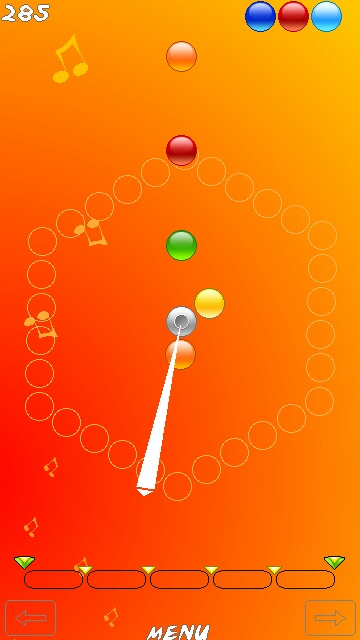
While the visual norm is that of balls falling towards the bottom of the screen, they are in fact falling to the centre of the screen – think of it as if gravity is focussed at a spot around the central axis – and like any gravitational system you can rotate round it. This is how you organise where you want the coloured balls to fall, by spinning the entire playing field. Once a falling ball touches one that is in the game grid, it slides down automatically into place – if you get a line of three or more, then they disappear and everything else falls towards the centre.
So what we have here is a rather traditional gaming style with a new layout – any mental tricks you might have learned are no use here, so you’ll be learning from scratch, which does increase the time you’ll have on the learning curve, but this is a good thing. The early levels have little time pressure so you can learn for yourself the stacking and tactics that work for you. As your skills increase, the levels will advance, and you can also jump to any level when you start a game.
Explode is a good idea, and the game mechanics provide a good challenge, but unfortunately the controls are a little bit loose. It’s quite hard to spin the game grid with any great accuracy. Thankfully the picking up of falling balls has a large margin for error so this partly makes up for the controls.


While the keyboard controls are certainly usable, the touch screen interface is very poor. Rather than have a huge hotspot area on either side of the play area to turn it round, the turning controls (clockwise and anti-clockwise) are restricted to the small areas that are normally used for the soft keys.
This leads to a bit of a hand-eye problem, because there is no physical indication that your fingers, on a touch screen, are over the correct space to rotate the playing grid. Your eyes have to shift down to check, and any flow that you have in the game is diluted. At higher levels, this can be disastrous. I hope that in future versions the whole screen might be used to control the spinning.
Those interface issues aside, Explode is a nice diversion that might not feel original, but has enough going for it to make it attractive, a little bit different, and fun.
-- Ewan Spence, March 2010.