
First impressions of the Nokia N81 & Next Gen N-Gage Game Demos
The Phone Itself
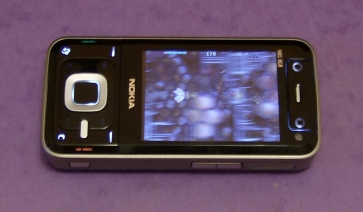
 The N81 is a fairly chunky phone at 140g and 18mm thick. It has a very shiny black finish on the top and bottom (yes, it's a finger-print magnet) and a nice matt metal plate all around the edges. The screen is large, bright and crisp.
It uses a slider mechanism to access the keypad, which is rather looser than on the similarly-sized Nokia 6110 Navigator. Quite why the N81's slider is looser is unclear, especially as it costs two hundred euros more than the 6110 and is a very similar phone technically.
The keypad is almost totally flat, with buttons that click but are hidden beneath a plastic surface. The buttons around the screen are also hidden beneath the surface, and only light up when the current application allows their use (for example there are playback controls around the direction pad which light up when you're listening to music or watching a video). There are two "gaming buttons" above the screen which light up when the phone is placed into horizontal mode, either with games or with photos and videos.
A nice touch on the N81 is the lock/unlock switch on the top, which lets you lock or unlock the keypad without having to know any key combinations. Another very nice touch is the 3.5mm headphone socket, which lets you use any standard walkman-size headphones without an adaptor.
The sides of the phone have stereo speakers, a volume control and a dedicated camera button.
The bottom of the phone has the standard thin-type Nokia recharging jack, and a microUSB port for data transfer with your PC (note that this is microUSB, not miniUSB, so the bit that plugs into the phone is much thinner than usual).
The N81 comes in two models, plain and 8GB, which are virtually identical. The plain N81 model has a microSD memory card slot so you can use your own flash storage cards and swap them if you wish. The N81 8GB has no memory card slot, but it does have 8 gigabytes of built-in flash memory which works just like an 8GB card.
There's a 2 megapixel still camera with flash, a QVGA (320x240) camcorder and a second camera on the front for videophone calls. There's a built-in FM radio, and you can also listen to internet radio stations if you know their RSTP address (lists of addresses can be found through Google).
For more details of the N81 as a phone and music player, see our sister site All About Symbian's music-oriented multi-part review:
Nokia N81 part 1 - The hardware, the naviwheel, the carousel
Nokia N81 part 2 - Listening To The Music
Nokia N81 part 3 - Looking Through The Microsoft Music Window
Yes, yes... but what about the games?!?
The N81 can run Symbian S60 3rd Edition applications and games, Next Gen N-Gage games, J2ME Java games, and emulated retro games through an S60 3rd Edition emulator.
The N81's horizontal mode and gaming keys are (as far as we're aware) only accessible to Next Gen N-Gage games, so you have to run S60 and Java games in vertical mode. This wouldn't be a problem, after all phone games are mostly written for portrait screens anyway. However, the N81 has an annoying flaw which we mentioned earlier: the slider screen wobbles when it's open. It doesn't wobble by much, but it's enough to make this €600 phone feel cheaper than it should, and it is especially frustrating when you're trying to play games (imagine if a brand new joypad felt like it was coming apart every time you pressed a button). Nokia can and do make solid slider phones, their numbered phone models are good examples of this, but for some reason the Nseries models have a lower build-quality despite generally having a much higher price.
To be honest, the main thing we were hoping to do was tell you how well the N81 runs Next Gen N-Gage games, but we can't, at least for the moment. Unfortunately the launch of the platform has been delayed to December, so we have no full N-Gage games to judge the N81 by.
Demos To The Rescue (Eventually...)
The N81 does however allow access to three N-Gage demos, which in theory should give us a flavour of what Next Gen Games will be like, but these are so limited and quirky that it's difficult to know how well these represent the full games let alone the platform as a whole.
Also, we couldn't actually get the demos to work at first. We clicked on the N-Gage logo, the "Discover N-Gage" application loaded up with no problems, but clicking on the demo logos did absolutely nothing at all, the phone just sat there doing nothing. Fortunately, and completely by chance, we tried looking in the Games section of the Download! icon and there the demos were. We were able to download each demo through Download!, and after that Discover N-Gage worked without a problem. Clearly Discover N-Gage has trouble actually starting the downloading of the demos, and perhaps this is linked to the last-minute software problems that have delayed the full N-Gage launch.
Let's tackle the demos one by one:
Asphalt 3: Street Rules Asphalt 3 is the latest installment in the Asphalt series which has appeared on the original gen N-Gage and the Nintendo DS (there's also a series of Java games that use the same brand, but that's a separate product line). In case you haven't played the prequels, Asphalt is a 3D arcade racing game where you have to race round various real world locations trying to collect nitro boosts and beat your opponents to the finish line.
The emphasis is on spectacular stunts rather than realistic physics, and in fact it's got such awful physics that this writer was able to get round much of the track without even touching the phone, as the car continues to crawl along at a very strange angle once it hits a wall. The graphics are perhaps a bit jerky by console standards, especially the way the camera shakes a bit, but they're perfectly good by phone standards, and there is no slowdown when you pick up speed. There are some very nice graphical touches, for example your car paintwork reflects the environment around you (some car colours will show this effect less clearly than others). The gameplay seems a little weak though, it's easy to finish first in the race on your first go, and the game seems to be expecting players to do things other than take part in the race (such as run other people off the road, but more on that later).
Asphalt 3 is almost entirely controlled through the direction pad: left goes left, right goes right, backwards brakes and forward... activates a nitro. Yes, there is no accelerator, just a nitro control. The top gaming button also activates a nitro, and the bottom gaming button lets you drift while turning. There's also a camera control, but this is only accessible through the keypad's * button.
One final point to make about Asphalt 3 though: is this really the kind of game that Nokia wants to be people's first impressions of the new N-Gage? The game modes included in the demo pay no attention to the lap time, and instead reward the player for things like driving into innocent moving cars, even flipping them over. Perhaps most tasteless of all is when you knock a police officer off their motorbike at high speed, which increases your score and puts the words "Cop Killer!" on the screen.
It should be noted that the above paragraph isn't an attack on violent games per se, there's absolutely no proof they encourage real world violence, and the relatively safe streets of Japan (with the world's most violent gaming heritage) suggest in-game violence may even reduce real-life violence. However, most people who buy N-Gage compatible phones could quite possibly be offended by things like the "Cop Killer" bonus, and decide that N-Gage games aren't for them because of it. Hardcore gamers will have seen much more shocking things in their time, but the whole point of N-Gage is to appeal to the non-hardcore gamers who make up the majority of phone owners. In the opinion of this writer, Asphalt 3 fails to do this.
FIFA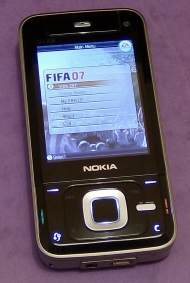 The demo calls itself FIFA 07, although the actual full game will apparently be called FIFA 08, but presumably they will be much the same thing. In case you don't follow the sporting world, FIFA is the world governing body of football, and the FIFA games are football simulators which allow you to form teams of real life players which can compete at both the club and international level.
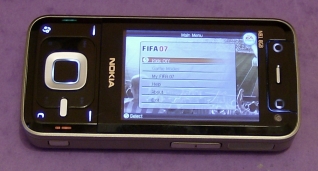
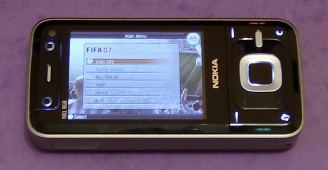
The game takes place on a 3D pitch which is mostly viewed from the side in the way TV coverage shows real matches, although the camera will automatically switch to other angles depending on special events (for example if there's a goal kick you get a view of the entire pitch from the goalie's perspective). The 3D models of the players are relatively simple and they don't look great in close-up, but this doesn't matter because they spend almost all their time viewed from a distance, and the actual animation of the players is very nicely done. The whole game runs smoothly and looks particularly good in horizontal mode.
The controls of FIFA are probably the most complicated and non-intuitive of all the demos. There are ten different controls, six of which can be used in attacking and four in defending, and which are context-sensitive (eg. 4 means Switch Player in defending mode and Pass in attacking mode). The help section doesn't even mention the gaming keys, so anyone who tries to play on the N81 in horizontal mode is playing blind. On top of that, because there are ten controls the two gaming keys don't even let you access most of the functions. You can press the number keys in horizontal mode by opening the slider, but unless you have three hands this is not very practical.
To make sure you're totally annoyed by the difficult-to-learn controls, you can only play ten matches before the demo shuts down permanently. Considering the difficulty many newcomers will have just learning how to play this game, the match limit should have been removed completely. As it is, players may be forced out before they develop a taste for the game, which is the worst mistake a demo can make.
One very positive thing to end on though: the FIFA demo lets you choose the orientation of the game, not just in terms of horizontal and vertical but also which side of the screen the d-pad goes on in horizontal. This means that left-handed people should find it just as easy to use as right-handed people, which is a significant portion of the market, perhaps as much as 10%. Nokia ought to make this option available in all N-Gage games, as it would cost nothing to do and would be a very distinctive selling point for literally millions of often-overlooked leftie gamers.
Space Impact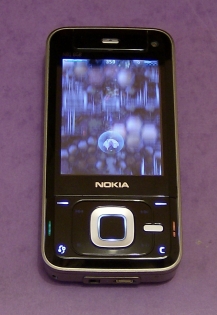 Another bit of name confusion, the demo is called Space Impact Light but the full game is called Space Impact Kappa Base. Again, presumably they're the same thing.
The Space Impact series is a very old line of scrolling 2D shoot-em-up games made by Nokia themselves, which go right back to their classic black-and-white models such as the 3310. The Next Gen N-Gage installment of Space Impact has the same basic gameplay but with a much bigger QVGA playing area, greatly enhanced graphics with the occasional 3D touch here and there, and pre-game customisation options (you can choose your craft, weapons and pilot). It's impossible to call this a horizontal or vertical scroller as it's both: it's horizontal when you have the game set to landscape mode, and vertical when you have it in portrait mode, so the visible playing area remains exactly the same.
The controls of Space Impact ought to suit the N81's horizontal gaming buttons perfectly, as it just requires the direction-pad and two buttons. However, in the demo only one of the gaming buttons actually works, the other does absolutely nothing. You can still play the game in vertical mode instead, where the conventional keypad controls do work fully.
The original gen N-Gage's best games tended to be first party titles, and Space Impact indicates that Nokia is continuing this tradition. Of all the three demos, Space Impact was by far the most satisfying to play, with enough gameplay to make getting through the level a challenge, and unlimited goes in which to do this. It kept this reviewer coming back for more, which is exactly what demos should do: once you complete them you'll be tempted to buy the full version.
Still Needs Work
If someone from Nokia is reading this and wants feedback on Next Gen N-Gage, it would be nice if they could do the following:
- Make all the games properly explain the controls for the phone model they're running on, eg. games on the N81 should all say what the gaming keys actually do. Even nicer would be a model-specific diagram with arrows pointing to each button saying what it does (the game can detect the phone's model number, so it could also know which diagram to load).
- Allow people to customise the controls. This is something that computer games have featured since their dawn in the 1980s, and it would be bizarre if this option wasn't available on N-Gage games.
- Allow people to choose which landscape they want to use (d-pad on the left or d-pad on the right) in all games. The FIFA demo allows this, but the other demos don't.
- Discourage third-party publishers from time-limiting or go-limiting on demos, especially those with complicated controls. Obviously a third-party publisher can do what they want, but they have to realise that the target audience of the new N-Gage platform is very casual, possibly including people who have never played commercial games. Time-limited or go-limited demos often mean potential customers never get to know what a game is like.
Nokia N81: Can you call us back later?
As stated above, we just can't comment on the N81's gaming abilities because we haven't seen the proper N-Gage games yet.
Other sites may try to tell you now whether the N81 is a good or bad gaming phone, but we're going to wait for the full evidence before making up our minds. The slider looseness is annoying in vertical mode, but it's a perfectly solid phone in horizontal mode, and the gaming controls could work if the full games make proper use of them.
In short, watch this space!
In the meantime, you might want to watch these gameplay videos from the three demos running on the N81 over at the Unofficial Nokia Gaming Blog:
Asphalt 3 Demo - N81 Gameplay Video
FIFA Demo - N81 Gameplay Video
Space Impact Demo - N81 Gameplay Video
