Originally posted by Muzikfreakah
Where do you get the update software? I havent installed any update software yet because after the checklist page (make sure your battery is full, make sure you are using the right cradle..etc..) I get this page 😞
I've tried to find the link, but I can't see it anywhere..I would have thought that when you update for the first time it will download the software automaticly..I found the link directly to the software somewhere but I can't remember where.
If you have a slow connection then that's why it may take so long, the update software is over 11mb itself...so if it is downloading that then it may take a while.
I was able to download the software too. And all I did was connect to the link provided. I agree that you need a fast internet connection. Good thing I already have my dsl 😊
Hey Muzikfreakah. I just got home now and went to the SE site and tried everything again. it worked! Funny why it wont work for you man. Am really sorry to hear that. Hope you can do something about it
Just got home, trying it again now.. why of all the people did this have to happen to me.. could it be that the link is in my favorites? But I went through the manual mode where you would enter your CDA and it checked it ok so that means these are not cache pages. Thanks Christomas for testing for me. I have dsl connection both in the office and here at home 😞 right now its stuck at the page again 😞 Im going to wait a few hours and see what happens.. do you think it would be safe if I could just get yours update files? If so, can someone please post it?
Hey is it safe to post around while its on that page where it asks you to wait? Should I just not do anything else? How long did that page take you guys? 5 mins? 10?
It seemed to take most of my connection and wasn't allowing me to do much else, so I just left it...I have a 4mb downline 😕
Well its still going as is 😞 I only have up to 256kbps ADSL.. will try to leave this overnight.. I have my virus protection off.. I have my firewall off.. Its all up to God now...
It really shouldn't take all night.....lol.....It took me about 4 mins for it to start, there is something wrong with yours..not sure what though, only thing I can think is that you don't have the software installed which is why it's taking so long, basicly it shouldn't take too long to download 11mb on a 256k connection so if it's not done in an hour I reccomend trying to find the software link, try My-Sy or Esato i'm sure I found it on one of those sites.
Search for seus_setup (.exe??) as that is the name of the installer, if you can't find it, send me an email and i'll sort out a way of sending it to you.
[email][email protected][/email]
Thanks! Ill do that! But what im afraid of next is if, when I get the file, I mite get all those errors other people are getting at esato.. Dang.. if this doesnt start in the next 20 mins I will try to use the Auto, if that doesnt start I will try to restart and disable everything including MSN messanger.. I already tried to delete all my cookies and my security settings set to medium.. Ill email you after all of these dont work..
That's the one, i'd just finished uploading it to me server too 🙄
Man its 3:42 am and its still stuck!!! (yawn...da heck. YAWN...) Thanks for the link guys downloading it, hope I dont get a DOA bec that way I cant use the restore mode bec it wasnt able to identify my phone... At first I thought I had it, google was stopping it from getting pop ups.. so I uninstalled google tools bar for explorer and set my security settings to low.. still the same problem.. Grrr.. No one better get in my way in the office tom.. im going to be grumpy.....
Originally posted by J2theIZZO
That's the one, i'd just finished uploading it to me server too 🙄
No need of wasting your bandwidth on that one then... SE can pick up the tab. 😃
Guys,the setup file is 11MB,right?What's the size of the firmware flash file?I'm on a 33600 at home,is there a way to download the firmware flash file and burn it on a CD?
another thing for you guys to ponder on:
what does your status bar say? It normally just says done aside from the big please wait.. but i noticed that when I press the refresh button... these come out quickly before the done text.. what does false mean? It approved my CDA, I ticked all the checkboxes..
and after that I just get stuck with this screen..
Attachments:
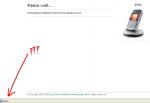
It's a direct setup that goes through the server.. It doesn't dump the firmware log in the pc to run at all.. I can't trace it on the hard disk in any way...
I believe one of the reasons for that might also deal with security issus.. I don't suppose SE wants users to have the ability to modify ("hack"😉 the firmware log in any way... I'm sure that thought process went through their minds before they released this update process.. So no physical firmware on the hard disk at all... Everything is encrypted during the process.. If it didn't go that route I'm sure someone would have figured out how to tweak it to upgrade the phones currently on the "non-approved" (ie Orange phones) list..
@Bigfeat, I went ahead and installed the file you uploaded, what do I do next? after installing it, nothing happend.. should I go back to the se site again or is there a program I should run on my pc or phone now?
@ Musik -
Do you have SP1 installed on your system? Or is your IE browser updated?
These were the files installed on my PC what do I do next?
Attachments:
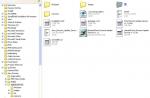
Hers my Version and yes I don have sp1 installed
Attachments:
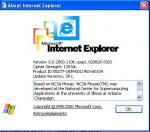
Try going through the SE link page instead... I think theoretically if you were to format your pc you might be able to get this done.. However, I would just strongly suggest that you find a good buddy with a recently manufactured PC plus broadband connection and ask them to borrow it for 1/2hr...
You must then double click the setup file in the directory in which it was placed to install that installer. Once the setup installer is extracted and installed the webpage will automatically resume the update process...
Ok this didnt happen.. all it did was install the program and nothing happend after that 😞 darn maybe this isnt for me.. going to try it tom on another PC.. gnite guys! and thanks..
Guys,the setup file is 11MB,right?What's the size of the firmware flash file?I'm on a 33600 at home,is there a way to download the firmware flash file and burn it on a CD?
20Mb!! at 33.6kbps that's going to take a while!! 😱
The files get downloaded to C:\Program Files\Sony Ericsson\Update Service\software-data or whatever drive you installed the seus to. Actual filenames are:
HL1_CDA1620035.bin_000000_0000_R2A10 <<<CDA 4Mb
HL1_12529_030912_1435_R5D <<<Bluetooth 147Kb
HL1_162021_000000_0000_R2B02 <<<Organiser 13Mb
HL1_162022_000000_0000_R3C006 <<<Phone 871Kb
HL1_CDA1620035.img_000000_0000_R2A10 <<<No idea!1.2Mb
Now, although you might be able to burn these to CD, two problems prevent this from working
a)It looks like firmware versions are phone specific, probably not specific to each individual handset, but there looks to be a difference depending on where the phone came from and what network it was bought on, since we all seem to get different version numbers after updating. Mine was sim free.
b) You'd have to hack the website to look at the CD instead of delivering the package over the wire.
Sorry to be the bearer of bad news dude.. 😞
Nothing is supposed to happen, you can't execute the program from your PC, the program excutes when you start the update process from the SE site, this is why I thought you might be waiting so long...if the software isn't present on your PC.
I'd try the service again from the PC you are on with the software now installed.
@j2theizzo: Good morning, yes I did tryit already and it still does the same thing. Im going to try to use a new system later at the office for the update.. I have a laptop there that has service pack2 I hope that wont mess it up also 😞
Thanks for the help everyone!
Well I just got up this morning. Boy Muzikfreakah and Bigfeat were mighty busy last night hehehehe. Well I think Bigfeat was right that the upgrade isnt executable from your PC. The process is done direct from the SE Server. So you really need a fast and reliable connection. I wouldnt want to think what would happen to your unit if the connection got terminated somewhat in the middle of the process. I feel sorry for you Muzikfreakah for all the troubles you are going through just to get the upgrade. If only you were near my place I would gladly let you use my PC. Anyway I hope you find the solution today. 😊
I just came from my-symbian forum. It seems alot of users are finding it hard to update too! One of the most common gripes is that it seems the SE Server if flooded with users having their updates. Guess we early birds were just lucky to be able to do it before the rest 😊


