vickyshahri wrote:Raven i'd love to make skins myself but the problem is i m confused in making a skin with the SkinStudio as i cannot understand all the parameters inside it...i've tried making skins with the SkinWizard too & even succeeded in making them but then since i use PowerDesk i m not being able to get the PowerDesk wallpaper right...i just cannot come to know how to crop and how much to crop the image so as to make it suitable with PowerDesk...can u help me on this Raven? Thanks a lot buddy...
No problem, it's quite easy. I don't know which image editing program you're using. I use Paintshop Pro. You just start with the 755 x 200 size master background and select 'crop' and point the cursor to 92 x 0 pixels counting from the top left and then drag it to mark a 548 x 200 pixel section of the image and hit the confirm button. You do the same for the 'Today' background except you start at point 32 x 0 and drag the cursor to cut out a 608 x 200 section.
I hope that explanation made sense...
Hi Raven,
Thanks a lot for the info buddy. Raven, actually i m using ACDSee and the settings which u have mentioned to crop the image don't work properly with ACDSee. Can u please give me the settings for PowerDesk as well as Today wallpaper settings as per ACDSee? Or buddy otherwise can u tell me where do i get Paintshop Pro? Thanks a lot anyways buddy.
Here are some basic skins that i have made...
http://rapidshare.de/files/9322195/Hyper_s_Skin_s.zip.html (7.62MB)
Am working on a LORD OF THE RING Theme (see attached)..but cant get a few things changed... it;s pretty time consuming...anyways am still at it..if someone can help... i can get this going mush faster...
Attachments:

Very nice skins Hyper...Keep up the good work buddy!

i found this here
here

and this here
here
both with the difrent net and charge symbols....
hi, i m new here, can any1 tell me how to install xp skin above? many thanks
Hi
Nice work definitly the XP skin. How did you manage to get the battery icon and send indication in color ????
Is it also possible to make some background for powerdesk (deskvie and today screen).
Thanks and nice work.
i downloaded the xp skin but don't know how to install it. skininstall on opl doesn't seem to recognize it.
might anyone know how to install the skin?
Roman wrote:I have my first skin fo you, its called AquaBlue OS X. Its the first skin you can install by a SIS-File. After the installation process you will find the Powerdesk and the Frontcover Wallpapers in folder C/Wallpapers.

Download: www.romankeller.ch
Any chance you can put it online again ? Can't seem to find it, and as a Mac user I really love this skin...
😊
first you need this tool
i make it here.
i make 2 mbm
the mbm can you download here
here
i put the mbm in the direktory c/:myfiles/skins/green/0x102083E

the obly thing you have to do is change the mbm with skinstudio on your phone. when you put it in the green folder you have to change it in green
you can make it with your own screen. you dont have to use my skin. make your skin with the tool and use my mbm.
when you want to install the skin you must have the tool. with this tool you can install your skin without reboot...
Raven wrote:Tux: 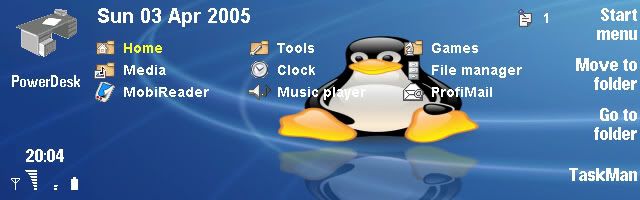
DOWNLOAD
hi, would it be possible to have this skin without the tux 😉
it is nothing personal agianst the tux 😊 I also use linux, but I find the background stunning and the tux a bit disturbing 😉
unsound wrote:Any chance you can put it online again ? Can't seem to find it, and as a Mac user I really love this skin...😊
I'd like to have that AquaBlue skin as well 😊
orol wrote:hi, would it be possible to have this skin without the tux
No, sorry, the image has Tux in it. No way to remove him.
I find the background stunning and the tux a bit disturbing
Hmm, ok, hehe...
pentium4 wrote:mTiger skin
Very nice!
Hi, I dont kno where to ask this message but Im putting it here cuz it has the most people.
If someone can help answer my question it will be appreciated
There is a Nokia N80 on ebay selling for 400 Cdn and I was wondering if it is a safe buy.
At first I thought the phone isnt out yet and yet there are so many people selling it on ebay?
Can someone help plz, thank you
Here's my first (and probably, only) skin:
My first skin 'AC_Skin_1' seen here in the AquaCalendar application.

It's available for download via this link. If you also read the notes, you'll see I don't think the skin is perfect because, for example, there are a number of colours I can't seem to change but I'm happy enough with it.
Hi,
everytime i put a new skin in the 9500 i have desktop blue with skin image around it, the skin image does not affect desktop icons and background which remains blue or ornage and i can not change the screen settings anymore, what am i doing wrong? any advise?
thanx.
NEVER MIND, I GOT IT. ITS IN BACKGROUNDS.
Just wandering guys why are there no more additional info about the skinstudio. Is there a site with reviews or discussions about it?
Thanks

You can download my new skin at: Link
Dear all, its my first post I just want to ask why Ican't do sms (read or send)
when I use skin studio active ? any suggestion can help or remain me !
T.I.A
Does anyone know where to get MBMWhizzard from an alternative location as the http://www.warlocks.be/ site does not appear to be accessible.
Hi Roman, nice skins you have, just love them.
Thanks
Excellent skins Roman...buddy can u please do me a favour by posting wallpapers for PowerDesk and PowerDay for ur above mind blowing skins...
Powerdesk and today wallpapers are already included. just see c:\wallpapers and you will find what you re seeking.
Got it! Thanks a ton buddy...:icon14:
http://groups.yahoo.com/group/nokia_9500_skins/
I've created a group to share skins. feel free to join and post your skins.
Hi everyone, i have just joint the forum as i have just bought a Nokia 9500. I was so impress with the work all of you have done and i was wondering how do i do it on my new nokia 9500?
Can someone guide me the step by step to change my original dull skin to any one that you all have done. Is there any new link that i could download the Dazler's MBMWhizzard?
Hope you could help me.:con? :con?
yup
i need the same help
i read the steps but found it a little confusing,tried but didnt work.
Can some 1 just write the main steps 2 be taken after the skin is dloaded.
Thanks


