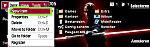
Thanks Raven & Vickyshahri for comments on previous post. I have tried to replicate the sidebar effect in windows vista with this new one. As ever my skn colour setup is not to clever.
Also attempted doing a full windows vista theme (see attached jpg) but cannot get the menu colours to match. Perhaps someone could do screenshots and list all the sections for the skn file, maybe its just me that cant seem to get grips with it.
I did try going through all the sections and putting very obvious colours in one at a time and reloading. Works for a lot of the already listed sections but the unknown ones remain unknown.
Do you think this dark vista theme is worth pursuing
Cheers all
Mick 😉
Attachments:
 Sidebarblue.zip
 (260 KB)
mp2000 wrote:First attempt at skin, not really bothered about background but was trying to give a different effect using shadowing. Dont know how to change menu colours ( would look better with a blue or grey theme). Any help with this would be much appreciated. I know i need to change the text file but when i do i just get the standard theme. Also need to change colour of clock.
Cheers MP
Hope attachments are showing
zip & jpg
hi mp2000, very nice inovation you have on your skin.
but you still have blackline thing... you can see in my skin if you want to remove blackline thing..
easy way to remove blackline thing is you have to put image#5 (skinapptitle) on top of the row in mbmwizard as c\16 the rest of *.bmps as \c1... good luck
mp2000 wrote:Thanks Raven & Vickyshahri for comments on previous post. I have tried to replicate the sidebar effect in windows vista with this new one. As ever my skn colour setup is not to clever. Also attempted doing a full windows vista theme (see attached jpg) but cannot get the menu colours to match. Perhaps someone could do screenshots and list all the sections for the skn file, maybe its just me that cant seem to get grips with it.
I did try going through all the sections and putting very obvious colours in one at a time and reloading. Works for a lot of the already listed sections but the unknown ones remain unknown.
Do you think this dark vista theme is worth pursuing
Cheers all
Mick 😉
Very nice skin mp2000...just get rid of the black line on the top as Raven told u...and i must say the Vista skin looks tempting too!!!
Hi
I tried to make a skin, but can somebody tell me how I can recompile (which program) the MBM files. The link to Dazler's MBMWhizzard is dead, can someone post this program as an attachment here and explain how i get multiple files in one MBM file?
Thanks
@Raven: could you mail me a list of all the known codes for skinning. I'm trying to create a small Communicator program that will allow you to create a complete skin from a single bitmap. Simply specify the bitmap (800x200), set the skin colors and then press a button to generate the complete skin.
For this I need this (as complete as possible) list of all the colors that have been discovered sofar. I'm hoping by making this very easy, we'll see a lot more skins for the Communicator.
Thanks in advance.
Cheers, Arjen
Looks marvellous, seeing forward for this application. Will it be running under windowns XP or under Symbian?
Hi Arjen,
That's a very good idea! I've been waiting for someone to put together such a program. Other than the codes in SwtchBlade's tutorial, I only have the code for the colour around the clock; 0x101F87FE under the [extended_color_section]. I have experimented with some of the undocumented colour codes, but unfortunately I haven't noted anything down.
Btw., the bitmap to start from should actually be 755 x 200, not 800 x 200.
I wish you the best of luck on this project.
Cheers
there's a software that help us to install our skin. I cant post it nor post the link in this forum. it came from an illegal website. but if it allowed by ADMIN OR MODERATOR I'll post it.
Do you mean SkinInstall? That program simply lets the user install already made skins, in stead of doing it manually. It is completely different from what Arjen is proposing.
Hi
First attempt to make a skin. Does anybody knows how to change the date on the Desk panel from black to white ???
Attachments:
Erotic Night.zip (57 KB)

yes, skinInstall is not a skin maker software. it only helps us to change skins.
bjornels wrote:Looks marvellous, seeing forward for this application. Will it be running under windowns XP or under Symbian?
I'm going to use OPL (with an extension library I wrote so I can read JPG files), so the program is going to be running on a Communicator.
The only part I could use some help with is the design of the icon. Other than some other people here (like Raven) my graphics skills are less than poor.....
Arjen wrote:Other than some other people here (like Raven) my graphics skills are less than poor.....
My design skills are non-existent. That's why I never bothered finishing 'art school' ten years ago... 😃
Improved the alignment of the bars on the left, created better skn file, and added powerdesk backgrounds. Still cant get rid of bar on top, sorry
Cheers
Mick 😉
Attachments:
 Sidebarblue.zip
 (266 KB)
mp2000 wrote: Still cant get rid of bar on top, sorryCheers
Mick 😉
I thought I've gave you the instructions..
Yes, that's right and beside that, when I tried it, I couldn't access my messaging folders. Kept getting an error message:frown: .
A bit more work needed on the skin please 😊 .
Rick
Just finished a new skin:


It's just as experimental skin, but if anyone's interested I'll put it up for download.
EDIT: Download
First of all, nice skin, I am interested in it, so I would be very happy that I would be avalible through a download. Nice work, Raven.
I'm busy finishing a Darth Maul skin for my 9300. Everything looks fine, but still there are some small thing things worth edditing who don't work very well.
The first is the little vertical box around the clock (NOT the colors of the chifers itself). How can I get rid of it ??
Second, how does I edit the color of the selection box of the desk application ???
And last question, I saw on the forum that you, Rven have managed to get the box (Desk application) transparent, how did you do it ???
Thanks in advance
Bjornels
bjornels wrote:The first is the little vertical box around the clock (NOT the colors of the chifers itself). How can I get rid of it ??
You can't, unfortunately. All you can do is change the colour of the box (mentioned that on the previous page of this thread). There is a lot of info in this thread, so might wanna browse through some pages.
Second, how does I edit the color of the selection box of the desk application ???
I'm not sure really. Maybe it's mentioned in SwitchBlade's tutorial. Can't remember.
And last question, I saw on the forum that you, Rven have managed to get the box (Desk application) transparent, how did you do it ???
PowerDesk.
I can see, no black line right now....😃
A1 skin, very nice piece of work!
Raven can u please post ur new skin...can u share it with us please...
It's there now. Just edited my post.
Raynold wrote:I can see, no black line right now....😃
Yep, well, it was hard as hell to get rid of it. I followed your advice about #5 on top of the list and making the rest of them into /c1. It sounds easy enough, but I first have to make all the BMPs into /c16 (starting with #5 to get it on top), then import the file again and edit it so that the others become /c1. That's the only way it would work for me. Otherwise MBMWhizard would compile the bitmaps into a 0MB MBM (corrupt). And if I didn't have #5 on top of the list, the little black line would turn into a little white line...🙄
stefanas wrote:A1 skin, very nice piece of work!
Thank you. Glad you liked it. 😊
Raven wrote:Yep, well, it was hard as hell to get rid of it. I followed your advice about #5 on top of the list and making the rest of them into /c1. It sounds easy enough, but I first have to make all the BMPs into /c16 (starting with #5 to get it on top), then import the file again and edit it so that the others become /c1. That's the only way it would work for me. Otherwise MBMWhizard would compile the bitmaps into a 0MB MBM (corrupt). And if I didn't have #5 on top of the list, the little black line would turn into a little white line...🙄
dont take the long road man...
it short way for me...
1. select image#5 and "add selected as /c16", and then
2. select the the rest of images and "add selected as /c1", then
3. save as....
it's true, it's easy enough....
By the way, I want to say good bye to you all guys... I will be busy in next 1,5 years, I have to go back to university to get my master degree of urban and rural planning. Thank you for everything and wish me luck...
Farewell..
ps. email still welcome...😉
Raynold wrote:dont take the long road man...
it short way for me...
1. select image#5 and "add selected as /c16", and then
2. select the the rest of images and "add selected as /c1", then
3. save as....
it's true, it's easy enough....
That's exactly what I tried a number of times, but like I said it doesn't work for me. All I get is a 0MB MBM (corrupt).
Good luck on your studies.
Thanks a lot Raven for your super-excellent skin! Its just too good...Thanks a lot for sharing it with us brother...
Her is my second made skin Darth Maul
Attachments:
Darth Maul.zip (100 KB)


Nice skin, Bjornels!
Question for ya; What line did you use to change the colour of the drop down box (see attachment)?
Attachments: