vickyshahri wrote:Hey Pentium4, ur batman skin seems to be great...can u please share it with us here in the forum...
Here it is....
vickyshahri wrote:Hey Pentium4, ur batman skin seems to be great...can u please share it with us here in the forum...
Here it is....
pentium4 wrote:Here it is....
Thanks a ton buddy!!!
Pentium4, the Batman skin doesn't work...
Three cheers to Raynold!!!

thanks for screenshot vicky, it helps me to evaluate my skin...
vickyshahri wrote:Pentium4, the Batman skin doesn't work...
pentium4 wrote:Here it is....
Wow, that is one of the most impressive skins I've seen so far! You must have spent a lot of time on that one... Really awesome work!
I hope you don't mind, but I'm not too crazy about the Batman motive, so I combined your skin with my 'Matrix2' skin, and I think the result is quite nice...
Here it is:


What do you think?
I have followed what some really dedicated and talented contributors have done here. I think that it's fantastic 😃 .
I am sure that a lot of people have not only learned a lot, but skinned their 'phones too 😊 .
Thank you for your efforts. I will try to spend some time reading the tutorials to make my own.
Rick
Raven wrote:I hope you don't mind, but I'm not too crazy about the Batman motive, so I combined your skin with my 'Matrix2' skin, and I think the result is quite nice...
What do you think?
It's very nice n also matrix is my fav too...
😃
Hi friends....no new skin in a long time......
Raven, can i have a copy of your matrix2 skin and the combination of matrix2 and bat theme...thanks....
Raven wrote:Wow, that is one of the most impressive skins I've seen so far! You must have spent a lot of time on that one... Really awesome work!I hope you don't mind, but I'm not too crazy about the Batman motive, so I combined your skin with my 'Matrix2' skin, and I think the result is quite nice...
Here it is:
What do you think?
mugen_jon wrote:Raven, can i have a copy of your matrix2 skin and the combination of matrix2 and bat theme...thanks....
Well, you can find the Matrix2 skin a few pages back in this thread. As for the latest combination with Pentium4's skin, I can upload it if it is OK with him...
Raven wrote:Well, you can find the Matrix2 skin a few pages back in this thread. As for the latest combination with Pentium4's skin, I can upload it if it is OK with him...
Thanks Raven, i have already download the skin n use it in my phone...its a cool skin...u done a great job...well let hope Pentium4's wont mind sharing da skin............😎
Raven wrote:Well, you can find the Matrix2 skin a few pages back in this thread. As for the latest combination with Pentium4's skin, I can upload it if it is OK with him...
Yes.. U can upload ur matrix2 skin combination with bat skin...
pentium4 wrote:Yes.. U can upload ur matrix2 skin combination with bat skin...
Thanks for your kindness pentium4 :icon14:
Raven wrote:Still messin' around with the SKN file. It wasn't that hard to create a skin based entirely on the default blue skin instead of the orange:
But in the default Desk view I always get that thin black border on top;
Any idea how to get rid of it, Switch?
This line appear when you create the skinapptitle.mbm file with the program MBM Wizard. If you use the bmconv.exe in the cmd for create the skinappfile.mbm the line disappear.
First attempt at skin, not really bothered about background but was trying to give a different effect using shadowing.
Dont know how to change menu colours ( would look better with a blue or grey theme). Any help with this would be much appreciated. I know i need to change the text file but when i do i just get the standard theme. Also need to change colour of clock.
Cheers MP
Hope attachments are showing
zip & jpg
 Shadow Theme.zip (245 KB)
Nice attempt mp2000.....i m sure with some help, one day u'll sure become an expert in making skins....just like Raynold, Raven and Pentium4!
bogliolo wrote:This line appear when you create the skinapptitle.mbm file with the program MBM Wizard. If you use the bmconv.exe in the cmd for create the skinappfile.mbm the line disappear.
Problem is I cannot get bmconv.exe to work.
mp2000 wrote:First attempt at skin, not really bothered about background but was trying to give a different effect using shadowing.
Very nice effects!
Dont know how to change menu colours ( would look better with a blue or grey theme).
Well, I got the other colour schemes from the ROM drive (Z😊. You can find the MBMs for the blue and green schemes in some of my earlier skins.
I know i need to change the text file but when i do i just get the standard theme.
That probably means you have a corrupt SKN file (happened to me before). Try downloading one of the skins in this thread to find a working SKN file.
Also need to change colour of clock.
Put this line; '0x101F87FE' with the RBG value of your choice under the '[extended_color_section]' to change the colour around the clock.
-------------------------------------------------------------------------------------------------------
Here is the download for the newest skin made mostly by Pentium4:
Thanks Raven, its awesome....:icon14:
Raven, i need some help..after using the black matrix...i cannot write message...every time i try to write a new message...its shown me error.....
mugen_jon wrote:Raven, i need some help..after using the black matrix...i cannot write message...every time i try to write a new message...its shown me error.....
I'll look into it.
Ok, everything should work fine now, please download it again.
I've tried a few of these skins, using the blackmatrix skin right now, but for whatever reason the date text (along with some tabs) is still black and not white like shown in the examples. how do you fix this?
necco wrote:I've tried a few of these skins, using the blackmatrix skin right now, but for whatever reason the date text (along with some tabs) is still black and not white like shown in the examples. how do you fix this?
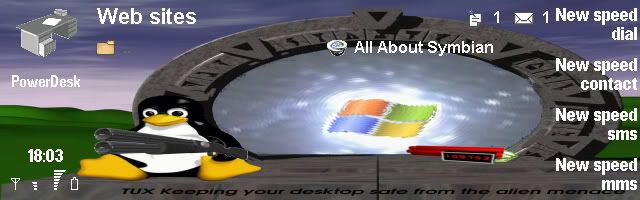
I know, the date text is a problem when you use a very dark skin. I don't think anyone who's doing skins in this thread knows how to change that particular text colour. The reason it is showing in my Desk screenshot is because I use PowerDesk in stead of the default Desk application.
Remember that themes aren't supported in Series 80 by default, so when we skin the interface and stray too far from the default look, there will be some small parts around the UI that are difficult (or pretty much impossible) to change the way we want it.
vickyshahri wrote:Anyone got this skin...
DaLarr wrote:I was just wondering if you ever got this skin? If you did can you please share it with me. Thanks
No buddy i dont have this skin...i would have loved to share it with all the
members of this forum if i would have had it...i got this picture of the skin from
some other forum where a member who had posted this picture was also
asking all the members if anyone had this skin!
vickyshahri wrote:No buddy i dont have this skin...i would have loved to share it with all themembers of this forum if i would have had it...i got this picture of the skin from
some other forum where a member who had posted this picture was also
asking all the members if anyone had this skin!
Hay thanks for the quick reply. I hope someone that had it will post it soon. Thanks.
Problem is I cannot get bmconv.exe to work.
With the MBM Wizard you have a BMCONV.exe.
If you don't have I attached this .exe. It's a little boring if you want create a MBM file, but you can create a .bat file for create the MBM file for not write the command line every time.
I attach also as example.
Hi Guys,
I changed the color of the text icon but I didn't found, how to change the color of the box selected icon. I continue to have the blue color from the blue skin. Somebody known which I need to define in the blue.skn
Thanks