jerm wrote:there's a newer version, ...316, which saves even more ram (8~10MB)
Ha! Ha! Ha! :laugh:
Just re-reading this thread jerm and it suddenly dawned on me that I've been reading your posts for a year now and have grown used to your signature of...
"...the eternal wish for multiple desktops on the N97"
Well, it would seem your wish has now come true with SPB Shell which has up to 10 fully configurable desktops!
So, what will you change your signature to now? :hmmmm:
jerm
"...the eternal wish for multiple desktops on the N97 (with at least 40MB of free RAM at boot up!)"
Getting there...!
Attachments:
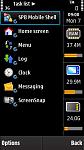
Wow - It seems the build 316 is a lot more frugal with its use of RAM.
Unfortunately, I can't install it as I havent got registered copy of SBP Shell yet. And I don't really want to register it (and pay $30), until I've tried out the media player widget which is very important to me.
I'll guess I'll wait until this build is available officially from SBP.
ironass wrote:jerm"...the eternal wish for multiple desktops on the N97 (with at least 40MB of free RAM at boot up!)"
Getting there...!
not on my n97!
got more background processes/monitors running...booting up @ 30MB free.
and with 21...102 firmware that totally crap-assed it's memory management compared to 21..045, it's a pain!
Build 316 is an unsigned beta at the moment.
As jerm pointed out, and I have noticed, it is a lot better on RAM usage.
It also has a few more widgets added to it, Music Player, Operator Name, etc; as well as more configuration options, particularly for icons (as many as 6 for each icon).
However, it is only beta and they are now on beta build 319 I believe. So fingers crossed.
Attachments:
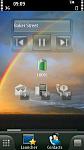
One thing I've noticed jerm is that SPB Shell doesn't require some of the built-in functions to operate.
For instance, a lot of the time that I boot up, the built-in Contacts does not open but this does not impair Shell's Contacts from functioning.
Also I'm running Free iSMS which i have set to "Hidden" from the task list.
Having said that, I was getting boot up RAM of around 45MB on my product code, prior to the installation of SPB Shell but with 3 live home screen widgets running, as the attached screen shots from March shows.
Of course, it all depends on what you have running at boot up.
Attachments:
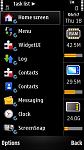
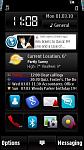
yup, do not attempt to scroll the birthdays widget in 316, you'll hang the program
operator logo is a pretty lousy widget imo.
wish they have a notes widget which lets you put notes as stickies
and wonder when will v5 come out, press release's been ages already
See what you mean about the birthday scrolling.
Haven't worked out the Operator widget yet.
i'm running at boot up
AdvanceSMS - custom sms tone for contacts
best profiles
swiss manager pro
SEVEN email with 3 emails configured
jbak task manager
antarix socially
total patrol - missed call/sms notifications
This is what I have running at boot up.
Allowing for ScreenSnap using about 1.5MB of RAM that would give me about 37MB.
So, allowing that Handy Taskman and Jbak Task Manager and Nokia Email and SEVEN email are roughly equal, it would seem that the following app's and possibly firmware difference, are swallowing around 7MB of RAM:-
AdvanceSMS - custom sms tone for contacts
best profiles
swiss manager pro
antarix socially
total patrol - missed call/sms notifications
Attachments:
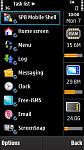
I don't have Handy Taskman but I do have the DeviceInfo widget, and know that I have SPB (build 295), nUnlock v5, and FreeiSMS on bootup. DeviceInfo tells me I have a little over 30Mb RAM free when I start the phone.
Might be worth trying build 316 of SPB if you can live with a beta version. It gives me, and jerm, I believe, about an extra 8-10MB of RAM and seems to be very good at handing it back during use.
ironass wrote:Might be worth trying build 316 of SPB if you can live with a beta version. It gives me, and jerm, I believe, about an extra 8-10MB of RAM and seems to be very good at handing it back during use.
I tried build 316, but sadly it was really buggy. Picture frames were broken and whenever I added anything new to a homescreen it'd just freeze. Tried uninstalling and reinstalling but somehow it remembers my settings from last time. It must install something to the phone memory, if that's the case.
Hi
I know messaging was mentioned earlier in the thread but is there any way to display new emails (headers not quantity)on Spb mobile shell as per the default nokia email widget ?
Thanks in advance
Boothy
don't think so unless there's a specific email widget to show emails
just tried some of the modded icons/widgets, very nice! only wish the battery icon has a way to not show the numbers!
....and remove the top bar of signal , clock and battery level!
boothy wrote:Hi I know messaging was mentioned earlier in the thread but is there any way to display new emails (headers not quantity)on Spb mobile shell as per the default nokia email widget ?
Thanks in advance
Boothy
There's no facility for this, so far, although "modding" on various sites is going in leaps and bounds.
jerm wrote:
just tried some of the modded icons/widgets, very nice! only wish the battery icon has a way to not show the numbers!....and remove the top bar of signal , clock and battery level!
With regards to the battery, do you mean something like the attached screenie?
I am given to understand that in the present builds it is not possible to remove the top signal/battery black bar but this will be done in a future release. In the meantime a wallpaper such as the one I'm currently using, which graduates to black, does help mitigate the top bar.
Attachments:

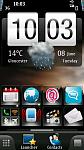
the attached screenie, yes, but the battery percentage will always show, ugh.
Hopiing for a new release soon, away with that bar! And more widgets, useful ones!
Ironass where did you get the HTC style clock on the image you posted a little while back?
edie209 wrote:Ironass where did you get the HTC style clock on the image you posted a little while back?
Hi edie209,
It's actually a "mod" for SPB Shell and modifies the "Big" clock, digital, that comes with SPB Shell. See here:-
http://forum.dailymobile.se/index.php/topic,23964.0.html
Good luck!
Hey thanks Ironass I figured it must be on that site somewhere but I couldn't find it. This might just make me hang on to the N97 a while longer 😉
edie209 wrote:Hey thanks Ironass I figured it must be on that site somewhere but I couldn't find it. This might just make me hang on to the N97 a while longer 😉
Go for the High Quality ones.
You will also need to download Weather as well if you want the same set up as my Screen shot with clock, weather and date.
ironass wrote:Until I read your post I hadn't noticed that RAM has improved with v3.5.0 build 316.I like some of the new widgets too, like the Media Player.
SPB Shell has completely changed the N97 and the way I use it... for the better. 😃
Im running a fully licensed copy of SPB MS, version 3.5.0 Build 295, how do I get the new build? In "About" theres no option to update?
Micky! wrote:Im running a fully licensed copy of SPB MS, version 3.5.0 Build 295, how do I get the new build? In "About" theres no option to update?
It's not "properly" available at the moment Micky, it's still in beta and has a few minor glitches.
I'm also looking forward to it's release, however i've had no problems at all running the 295 version and am extremely happy with it - how is it with you ?
Thanks for the reply. I did wonder. i too am very happy with this, and one has to wonder why Nokia cannot create such feature rich UI functionality to their devices such as what this does for the N97, and not only that, SPB installs to mass memory too, which is kind of a taboo with Nokia for some reason, always insisting that installation must be on phone memory for optimal results, but sadly I, and many other Nokiausers would disagree on that front.
Micky! wrote:Thanks for the reply. I did wonder. i too am very happy with this, and one has to wonder why Nokia cannot create such feature rich UI functionality to their devices such as what this does for the N97, and not only that, SPB installs to mass memory too, which is kind of a taboo with Nokia for some reason, always insisting that installation must be on phone memory for optimal results, but sadly I, and many other Nokiausers would disagree on that front.
angiepea is right, Build 316 is a beta version and has already been superceded by Build 319.
My guess is that it will not be long before you can update to whatever new Build number they release after testing.
Judging by the beta I have, it will use less RAM, be a smaller installation than Build 295, and contain more features and widgets.
The reason that Nokia like using C: (phone) memory is that it has a paging facility which E: (Mass Memory) does not. Of course, it would have then helped if they'd then made it at least twice the size.
Beta builds should not be talked about in public as per the beta testing rules SPB have posted on their forums.
Dazzy wrote:Beta builds should not be talked about in public as per the beta testing rules SPB have posted on their forums.
Hardly a State secret Dazzy!
Just Google SPB Shell beta and you receive 417,000+ hits.
*UPDATE*
Build 332 now out


