really... bit short sighted that isnt it?? So if they brought the best phone out EVER... you'd still not have it as it was a Nokia? 😉
SPB Mobile Shell
Absolutely loving this spb shell, a big thanks for the heads up :icon14:
and also thanks for the pdf+, its so much better than adobe. I like the way it loads up one page at a time instead of trying to handle the whole document, its way more responsive than quick office/adobe.
can this phone get any better ?
I have even fine tuned video conversion and this phone is a beast at video playback.
The only downside to this phone is the lack of games....
SPB mobile shell is available for USD 15.99 on Ovi store, one week special.
nice!
ajeet wrote:SPB mobile shell is available for USD 15.99 on Ovi store, one week special.
In the UK it's �17.99!! :frown:
Thanks, just bought it (179 NOK), same as UK price.
So, I wanted to try some of the mods I found here:
http://forum.dailymobile.se/index.php/topic,23448.0.html
but I must be a bit thick, since I can't figure out how to do it.
I see they kep talking about modifying some files (e.g x:/system/apps/SpbShell_20028b16.reg) and C:\Private\20028b16 ir E:\Private\20028b16 but there are no such folders or files on my phone (it's installed to E).
I tried to make the E:\Private\20028b16 folder, and put modified files there, but no luck.
Help pretty please....??
hey flek, if you want to modify the private folder you need to hack your phone
if it's not hacked you can do only the cosmetic stuff, changing skins, etc which can be put in the (install drive)/spbshell
that's not necessarily true .... you can change the clock/weather/icons without hacking your phone.
only, i've forgotten how to do it ...... Ian will tell you .... where's Ian, Ian, Iaaaannnnnn 🙄
Yes, I finally found out how to change/add the widgets.
Just make a folder on x:\Others\SPBShell and put the .dat-files there...
I guess I have to find out how to hack it now...
btw: I tried to make a folder on e: like E:\Private\20028b16\ and then put all the modified files there (9 mb in total), and then rebooted the phone.
After reboot, the folder on e: was gone, and the memory on my c-drive had shrinked with 9 mb, making the phone unresponsive. I had to hard reset it 😞
edit:
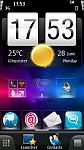
Here's how it look now:


Looks good Fleksnes!
Just a couple of things...
I think the Weather widget on your HTC clock would look better if it were centred and balanced with a date widget (see screenshot).
The HTC Menu bar looks nice but only worked in Portrait mode when I tested it. Is it working in Landscape now with Launcher as well?
angiepea wrote:that's not necessarily true .... you can change the clock/weather/icons without hacking your phone.only, i've forgotten how to do it ...... Ian will tell you .... where's Ian, Ian, Iaaaannnnnn 🙄
I feel a headache coming on darling....!
I need to lie down.
Attachments:

well, it's back to the default homescreen of the n97 to me for now,
hard to work with 20MB+ ram missing. i can only have one major app opening at one time
right now at least i can have msn (testing nokia chat beta, May 10 update) and gravity open at the same time without other apps closing
i think version .349 of mobile shell does not do very good memory optimisation...
.....coupled with the fact that from v21 onwards, the memory management on the n97 has gone tits up.
here's hoping the rumored v30 is able to do something about......anything!
@ironass: No, the menu bar doesn't lay out correctly when in portrait mode, but I can live with it for now (he's working on a portrait mode for it).
I need to find that date widget....
@jerm: I have no problems with to little ram (well, all is relative), but I have 40mb free with it running, which is more than enough to do some multi tasking
jerm wrote:well, it's back to the default homescreen of the n97 to me for now,hard to work with 20MB+ ram missing. i can only have one major app opening at one time
right now at least i can have msn (testing nokia chat beta, May 10 update) and gravity open at the same time without other apps closing
i think version .349 of mobile shell does not do very good memory optimisation...
.....coupled with the fact that from v21 onwards, the memory management on the n97 has gone tits up.
here's hoping the rumored v30 is able to do something about......anything!
Hi. I tried it and had the same problem. I could not even open the pictures application on the phone as it said that I do not have enough memory free. It is a pity because I liked the multiple home screens, speed and customization options of SPBShell.
Fleksnes wrote:@ironass: No, the menu bar doesn't lay out correctly when in portrait mode, but I can live with it for now (he's working on a portrait mode for it).
I need to find that date widget....@jerm: I have no problems with to little ram (well, all is relative), but I have 40mb free with it running, which is more than enough to do some multi tasking
yup, relative to each other's experience. i have much-needed background apps working, and all the blablabla stuff to keep my phone behaving the way i want it to be, so...for now spbMS is back on the shelf..
Is that any way I could exit Shell? I really like those home screen and wizgets.... But it left me so little ram that I couldn't open photo browser(around 120 photos in 'captured' tab) while my music player is running... (well most of the time)...
I am somewhat wondering if I could exit the shell while do some serious work and leave the eyecandy items for rest of time....
If it would help someone
Shell version 3.5.0 - 295 build
N97 mini (unbranded Unlocked)
V 12.0.110
you exit shell by hitting 'launcher' , 'settings' then the icon bottom right and then pick exit
Photos
It was the only time i got the message "not enough memory" and i got it quite often when i first loaded the shell.
Ignore it, just keep trying to open your photos and it should do after two or three times - i found that after a few weeks of persistance the error message came less and less often.
Also, every time i rebooted my phone i would always close down unwanted running apps via task manager and they would stay closed until either I opened them or the next time i rebooted, anything you can do to take back some ram will help shell and the apps that you do want to run.
xx
to_sukanta wrote:Is that any way I could exit Shell? I really like those home screen and wizgets.... But it left me so little ram that I couldn't open photo browser(around 120 photos in 'captured' tab) while my music player is running... (well most of the time)...
I am somewhat wondering if I could exit the shell while do some serious work and leave the eyecandy items for rest of time....If it would help someone
Shell version 3.5.0 - 295 build
N97 mini (unbranded Unlocked)
V 12.0.110
Update to 3.5.5 and it will fix the ram issue
To exit SPB Shell...
Launcher > Settings > Bottom right button > Exit Shell
Hope that helps.
I would guess that you have a few other app's running in the background (or have not emptied your built-in home screen) as I can access Photo's and Music Player together with no problem.
I do also notice that you are using the old edition of SPB Shell (build 295) which is RAM heavy and uses about 10MB more than the latest v3.5.5.
Therefore a simple update may solve your problems. 😊
Any ideas where on the C drive it stores the fact you've installed a trial? I don't want to do a hard reset, but I'd like to try the newer build, except it won't let me install it.
Just back-up your settings using Shell's Settings Back-up and then uninstall your old Shell using the phones application Manager and then install the latest version.
If you likes the old version (build 295) you'll love the new one!
If you're trying to get another 15 day trial then, without hacking your phone, you'll have to do a hard reset.
Thanks everybody for helping me out of shell... 😉 and seriously I know it would be easier to ask here then googled it...
And for update... I'm currently out of my city and really dont want to hammered my EDGE connection(really In India it still exist) for update...
@angiepea -- thanks for tips.. I noticed that also... but sometime it simply didnt work 😞 and I do clear my default homescreen and restrict myself in 3 homepage in shell... It do help..
@ironass - I dont have anyother application open except those said two...(well shell and home and menu are open.. atleast that's what my task manager saying)... But may be there are some invisible application opened.. How do you people see thats running..(except stock task manager)
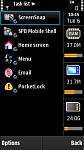
I use Handy Taskman (see screen shot) for viewing and closing tasks as well as monitoring RAM and disk usage.
It is an absolute "must have" for my N-series phones.
Costs $14.95 from here:-
http://nokia-n97-software.epocware.com/Handy_Taskman.html
There are also a number of FREE Task applications such as JBTaskman. See here:-
http://jbak.ru/jbaktaskman_en.php
Hope this helps. 😊
Attachments:

Thanks ironass... I would explore JBTaskman first... then go for paid one.....
Just a quick qs... Do I have any option to pay by Indian Rupee... as my credit card company would put a premium over the actual price if I pay in foriegn currency... 😞
(for history I pay SPB shell in $ which actually make it costier of roughly 1$... But I happily accept that...)
The honest answer sukanta is that I don't remember as it's been over a year since I purchased Handy Taskman for the N97.
JBTaskman should more than do the job though.
SPB Shell is currently on 'offer' at Ovi.
It looks cool - I've been watching a couple of video reviews of this on the N97 and N97 Mini on YouTube from reputable sources like Symbian Guru etc and it does look tempting.
I know people have mentioned that there's no way to integrate the Nokia Messaging widget from the default homescreen onto this but the user guide that you can read on the SPB website talks of an email widget.
Any know any more about this? It's clearly not simply a shortcut to the email program so I wondered if there is a widget that can display when you have a new email on a homescreen - even if there's no info about the subject and sender etc etc.
Cheers
I use SPB Mobile Shell and I think it's a brilliant piece of software. I'm really happy with it.
nudger wrote:snipped>> that you can read on the SPB website talks of an email widget.Any know any more about this? It's clearly not simply a shortcut to the email program so I wondered if there is a widget that can display when you have a new email on a homescreen - even if there's no info about the subject and sender etc etc.
Cheers
Yeah, there is an option... A widget sits on a screen as an envelope icon BUT that is tied into the messaging mail boxes, so you can still have it showing new and number of mails, just not if they are coming thru Nokia Messaging client. Looks like this. (X6 tho)
