Alastair wrote:This Thread's purpose
Clearly it was in the beginning to approach Rafe for his direct input toward solving a problem. But now it's taken a life of its own, and has become a sub-forum within the bigger forum.
The downside is that it comes up within a little window, so one cannot see any thread headings, and whenever one looks at posts - many of which are most interesting - it resets to the top.
Can I make a plea that its function be reviewed please?
I'm not quite sure what you mean here?
You're right this thread probably has outlived its usefulness, but until I can get get a generic FAQ / Tips post sorted out its probably easier to leave it as a reference.
This thread is still useful, and while an FAQ would be nice I don't see any reason to get rid of it. Which brings me onto my questions...
- Battery life. I've done a lot of searching on this forum and others, and read mostly conflicting reports on battery life with the N95. In this thread Rafe commented on it once or twice, saying that it was too early to tell what the performance was like. Now the phone has been out for some time, what's the final word on battery life? I've specifically been trying to find out quickly using the GPS functionality drains the batteries, once again the reports have been conflicting. Is there any similar data for music/video playback?
- I'm sure once upon a time I heard that the N95 would be able to post photos taken directly to flickr, but I haven't seen any screenshots showing this. Does this functionality exist, or was I dreaming?
- Wi-Fi roaming. Is it possible to save multiple Wi-Fi profiles, and have the N95 connect to whichever network has the strongest signal? Or do you have to manually switch to a different profile whenever you want to connect?
Shaolyen wrote:I'm sure once upon a time I heard that the N95 would be able to post photos taken directly to flickr, but I haven't seen any screenshots showing this. Does this functionality exist
Yes this functionality exists. I've used it, as Shozu doesn't have a dedicated N95 version available yet (although I've since found out that the version for the N93 works just as well).
Can't be specific about battery life but I've found it lasts as well as, if not a little bit better than, my previous N80's. However, that is not with the GPS. That does suck it dry -you'll only get several hours of active GPS use, with the screen backlight on permanently. About the same as playing a game on it non-stop 😊
I've several WiFi profiles saved but tend not to roam to them, rather just switching on when needing. WiFi does drain battery and leaving it on permanently is a recipe for flat battery in no-time-flat.
Shaolyen wrote:- I'm sure once upon a time I heard that the N95 would be able to post photos taken directly to flickr, but I haven't seen any screenshots showing this. Does this functionality exist, or was I dreaming?
im not sure , but is this what your looking for?
http://www.flickr.com/photos/rafeblandford/sets/72157594497769867/
Doggen wrote:im not sure , but is this what your looking for?
http://www.flickr.com/photos/rafeblandford/sets/72157594497769867/
I was interested in seeing the actual process of taking a photo and then sending it to flickr.... I haven't been able to find anything on it. 😞
Hi there - and thank you for setting up this very useful thread.
Just a quick question - I want to personalise my standby screen. At the moment, I have:
[LIST=1]
[*]6 short cuts (which I have selected myself)
[*]a couple of upcoming calendar entries
[*]the WLAN Network notice
[*]the two shortcut keys at the bottom (again, which I have selected)
[/LIST]
I would really like to get rid the the WLAN notice and have additional calendar entries showing up. Is this possible?
Also, does anyone know where I can download extra themes for the phone?
Thank you in advance. Paul.
pls help me i have to change my MC to 2GB after that i donno why my dictionary can't work.... when i click dictionary icon "dictionary word infomation missing install word database".....T.T what it this ...im Nokia new user ><HELP
Shaolyen wrote:I was interested in seeing the actual process of taking a photo and then sending it to flickr.... I haven't been able to find anything on it. 😞
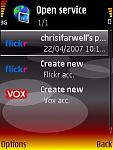
I found it simple enough. Once you have a pic in your gallery, Options > Open online service, and select Flickr.
Attachments:
I am a new owner of a Nokia N95 and I just downloaded a theme into my phone. If ever the time comes that I get tired of the theme(s) that I installed, how can I remove it from the phone?
Change the theme in Settings and then just delete it from the App Manager screen.
am 4m india am tryin to get a fone 4m my sis whoz der in UK on contract basis den how 2 unlock da fone to make da fone work in india...?
chrsfrwll wrote:Change the theme in Settings and then just delete it from the App Manager screen.
Hi again, but I can't delete all the themes that I have downloaded by using App Manager.
Is there another way ? :redface:
What I mean is that the questions and answers posted here - as an example the pictures/flickr posts that follow in this thread - might just as well be in the open forum, rather than in this sticky.
I have suggested in another post that a tips sticky (hidden/undocumented features) would be valuable.
But the Qs & As then should stay in the open forum, where they are easier to read
Hi Rafe, thanks for your support.
I've a question for you. My phone bill allows me to have 600minutes for month. On my actual phone, a 6680, I bought Psiloc Extended Log, a software useful to analyze all phone logs, so I can check if I used my bonus calls.
Is there any kind of native "minutes manager" utility on N95?
If not, what can I do? I was thinking about using the internal counter, but can I reset it every month?
Thanks in advance. Regards.
I got my N95 and now have a few questions.
Maybe this has already been answered, sorry if it has.
I sometimes check my email using my provider's 3G connection, and I also ocasionally browse the net. However when I finish with my email and want to go to the browser I loose the connection and when I access the browser it reconects again. I am paying in time blocks for internet use (which means that I have to pay two time blocks of 5 min even though I could have spent only 1 min checking email). So my first question is:
1. Is there is a way to switch between email and web browser without loosing the connection in the process
Second quesiton.
2. Is there a way to turn of the camera shutter sound?
Thanks
David0203 wrote:
....1. Is there is a way to switch between email and web browser without loosing the connection in the process
....
When done with mail, instead of selecting "Exit" press the menu button (left from nav-pad). This will bring you to main menu without exiting mail, hence keeping connection. Not sure this will work for you though. It depends on what king of connection you have to your mail account. Some specific ports or SSL in use my prevent you from internet browsing.
hi, newbie here !
i've checked all the settings and cannot find the proper setting !!!
is there a way to automatically end the phone conversation by sliding the phone into the closed position ? everytime i end a conversation, i have to press the red hangup button. I've set it up for "any key to answer" already.
thanks for spoon feeding me !!!
Monica
Route speeds
I think it's well established now that the route calculation on the N95 is seriously dysfunctional. I've just calculated the journey from Oxford to Salisbury (England) and been told 2hr 44 min. It's actually 1hr 15 min, at normal driving speeds - exactly as Autoroute says.
But then I realised that the N95 doesn't ask for mode of transport, or driving speeds.
It clearly thinks I'm on a bicycle - or has anyone seen how to set driving speeds?
monica _69 wrote:hi, newbie here !i've checked all the settings and cannot find the proper setting !!!
is there a way to automatically end the phone conversation by sliding the phone into the closed position ? everytime i end a conversation, i have to press the red hangup button. I've set it up for "any key to answer" already.
thanks for spoon feeding me !!!
Monica
You can stop looking, there's no such option/setting. Have to press the red "hangup" button or simply wait for the network to end the session after the other person has hung up.
superswede wrote:When done with mail, instead of selecting "Exit" press the menu button (left from nav-pad). This will bring you to main menu without exiting mail, hence keeping connection. Not sure this will work for you though. It depends on what king of connection you have to your mail account. Some specific ports or SSL in use my prevent you from internet browsing.
Thanks! It works perfectly!
David0203 wrote:Second quesiton.
2. Is there a way to turn of the camera shutter sound?
Thanks
First i don't have the N95, but i had this same problem with the 6680.
2 things you can try, first choose a profile that is quite (meeting,no sound etc.)
if that doesnt work, here's an other way (el cheapo)
Make a call, open the camera lens, take a photo...with the 6680 it's quiet when your having a call established.
superswede wrote:When done with mail, instead of selecting "Exit" press the menu button (left from nav-pad). This will bring you to main menu without exiting mail, hence keeping connection. Not sure this will work for you though. It depends on what king of connection you have to your mail account. Some specific ports or SSL in use my prevent you from internet browsing.
Press and hold the Menu button .. this brings up a list of running tasks .. choose the one you want.. game over 😃
Hi guys,
I'm a newbie here. I just got my Nokia N95, recently. My N95 have a few problems which really frustrate me, but i'm not sure whether you guys are having the same problem like mine or not... Anyway, just would like to share, maybe you guys know where the problem lies and know what are the solutions to rectify it?
1) Caller ID. My N95 couldn't identify caller if I add + Country code in front of each of the phone numbers in my phone contact. However, if I remove the + country code from the number in my contact or swapping to use a GSM sim card (currently using 3G line), instead of the 3G's one, my N95 has no problem in identifying who is the caller. I have been trying all the 3G SIM card from my friends on my phone, and I'am having the same problem. So, for this case, is it my N95 problem or my telco's problem?
2) Unable to make call in dual-mode network band. I suppose the choice of dual mode band selection is for automatically switching between GSM & UTMS band. But what weird is that, I can't make any calls with dual-mode band selected if with my 3G sim card in it. Whenever I attempt to make call, an error message will prompt and inform me that the Network is currently busy. Then, without making changes to the network band selection, I swap and insert in my GSM sim card, and it works fine. I can make calls like normal. Up to here, I begin having doubts that this N95 is actually a 3G phone or not. It doesn't seems like 3G friendly to me.
3) Unable to write my micro-SD card with my computer. The last problem I have with my N95 is that I can't write anything into my micro-SD card with my card reader from my PC. Now, i believe some of you might comment me to check whether the write-protection lock on the SD adapter is free or not. I have check that out and it is always "free". It seems like my card is lock from the factory and I simply just couldn't find a way to unlock it. FYI, I have no problem writing anything onto my micro SD card with my phone, neither I have any problem transfer file from my computer over the USB/bluetooth into my micro SD card. Also, I have tried to unlock the card by modifying the ACL properties of the card when it is plugged into my computer and appearing it as F:\. But whenever I untick the "read only" permission and click Ok, it will automatically change back to "read only" permission status. Is there anyway to rectify this problem?
I'm looking forward to read from you guys soon. Lastly, I would like to give thanks in advance for those who try to contribute and to those who read it. Thank you very much & may God bless you all.
Cheers & Regards,
Caesar
Hi, I'm having 2 problems... unfortunately with the features that attracted me to N95. First, when I try to start navigation (after paying for it on Smart2go), I get an error message "Error while downloading". It also prompts me to download the same route over and over again.
Second problem is connecting to wi-fi (802.11g) network at home. I get error messages trying to connect to it as well. I tried turning WEP off on router, but always get same result... no connection.
I am in US with t-mobile (t-zones) connection. Any help is greatly appreciated.
-Jim
siehook wrote:
3) Unable to write my micro-SD card with my computer. The last problem I have with my N95 is that I can't write anything into my micro-SD card with my card reader from my PC.
Hi Caesar,
Can't say I have encountered any of the problems you are having but wanted to comment on the 3rd problem - writing to MicroSD using you PC's card reader.
If the MicroSD card is working fine in the N95, why not attach the Nokia USB Data Cable to the PC USB port and put the N95 into Mass-Storage mode? This is effectively the same as taking the card out of the N95 and putting it into a card reader on the PC. You see a new drive letter on the PC and can read/write/view all files and folders, including hidden & system ones. Hope this helps.
Dez
Hi all.
I hope I can get an answer to this simple question.
I have installed the FExplorer version 1.16_beta on my N95 phone so that I can go to C:\System\Apps\Phone to delete the folder "Phone" and then restart the phone like what many other Symbian forums recommend. I am doing this so as to remove the ugly operator logo on the phone's main page.
However, I only see "Lifeblog" under C:\System\Apps and nothing else. FYI, "Lifeblog" is just one of the applications of N95.
May I know where I can find this "Phone" folder for N95? But perhaps the most pressing root problem is:
"What is the correct way to remove the operator logo for N95 phones?"
Thanks so much guys. I appreciate any help I can get from here.
Kim (Singapore)
nauhcmik wrote:Hi all.I hope I can get an answer to this simple question.
I have installed the FExplorer version 1.16_beta on my N95 phone so that I can go to C:\System\Apps\Phone to delete the folder "Phone" and then restart the phone like what many other Symbian forums recommend. I am doing this so as to remove the ugly operator logo on the phone's main page.
However, I only see "Lifeblog" under C:\System\Apps and nothing else. FYI, "Lifeblog" is just one of the applications of N95.
May I know where I can find this "Phone" folder for N95? But perhaps the most pressing root problem is:
"What is the correct way to remove the operator logo for N95 phones?"
Thanks so much guys. I appreciate any help I can get from here.
Kim (Singapore)
I haven't got your problem .. or "Phone" Folder .. but a few other apps are installed there .. try it.
I use Y-browser to look at this system stuff .. but its likely your FExplorer will do the same.
Good luck!😊
Hi seki,
I don't seem to have a Z drive when I check my phone directories using FExplorer. Why do you have it?
Where can I download the Y! Browser application?
When you say you don't have the problem, do you mean that you have no need to remove the operator logo?
Thanks,
Kim
Sorry. I do have a Z drive. But I don't see "Phone" under Z:\System\Apps.
Sgh....
can you point out where you got the info ..
while looking about I did notice a few things .. Operatorlogo etc ..
While I wouldn't advise killing such files .. perhaps renaming them might do the trick? But without the same set up I can't test the effect. So do this at your own risk!
Good luck!
